Varun Pratap Bhardwaj · AI Reliability Engineering · November 2026
The film premieres on the Qualixar AI YouTube channel at 6 pm IST on 1 November, and the free guide with every prompt, in order, is at qualixar.com/learn/guides/claude-code-7-free-office-alternatives. This post is the long version for people who want to read the run, the failures, the code and the installer. It is part 2 of a series; part 1 ran the six free Adobe alternatives from the same set of thirteen apps.
Episode 2 of the ArtCraft series gives Claude Code seven free, open-source apps from Storytold that stand in for Word, Excel, PowerPoint, Acrobat, InDesign, Figma and AutoCAD. We asked it to make a client packet for a fictional coffee shop, Harbor & Pine, from one prompt. It finished in 243.1 seconds and produced a 12-page PDF.
That is the headline, and it is true. It is also the least useful part. The useful parts are what the run did and did not check, and three places where an app reported success while the output was wrong.
Where the numbers come from, because they come from three different places. Session timings come from 1 November recordings with Claude Code 2.1.304. The failure reproductions are CLI tests from 31 October on the same releases, and the code quotes are from the tagged source. The releases are WordCraft 0.13.2, GridCraft 0.14.2, DeckCraft 0.13.1, PdfCraft 0.16.1, DesignCraft 0.15.2, FigCraft 0.13.1 and CADCraft 0.15.1. The sessions are single recorded runs on one Mac, not a benchmark.
The architecture: one engine, four front doors
All seven apps are Rust workspaces with the same shape. A crate called engine holds the document model and a registry of named commands, such as cell.set, type.char and frame.create. Each command takes JSON and returns JSON. The desktop window, the command-line tool, the web build and the MCP server all call that same registry. So when Claude Code uses an app, it is not clicking anything. It is calling the function the button would call.
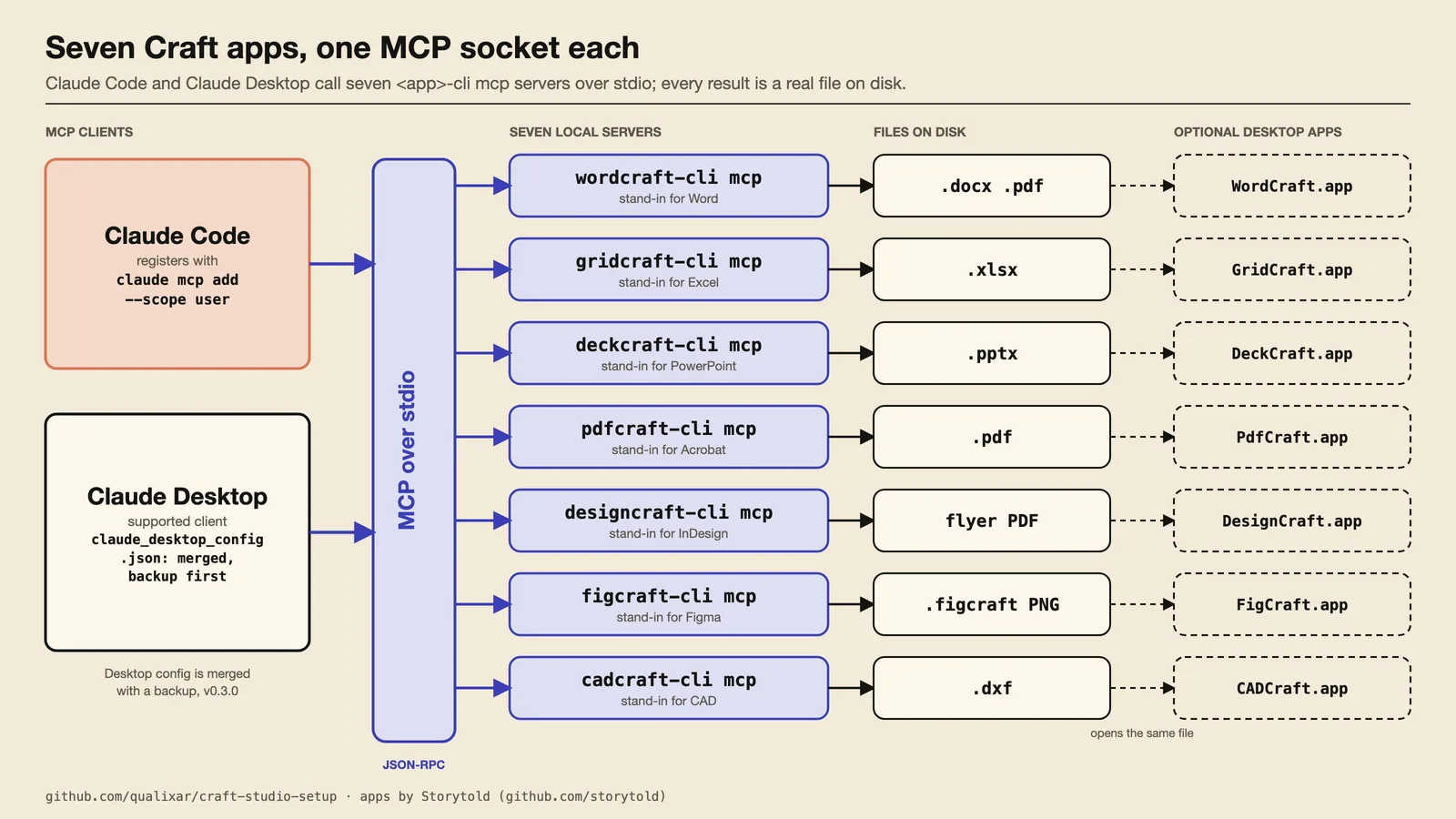
The path of one tool call, traced in GridCraft, goes like this. Claude Code sends a JSON-RPC tools/call on stdin. The server checks the arguments against the tool's JSON Schema, maps the tool name to an engine command, and runs it in a headless in-process engine, or against a running desktop window over a local port.
There are two separate error paths. If the arguments fail the schema (unknown tool, missing required argument, wrong type), GridCraft answers with a JSON-RPC -32602 error. If the command itself fails inside the engine, the result comes back as isError: true with a readable message. All seven servers carry the isError path.
Neither path covers a command that succeeds and has nothing to say. That case matters below.
The apps are honest about their age. WordCraft's README says it is about 60 percent ready for real work, and CADCraft's roadmap puts it near 38 percent. GridCraft's README says about 50 percent, and that "depth, fidelity and file compatibility are still rough". We treat all of them as alpha software and check their output.
The run: one prompt, 243.1 seconds
The prompt, typed once into Claude Code, asked for the whole packet from brief.md and outline.md: a proposal as Word and PDF, an invoice with real formulas, a six-slide deck, an A4 flyer, an ordering screen and a floor plan with four tables, then a PdfCraft merge with a stamp and a Client Review watermark, and "read every file back before you finish."
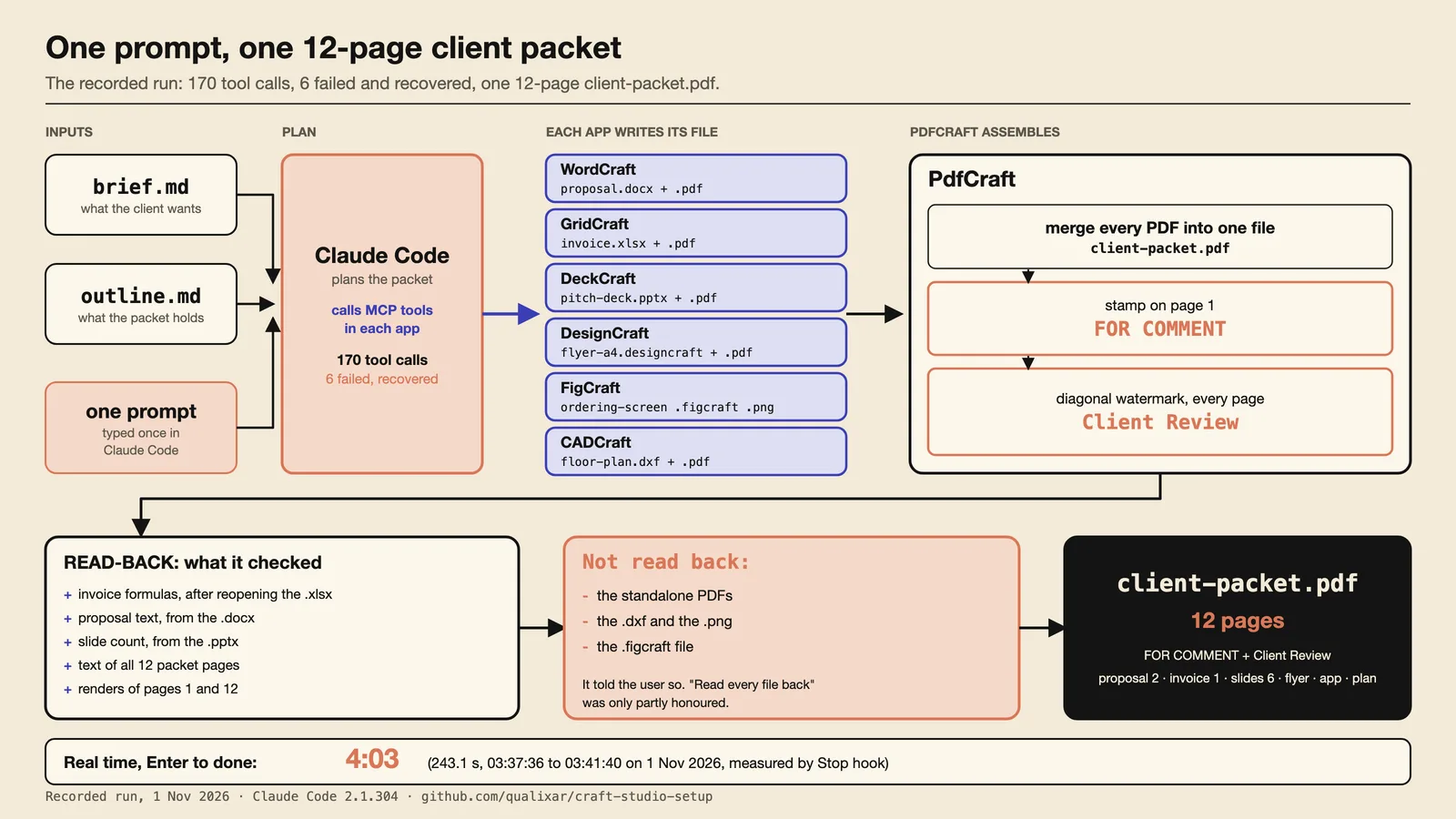
The clock ran from Enter at 03:37:36 to the Stop hook at 03:41:40, which is 243.1 seconds, read by a hook rather than off the video. It took 170 tool calls and 6 failed. Claude recovered from all six on its own: it tried two commands that do not exist (select.set and cell.columnWidth), wrote into an out/ folder that was not there yet, and sent one empty text argument. The result was a 12-page client-packet.pdf with a FOR COMMENT stamp on page 1 and a diagonal Client Review watermark on every page.
Single-app runs ranged from 20.9 seconds for the deck to 103.1 seconds for the Word proposal. The proposal needed 52 tool calls and four failed. Among them, insert.text and edit.delete are not WordCraft commands, and ui.key needs the desktop app. Claude read the text back from the .docx and said it had not rendered either file.
The prompt matters as much as the app. The recorded floor-plan take had a one-line note in the system prompt saying the folder was the Harbor & Pine job and brief.md was the brief. We also ran the same words, "a floor plan of the café with four tables", with no such line. In 12.7 seconds Claude drew a generic 10 by 8 m room with four round tables and no chairs. It had not opened brief.md, which asks for a 6 by 8 m room and 16 seats. Its closing message listed what it had left out (chairs, door, windows, labels) and did not say it had skipped the brief. The flyer and ordering-screen takes found brief.md on their own without the line, so this is not a rule in either direction.
The read-back, and what it did not cover
"Read every file back" was only partly honoured. Claude reopened the .xlsx and read the invoice formulas. It wrote them explicitly (there is no range.fill call in the transcript), and the read-back showed =C10*D10, =C11*D11 and so on, each pointing at its own row. It read the proposal text from the .docx, counted the slides in the .pptx, read the text of all 12 packet pages and rendered pages 1 and 12. It did not read back the standalone PDFs, the .dxf, the PNG or the .figcraft file, and it said so in its closing message. Its closing message also said the floor plan sits on one layer with no dimension lines, only a size note, and that the deck's slide titles are not marked as titles, so the outline view shows them empty. It left a stub README.txt in out/, which it said it wrote only to create the folder.
Where the packet run skipped the read-back, we don't know what it would have found. A reviewer should know that before forwarding the packet.
Quality depends on which run you mean. My 31 October grades, on a 1 to 5 scale, are for the scripted packet, which has 11 pages and a DRAFT stamp: the pitch deck 2 (mostly bullets), the floor plan 2 (faint dimension labels, little service or clearance work) and the merged PDF 3. The recorded 1 November packet is a different run, with 12 pages and a FOR COMMENT stamp, and I have not graded it on that scale. In the 1 November single-app takes, the deck came out as plain white text slides and the floor plan as plain white line work.
My verdict, as in the film: I would send the proposal, the invoice and the flyer after reading each once. The deck and the floor plan, not yet.
How the sessions were recorded
The sessions ran with a restricted tool list (no shell, no web, no sub-agents). Without it, Claude published a private claude.ai Artifact on the first FigCraft try and stalled the unattended recording at approval prompts. A fresh user on default settings may see those prompts. This is the line, in case you want to reproduce it (the recording also passed hook settings for the on-screen clock, left out here):
claude --mcp-config .mcp.json --strict-mcp-config --setting-sources project,local --disable-slash-commands --permission-mode acceptEdits --disallowedTools Bash Agent Workflow Artifact ArtifactComments ArtifactData WebFetch WebSearch --allowedTools mcp__wordcraft mcp__gridcraft mcp__deckcraft mcp__pdfcraft mcp__designcraft mcp__figcraft mcp__cadcraft Read Glob Grep
Three failures that returned success
These come from scripted CLI test runs on 31 October, three runs each, on GridCraft 0.14.2 and DesignCraft 0.15.2. They did not come from the packet read-back. As above, the one-prompt packet run wrote and read back its invoice formulas correctly. The 100,000-row spreadsheet in the third failure is its own separate test.
The first two share a shape: the command succeeds, returns nothing, and the app does the wrong thing. To see why, look at how a null result travels. In GridCraft's command-line runner the output line is skipped for null results:
// gridcraft/apps/gridcraft-cli/src/main.rs:446-449
let r = exec(&mut s, &id, p).map_err(|e| format!("step {step} ({origin}, {id}): {e}"))?;
if !quiet && !r.is_null() {
    outln!("{}", serde_json::to_string(&json!({"command": id, "result": r})).unwrap_or_default());
}
DesignCraft's CLI has the same rule. Over MCP, reading the serializer code (ToolResult::json) says a null becomes a text block containing null with isError: false. That part is inferred from the code. We did not capture a live MCP exchange. If it is right, an agent cannot tell a command that changed the workbook from one that changed nothing.
1. The $0.00 invoice
In our earlier test runs we asked for an invoice with an Amount column of =B3*C3. GridCraft's range.fill wrote =E5*F5 through =E8*F8 instead. The PDF export exited 0 and every amount read $0.00. We reproduced it three times of three on 0.14.2. The cause is two lines in crates/engine/src/cmd/edit/cell.rs:
// line 255
let origin = s.doc()?.selection.active;
// line 279
let shifted = gridcraft_formula::adjust::shift_relative(e, at.row as i64 - origin.row as i64, at.col as i64 - origin.col as i64);
The command treats the formula as if it were typed into the active cell, then shifts it for every target by that distance. That is right for the keyboard shortcut, where you select a range and press Ctrl+Enter. But the command also accepts an explicit range, and when it does, origin is still the active cell, which can be anywhere. With A1 active, D3 sits two rows down and three columns right of it, so B3 becomes E5 and C3 becomes F5. We did not log which cell was active. A1 is the only origin that gives exactly those four formulas, so that is the reading of the code, not a logged fact. The function ends with Ok(Json::Null) at line 288, so there is no result line to warn you.
The shift function itself is fine. It was handed the wrong offset. The function body is the same in 0.10.0 and 0.14.2 apart from a file move and one added helper call.
The tests do not cover it, though the claim needs to be narrow. The focused integration tests in range_fill_formats.rs all fill ranges that start at A1 with A1 active, so origin and range start coincide and the bug cannot show. The command-sequence fuzzer does call range.fill with an explicit range, but it checks for panics, valid structure, incremental against full recalculation, and save and reload equality. It does not check that a formula points where the caller meant.
GridCraft's own check command would not have helped either. It recomputes each formula and compares it with its cached value, so by the code it can pass on a wrong invoice: it compares each formula with its cached value, not with what you meant. We read that in the source and did not run check on the wrong invoice.
The fix: select D3:D6 with D3 active first (selection.set with an explicit active), or write each cell, then read the formulas back. In three focused runs, the selection fix read back =B3*C3 through =B6*C6. We found no upstream issue for this specific case when we searched on 31 October, so this is not a "known bug" claim; absence of a search hit is not proof. A related open issue, gridcraft#1801, reports commands acting on only the first area of a multi-area target while reporting success.
2. The flyer that ignored the font
DesignCraft's frame.create leaves a text caret at the end of the new text by default:
// designcraft/crates/engine/src/cmd/object.rs:1002
let caret = bool_or(p, "caret", content == "text");
Then type.char with a caret in existing text does not format that text. It stores a format for the next thing you type and returns:
// designcraft/crates/engine/src/cmd/text/format.rs:187-188
s.typing_format = Some(f);
return ok();
ok() is a null result. So Helvetica Bold 40 was "applied", nothing printed, and the headline stayed small serif. That is deliberate, InDesign-style behaviour. With a frame selected instead of a caret, the command formats the whole story, which is why a selection.set on the frame fixes it. We reproduced the failure and the fix three times of three on 0.15.2.
The MCP execute tool's own description teaches the trap: its examples are frame.create with text, then type.char, with no selection in between (crates/mcp/src/tools.rs:106-108). The crate's own test steps around it with selection.set first (crates/mcp/src/tests.rs:215-216).
This was reported. DesignCraft issue #289, "Character formatting at a caret inside existing text is silently discarded", described exactly this agent sequence and asked for either a real typing format or a signal that nothing changed, "so callers don't believe it worked". It was closed on 14 October after the typing format was implemented. The second request, the visible signal, was not adopted, and the function is byte-identical between 0.11.0 and 0.15.2.
3. 52,383 rows, with a warning, then exit 0
This one is a measurement, not a code read, so we say less about cause. It is a separate test from the packet. We built a 100,000-row sheet with dates, IDs with leading zeros and 300,000 formulas. GridCraft 0.14.2 opened it, printed one warning about an XML limit, saved it and exited 0. Only 47,617 data rows survived, so 52,383 were gone, in all three runs. The warning called the worksheet "invalid XML", yet Python's parser confirms it is well-formed. It holds 2,200,028 XML elements, and the warning mentions a limit of one million. A formula check on the output passes, because it only sees the rows that remain. Splitting the same data across three sheets of 40,000, 40,000 and 20,000 rows kept every record and all 300,000 formulas. The cutoff depends on the XML structure, so 47,617 is not a row limit you can quote. An upstream issue exists: gridcraft#2819, "XLSX import incorrectly truncates large files due to XML node limit", which was open when we checked on 1 November.
What we'd want from the apps
The most useful change is small: every command that writes should say what it wrote. A one-line result such as "filled D3:D6, first formula =E5*F5" would have shown the wrong references at once. A bare "wrote 4 cells" would not: the failed invoice run did write four cells, and that line would have looked correct. A command that only stored a typing format should say so, for example "stored a typing format; no text changed". DesignCraft's maintainers were asked for a signal like that in #289 and did not add it. As far as we found on 1 November, nothing has changed upstream on either path, and we are not claiming a fix that does not exist.
There is a workaround that needs no fork. Every server talks to its engine through a small Backend interface, so a thin MCP proxy could follow each mutating call with a read-back (sheet.read with formulas, or story.get for character runs), compare it with what was asked and return an error on a mismatch. We have not built that. It is an idea from reading the code, and it is the same check a person would do by hand.
The installer, in three new points
Connecting seven apps by hand means downloading seven archives, verifying them, linking binaries and writing seven MCP entries. craft-studio-setup v0.3.0 does that in one line:
curl -fsSL https://raw.githubusercontent.com/qualixar/craft-studio-setup/v0.3.0/install.sh | bash -s -- microsoft
The command installs the command-line tools and connects the Claude hosts it finds. --desktop adds the graphical apps as well, and Apple's command line tools are a prerequisite. The same line takes all for the full set of 13 apps and adobe for the six from part 1. When the claude CLI is available, each server is registered at user scope with claude mcp add --scope user; otherwise the servers go into the workspace .mcp.json. The full list of changes is in the v0.3.0 release notes in the repository. Three points are new compared with a typical pipe-to-bash installer.
1. A clean-folder hash check. The URL names the v0.3.0 tag, and install.sh pins its own source:
CRAFT_SETUP_REF="v0.3.0"
CRAFT_SETUP_REPO="qualixar/craft-studio-setup"
A tag is not an immutable digest, so the repository also publishes install.sh's own SHA-256 for you to compare before you run it. What the embedded hashes do is check every helper script against the bootstrapper you downloaded. The script carries the SHA-256 of six files (two catalog files and four scripts), copies each into a clean folder, and checks it there:
cp "$top/$path" "$src/$path"
actual="$(shasum -a 256 "$src/$path" | awk '{print $1}')"
if [ "$actual" != "$sha" ]; then
  echo "CHECKSUM MISMATCH for $path ... Nothing was installed." >&2; return 1
Only that clean folder is executed. A read-only review by a second model (Codex) of the first v0.3.0 commit found twelve problems. One was that a file planted in the tarball, such as a scripts/json.py, could be imported by the Python helpers. The fix was this copy-and-check step plus python3 -I for every helper, with a test where planted modules never run. The last line of the file is main "$@", and everything runs inside main, so in almost every case nothing runs until the whole script has arrived. A cut right after main could still invoke it, so I would not call a partial download impossible.
App downloads are checked too. Each release asset is checked against a SHA-256 pinned in catalog/apps.json; a mismatch deletes the download and aborts with exit 1. That is separate from a proof run we did on 31 October, in which all fourteen release assets (seven CLI archives and seven desktop disk images) matched the upstream SHA256SUMS.txt.
2. A drift check on the Claude Desktop config. Claude Desktop has no mcp add. It reads claude_desktop_config.json, a file that holds your other servers and settings. mcp_config.py refuses invalid JSON, leaves the file untouched, and makes an exclusive, symlink-refusing backup before the first change:
flags = os.O_WRONLY | os.O_CREAT | os.O_EXCL | getattr(os, 'O_NOFOLLOW', 0)
It writes the new file to a temporary file in the same folder, fsyncs it, and renames it into place only if the file still holds the bytes it read:
if expect is not _ANY and _current_bytes(path) != expect:
    raise Raced(f'{path} was changed by another program while this installer was '
                'editing it. Nothing was written; run the command again.')
...
os.replace(tmp, path)
After the rename it reads the file back and checks that every other top-level key and every other server is unchanged. If that check fails, it puts the previous bytes back, but only while the file still holds what this installer wrote. The release notes admit a very short window remains between the check and the rename.
3. Uninstall from a record. The installer writes a state file, ~/tools/craft/.craft-setup-state.json, listing what it added. Uninstall reads that record, not a guess. It removes a folder only if recorded, or if it is the target of a v0.2.0 link, since v0.2.0 kept no record. It removes an MCP entry only if it still equals what was written, and leaves your own servers alone. If nobody else edited the Desktop config, it restores the original byte for byte from the backup.
The numbers, with their scope. In the end-to-end run on a temporary home folder, the dry run for all 13 apps listed 27 changes with every URL, hash, folder, link and config edit, and ended with "nothing was changed". The seven-app microsoft install took 122 seconds and reported 15 changes. Running it again took 6 seconds and said "Already installed, nothing changed." After the adobe group was added as well, the uninstall for all 13 apps removed 40 items, and cmp showed the Desktop config identical to the copy taken before install.
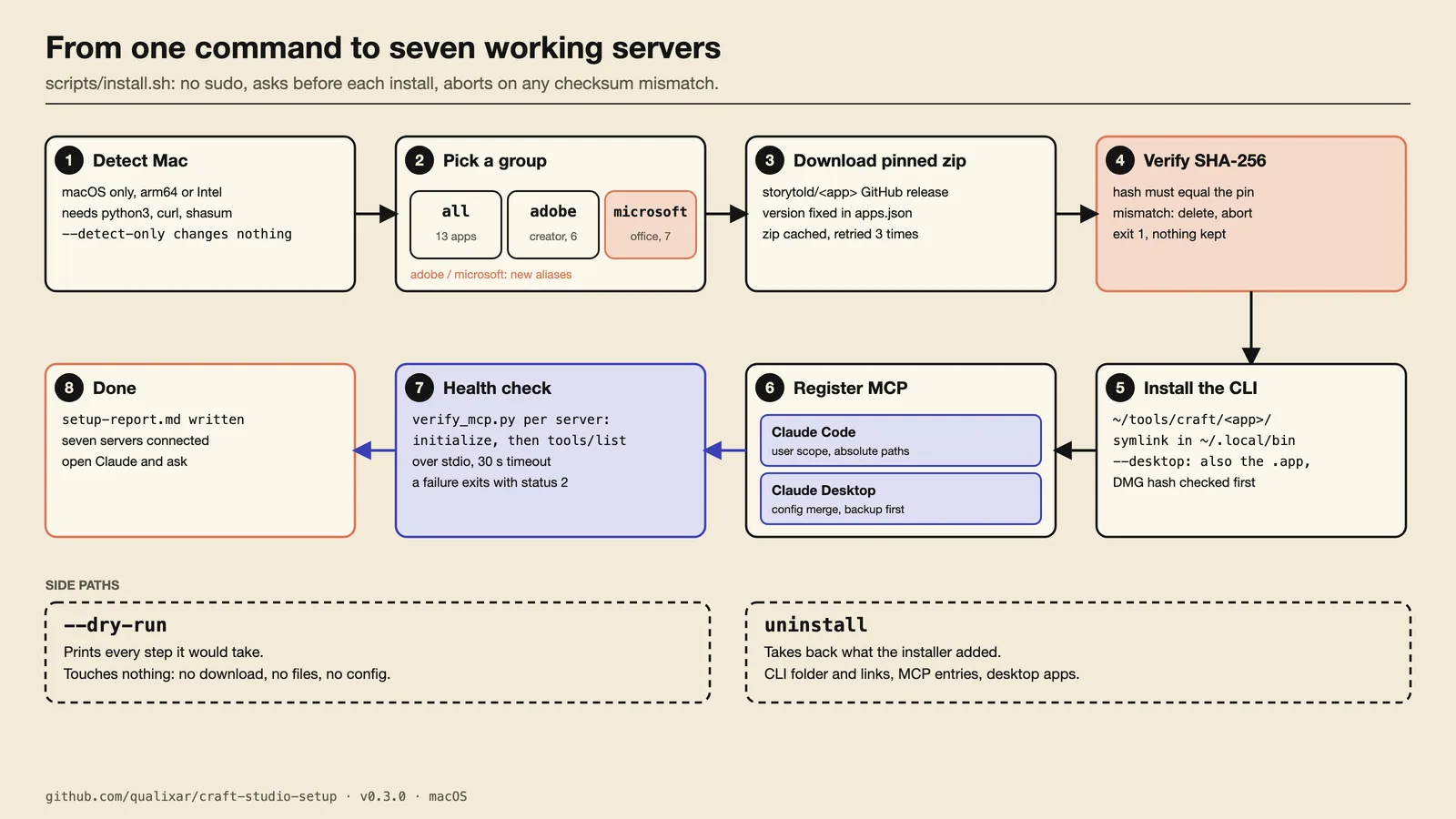
All of this ran in a temporary home folder with real downloads and real claude mcp add. The things we did not verify are in the release notes: GitHub's macOS runners had not run yet, the Intel half of the universal binaries was not run, a real Claude Desktop app loading the merged file was not tested (the servers were checked by MCP handshake and through Claude Code), and no fresh macOS user account was used. After install, verify_mcp.py starts each server, sends initialize, then tools/list, and fails the run with exit 2 if any server does not answer. All seven office servers passed.
The habit
The three failures, and the unread parts of the packet run, come down to one habit: before a file leaves your hands, open it, read it back, and if it is a spreadsheet, count the rows. In our test runs a read-back or a row count caught each of them. In AI Reliability Engineering terms, you check the state of the output, not the exit code or the success message that came with it. The invoice exported cleanly and the PDF was wrong. The big workbook saved with a warning and half of it was missing. The packet run read back most of what it made and told us what it skipped, which is the behaviour to ask for in the prompt: "read each file back and list what you could not check."
Links
- The film: ArtCraft Episode 2 on the Qualixar AI YouTube channel, from 6 pm IST on 1 November.
- Part 1, Claude Code with the six free Adobe alternatives: youtu.be/-VPYXcrsEs0
- Free guide with every prompt, in order: qualixar.com/learn/guides/claude-code-7-free-office-alternatives
- The installer: github.com/qualixar/craft-studio-setup, release v0.3.0
- The apps, made by Storytold: github.com/storytold
Microsoft, Word, Excel, PowerPoint, Adobe, Acrobat, InDesign, Figma and AutoCAD are trademarks of their owners. This project is independent and not sponsored. The apps are early software; this post shows what worked and what did not in the runs described above.
Varun Pratap Bhardwaj builds AI Reliability Engineering tools at Qualixar. ORCID 0009-0002-8726-4289