PDF · Free download
Keep this guide as a PDF
Claude Code × 7 Free Office Alternatives: The Prompt Guide, as one file you can read offline and share with your team.
Sign in with Google or GitHub to download.

What this is, and who it is for
This is the written companion to Episode 2 of the series. In the film, Claude Code makes a client packet for a made-up coffee shop (a proposal, an invoice, a pitch deck, a flyer, an ordering screen, a floor plan and one stamped PDF) using seven free apps. Every prompt from the film is below, in film order, ready to paste.
It is for freelancers, small studios and anyone who needs a proposal, an invoice or a deck and does not have an Office licence. You do not need to be a developer. If you can paste text into Claude Code and open a file afterwards to read it, you can follow along.
The apps are made by Storytold and are open source. They are young. Each one says on its own page how ready it is, and none of them claims to replace the paid original yet. Use them for drafts and your own work, and read every output before a client sees it. That is also why the guide has a section on what went wrong.
All the numbers here come from sessions we recorded on 1 November 2026 with the app releases of 31 October 2026. The client, Harbor & Pine Coffee, and its 18% tax rate are invented for the test.
What you need
A Mac, and either Claude Code or Claude Desktop. The setup helper in this guide works on macOS only. Windows installers exist in each app's upstream releases, but we have not tested the helper there.
The prompts read two small text files from the folder where you run Claude. Save them next to each other.
brief.md is a few lines about the client and the job: who they are, what you are selling, prices, dates. The one from the film begins like this:
# Harbor & Pine Coffee client brief

Harbor & Pine Coffee is opening a third cafe at 14 Quay Street, Harbor Town.
Northwind Studio will deliver a consistent identity and a five-page ordering
website in six weeks. The client needs a proposal, an invoice, a six-slide
pitch, an A4 opening-day flyer, a mobile ordering concept and a 6 x 8 metre
cafe layout with 16 seats. Use warm cream, deep navy and burnt orange.
Two review rounds per milestone; 50% deposit and 50% on launch. USD pricing.

Items: Brand identity 1 x 2,400. Five-page ordering website 1 x 3,600.
Website copywriting 5 x 240. Launch support 8 x 100.
outline.md is headings and bullets for the deck, one heading per slide:
# Harbor & Pine Coffee
- One identity. Three neighbourhood cafes.
- A proposal from Northwind Studio

# The brief
- Make the third cafe feel part of the family
- Help customers find the menu and order ahead
- Keep the identity easy for staff to use

# The approach
- A shared logo, palette and type system
- A five-page responsive ordering website
- An opening-day flyer and mobile concept

# Six weeks to launch
- Weeks 1-2: identity and review
- Weeks 2-4: website design and copy
- Weeks 5-6: build, review and launch support

# The investment
- Identity: USD 2,400
- Website: USD 3,600
- Copy: USD 1,200 | Support: USD 800
- Subtotal: USD 8,000 + 18% test tax

# What happens next
- Approve scope and pay USD 4,720 deposit
- Two review rounds per milestone
- Opening: 14 November 2026
Swap in your own client, numbers and tax rate.
Install
The setup helper is a small open-source script from us that downloads the apps from their official GitHub release pages, checks each download's SHA-256 fingerprint against a pinned list, and stops if one does not match. It then connects each app to Claude over MCP, which is the plug socket that lets Claude operate an app. The install lines below are for v0.3.0 of the helper, tested end to end on macOS: install, re-run (it changes nothing the second time), Claude Code and Claude Desktop registration, and uninstall. It shows exactly what it will change and asks once before doing anything; add --dry-run to see the list without changing anything. The setup repo has the full details.
Open a terminal and paste one of these:
curl -fsSL https://raw.githubusercontent.com/qualixar/craft-studio-setup/v0.3.0/install.sh | bash -s -- microsoft
installs the seven office apps in this guide.
curl -fsSL https://raw.githubusercontent.com/qualixar/craft-studio-setup/v0.3.0/install.sh | bash -s -- adobe
installs the six creative apps from Episode 1 (PhotoCraft, VectorCraft, FilmCraft, LightCraft, EffectCraft and SoundCraft).
curl -fsSL https://raw.githubusercontent.com/qualixar/craft-studio-setup/v0.3.0/install.sh | bash -s -- all
installs all thirteen.
If you would rather not use a terminal, there is a Claude Code route. Open Claude Code, paste these three lines, press Enter and answer its questions. Nothing is installed without your yes. This is the route shown in the film:
/plugin marketplace add qualixar/craft-studio-setup
/plugin install craft-studio@craft-studio-setup
/craft-setup
What the helper does: it downloads each pinned command-line tool from the app's GitHub release, checks the fingerprint (a mismatch stops everything), unpacks it under ~/tools/craft, links the command into ~/.local/bin, connects the app to Claude, and then checks that every app answers. No sudo, no password prompt, no changes to your shell profile. Plan for roughly 1.1 GB of downloads and 2.2 GB of extracted tools for all thirteen apps, with at least 4 GB free.
Claude Code: each app is added with claude mcp add --scope user, so it works in every folder. Open a new session and type /mcp to see them connected.
Claude Desktop: install Claude Desktop first, then run the same command. The helper backs up ~/Library/Application Support/Claude/claude_desktop_config.json, adds one entry per app, keeps every other server and setting, and checks the file afterwards. Quit Claude Desktop completely (Cmd+Q) and open it again; the apps appear under the tools button in a new chat.
The desktop apps (the ones you click around in, with menus and pages) are optional. The command-line versions are what Claude drives. Without the desktop apps you can still read every file Claude makes in any other viewer. macOS asks once before it opens a downloaded app. That is normal; approve it in the dialog or in System Settings.
Uninstall with one line:
curl -fsSL https://raw.githubusercontent.com/qualixar/craft-studio-setup/v0.3.0/install.sh | bash -s -- uninstall
It removes the tools, the desktop apps it installed and the MCP entries it added, and nothing else. Servers you added yourself and your files stay. If nothing else edited the Claude Desktop config since the install, that file is restored exactly from the backup.
The seven apps
| App | Stands in for | Main file type | How ready it says it is |
|---|---|---|---|
| WordCraft | Word | .docx | alpha, "about 60% ready for real work" in its README |
| GridCraft | Excel | .xlsx | alpha, "about 50% ready for real work"; depth, fidelity and file compatibility "still rough" |
| DeckCraft | PowerPoint | .pptx | alpha, "about 55% ready for real work" |
| PdfCraft | Acrobat | alpha, about 55% for everyday work; its README lists no office-document-to-PDF and a .docx export that loses layout | |
| DesignCraft | InDesign and Publisher | .designcraft, exports PNG and PDF | pre-alpha, "~47%" in its roadmap |
| FigCraft | Figma | .figcraft | alpha, "about 49% of the way"; opening .fig files is "only best effort" |
| CADCraft | AutoCAD | .dxf (DWG read via an open-source library) | pre-alpha, "≈ 38%" in its roadmap, under its own roughly 40% alpha bar |
The percentages are the projects' own estimates, quoted from their README and roadmap files at the 31 October releases. They are not our scores. Versions we tested: WordCraft 0.13.2, GridCraft 0.14.2, DeckCraft 0.13.1, PdfCraft 0.16.1, DesignCraft 0.15.2, FigCraft 0.13.1 and CADCraft 0.15.1. All seven are licensed MIT or Apache-2.0. Credit for the apps goes to Storytold. We only wrote the setup helper and this guide.
These apps move fast, so check each repo's releases before you rely on a command: WordCraft, GridCraft, DeckCraft, PdfCraft, DesignCraft, FigCraft, CADCraft.
Prompts 1 to 6: one app at a time
Each prompt below was typed at human speed into a real, interactive Claude Code session, one line each, with the seven apps connected. The time is measured from pressing Enter to Claude finishing. Paste them exactly, or change the names and numbers.
Prompt 1: a client proposal (WordCraft)
Write a client proposal for Harbor & Pine Coffee from brief.md with a title, sections and a price table, save it as a Word file and a PDF, then read it back to me.
What came out: a two-page proposal as .docx and PDF, with the price table on page 2, in 1 minute 43 seconds. Four tool calls failed on the way (it tried commands WordCraft does not have) and Claude recovered on its own. It read the text back from the .docx only and said it had not rendered either file. The last clause matters: "read it back to me" makes Claude open the file it just wrote.
Prompt 2: an invoice that calculates (GridCraft)
Make an invoice for Harbor & Pine Coffee from brief.md with real formulas for quantity times rate, a subtotal, 18% tax, a total and a 50% deposit, save it as an Excel file and a PDF, then read the formulas back and run GridCraft's check.
What came out: an .xlsx with live formulas and a one-page PDF, in 32 seconds, with no failed calls. The subtotal was $8,000, tax $1,440, total $9,440 and deposit $4,720. Claude read the formulas back as a table. "GridCraft's check" ran as the app's Error Checking command, which found no errors and no circular references; it was not the separate gridcraft-cli check command. Claude added a balance row we had not asked for. The terms line was clipped at the right edge of the PDF. In an earlier take the Rate and Amount columns in the PDF showed #######, so look at the PDF yourself.
Prompt 3: a pitch deck from an outline (DeckCraft)
Turn outline.md into a 6-slide pitch deck for Harbor & Pine Coffee and save it as a PowerPoint file and a PDF.
What came out: six slides as .pptx and PDF, in 21 seconds. They are plain text slides on a white background with no brand colours, and Claude only rendered two of the six to check them and said so. Use the deck for the structure and the words, then add your own images and colours. That part is still your job.
Prompt 4: an opening flyer (DesignCraft)
make an A4 opening flyer for the coffee shop, with the date and the address
What came out: a navy, cream and orange A4 flyer with the date, hours and address, saved as a .designcraft file plus a PNG preview, in 40 seconds. No PDF, because we did not ask for one. Claude added the word "Saturday" and a tagline of its own and told us it had. This prompt is short on purpose. We ran it twice, once with a line telling Claude that the folder is the Harbor & Pine job and once without. Both worked, because Claude found and read brief.md itself.
Prompt 5: an ordering screen (FigCraft)
design an ordering screen for the coffee shop
What came out: a 390 by 844 mobile ordering screen saved as a .figcraft file, in 44 seconds, with no failed calls. Claude invented the item descriptions and said so. No image export was saved, so ask for a PNG or PDF if you want one.
Prompt 6: a floor plan (CADCraft)
a floor plan of the café with four tables
What came out: a 6 by 8 metre room with four tables, four chairs each (16 seats), a counter and an entry label, saved as .dxf plus a PNG, in 52 seconds. Claude said the entrance is a label and a short line, not a door, and that the plan is a concept only. When we ran this prompt without telling Claude about the brief, it did not read brief.md. It drew a generic 10 by 8 metre room with four round tables and no chairs in 12.7 seconds. If a prompt is short, name the file: "from brief.md".
These three short prompts leave Claude to fill in the rest, so expect to ask a second time with the details you care about.
Prompt 7: the whole packet in one prompt
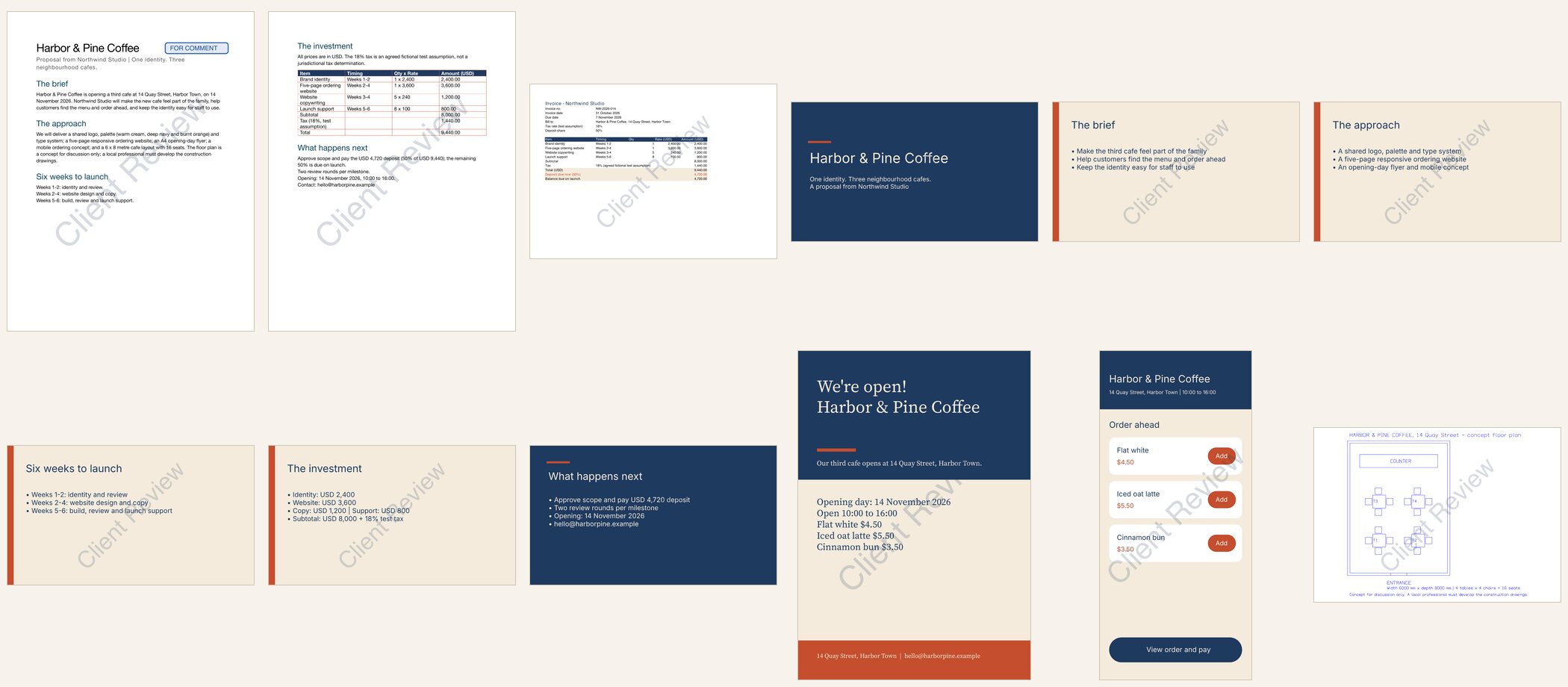
Each earlier prompt did one job and you read the result. By now you know what each app does well and where it slips, so you can ask for all of it at once and still check it.
Use brief.md and outline.md to make the whole client packet for Harbor & Pine Coffee: a proposal as Word and PDF, an invoice as Excel and PDF with real formulas, a 6-slide pitch deck as PowerPoint and PDF, an A4 opening flyer, an ordering screen and a floor plan of the café with four tables, then use PdfCraft to merge everything into one client-packet.pdf with a stamp and a Client Review watermark, and read every file back before you finish.
What to expect: our real run took 4 minutes 3 seconds (243.1 seconds), measured from Enter to the end of the turn, with 170 tool calls of which 6 failed and were recovered. It produced all seven documents and a 12-page client-packet.pdf with a FOR COMMENT stamp on page 1 and a diagonal Client Review watermark on every page. The packet holds the proposal, the invoice, the six slides, the flyer, the ordering screen and the floor plan.
It tells you what it could not read back. Claude reopened the xlsx and read the invoice formulas, read the proposal text from the docx, read the deck's slide count from the pptx, and read the text of all 12 packet pages and rendered pages 1 and 12. It did not read back the standalone PDFs, the DXF, the PNGs or the .figcraft file, and it said so. So "read every file back" was only partly honoured, and the honest line in its closing message is the useful part. It also left a placeholder README.txt in the output folder, which you should delete before anything goes to a client.
Would we send this to a paying client? The proposal, the invoice and the flyer, yes, after reading each once. The deck and the floor plan, not yet. They need human hands on them first.
Six watch-outs, and the fix for each
All six still happened when we re-tested them on the newest releases. None of them printed an error. We did not find a fix upstream for any of them; the fixes below are workarounds.
- GridCraft: a column of $0.00.
range.fillcan write shifted references, so every Amount shows $0.00 while the PDF still exports with exit code 0. Fix: select the range with its first cell active before the fill, or set the formulas cell by cell, then read the formulas and the values back. - DesignCraft: select the text first. Styling text that already exists does nothing unless its frame is selected, and the command still returns success. Fix: select the text frame, then style it, then look at the flyer.
- WordCraft: bold carries on. Bold from a table header cell can leak into the next cell. Fix: turn bold off before the body text and check the table.
- DeckCraft: an empty first slide. A new deck already holds one blank slide, so a six-heading outline gives you seven. Fix: delete the first slide, then count the slides.
- PdfCraft: a stamp's position is its centre. The position you give is where the middle of the stamp goes, not its corner. Fix: aim for a free area of the page and look at the page before you send it.
- CADCraft: dimension text needs a sensible scale. On our millimetre-scale plan, a dimension scale of 100 made the labels readable. Fix: check the labels at the size your client will see them.
One more thing is a limit rather than a quirk: big spreadsheets. In our test GridCraft 0.14.2 saved 47,617 of 100,000 data rows and still reported success. It warned about a one-million-element XML limit and exported the partial workbook with exit code 0. Splitting the data across three sheets (40,000, 40,000 and 20,000 rows) kept all 100,000 rows in our three runs. Count the rows in the saved copy before you trust any large file.
The habit
Before any file leaves you, open it and read it. If it is a spreadsheet, count the rows. That one habit caught every problem in this guide, and none of them was caught by an error message. It is the practical form of AI Reliability Engineering: assume a tool that says "done" may have done less, and check.
Links
- Setup helper: github.com/qualixar/craft-studio-setup
- The apps, made by Storytold: WordCraft, GridCraft, DeckCraft, PdfCraft, DesignCraft, FigCraft, CADCraft
- Episode 1 guide, the six creative apps: Claude Code × 6 Free Adobe Alternatives
Which document would you make first, and which app would you trust with a real client? Tell us in the comments under the video.