I Let Claude Code Run 6 Free Adobe Alternatives. Here's What Broke.
Claude Code made a 30-second short in ArtCraft's six free, open-source editors over MCP: 0 ArtCraft credits, about 3 minutes cold. App by app, what worked, what broke, and how to check an agent's 'success'.
Varun Pratap Bhardwaj · AI Reliability Engineering · October 2026

Watch the film first: Claude Code Tested ArtCraft's 6 Free Adobe Alternatives: What Broke. This post is the long version, with the commands, the measured times and the caveats that didn't fit on screen.
The film opens on a 30-second vertical short. Claude Code made it inside six free, open-source editors that stand in for Photoshop, Lightroom, Illustrator, After Effects, a music studio and Premiere, it spent zero ArtCraft credits doing it, and when we rebuilt it cold from a script the whole thing took about three minutes on one laptop. That's the headline, and it's true. It's also the least useful thing we learned, because along the way one of the six apps told Claude Code it had finished a job it hadn't done, and nothing in the reply would have warned you.
Every number below comes from a run we recorded on 22 October 2026, on PhotoCraft 0.12.0, LightCraft 0.11.0, VectorCraft 0.14.0, EffectCraft 0.14.0, SoundCraft 0.11.0 and FilmCraft 0.10.0. These are single recorded runs on one Mac, not a benchmark, and the versions move fast.
Chapter 1. The problem: a monthly bill on one side, alpha software on the other
Most of us who edit photos, sound or video pay every month for the Adobe tools. So when ArtCraft published free, open-source desktop apps that stand in for them, people noticed fast. PhotoCraft alone showed 71,528 GitHub stars when we checked on 23 October. The apps are dual-licensed MIT or Apache-2.0, and their READMEs say installers are attached to each GitHub release for macOS, Windows, Linux, FreeBSD and the web.
There are two catches. The first is that the apps say plainly they aren't finished. PhotoCraft calls itself early alpha, FilmCraft says it's in alpha, and EffectCraft's README puts itself at about 45% of the way to full professional production work.
The second catch is newer. These apps are built to be driven by an agent, and once an agent is pressing the buttons, the failure that costs you money stops being the crash. A crash gets noticed. A confident "done" on the wrong result can go straight to a client. So the question we tested was never "are they free?" It was the one I asked at the end of the film: which of these six would you trust with a paying client tomorrow?
Chapter 2. Six editors, one plug each
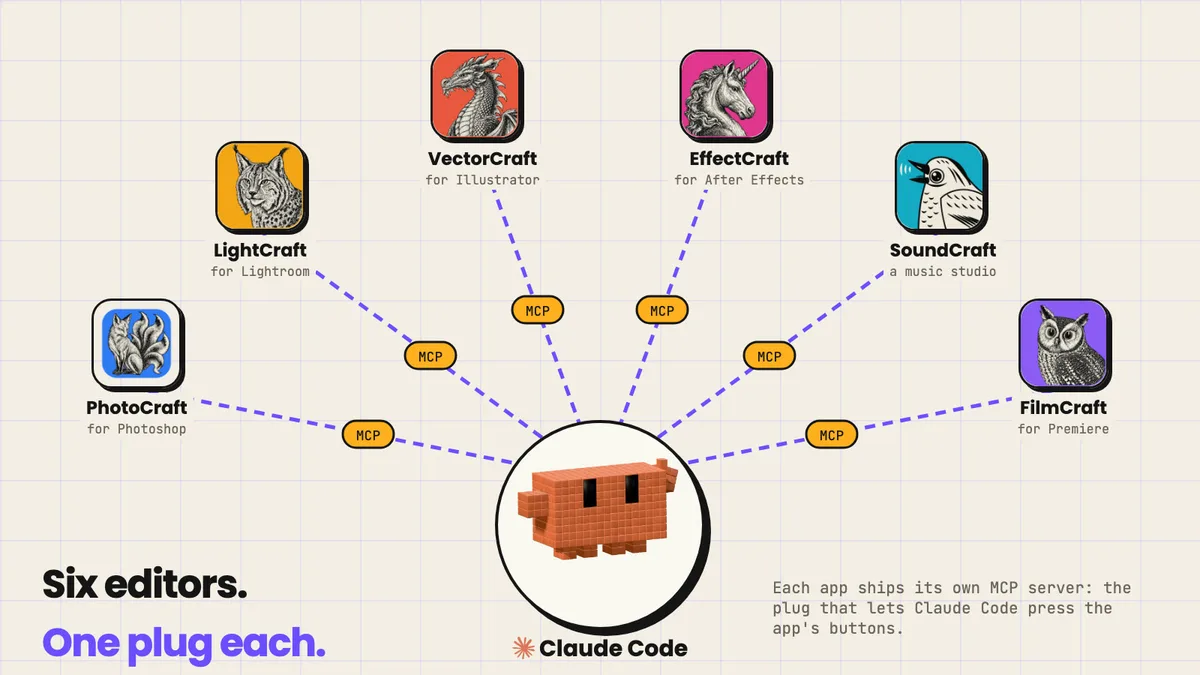
PhotoCraft stands in for Photoshop, LightCraft is a non-destructive photo library and raw developer in the Lightroom mould, VectorCraft does vector art like Illustrator, EffectCraft handles motion graphics and compositing like After Effects, SoundCraft is a music studio (its README calls it a clean-room reimplementation of Pro Tools), and FilmCraft is a non-linear editor in Premiere's place.
Each one ships a command-line tool, which is the app driven by typing, and its own MCP server. MCP, the Model Context Protocol, is an open standard for connecting AI applications to outside systems; for a creator, it's the plug that lets Claude Code press the app's buttons for you. The app publishes its actions as named commands, Claude Code calls them, and the app answers with a structured reply saying what it did. PhotoCraft's README states the goal: anything you can click, a script or an AI agent can do too. Keep that reply in mind, because the app's own account of what it did is exactly where the trouble showed up.
Claude Code doesn't draw or record anything itself; it runs the tools that do. And the six apps are editors, so they don't generate anything either: no voice, no pictures, no 3D. That's why the machine has a second ring.
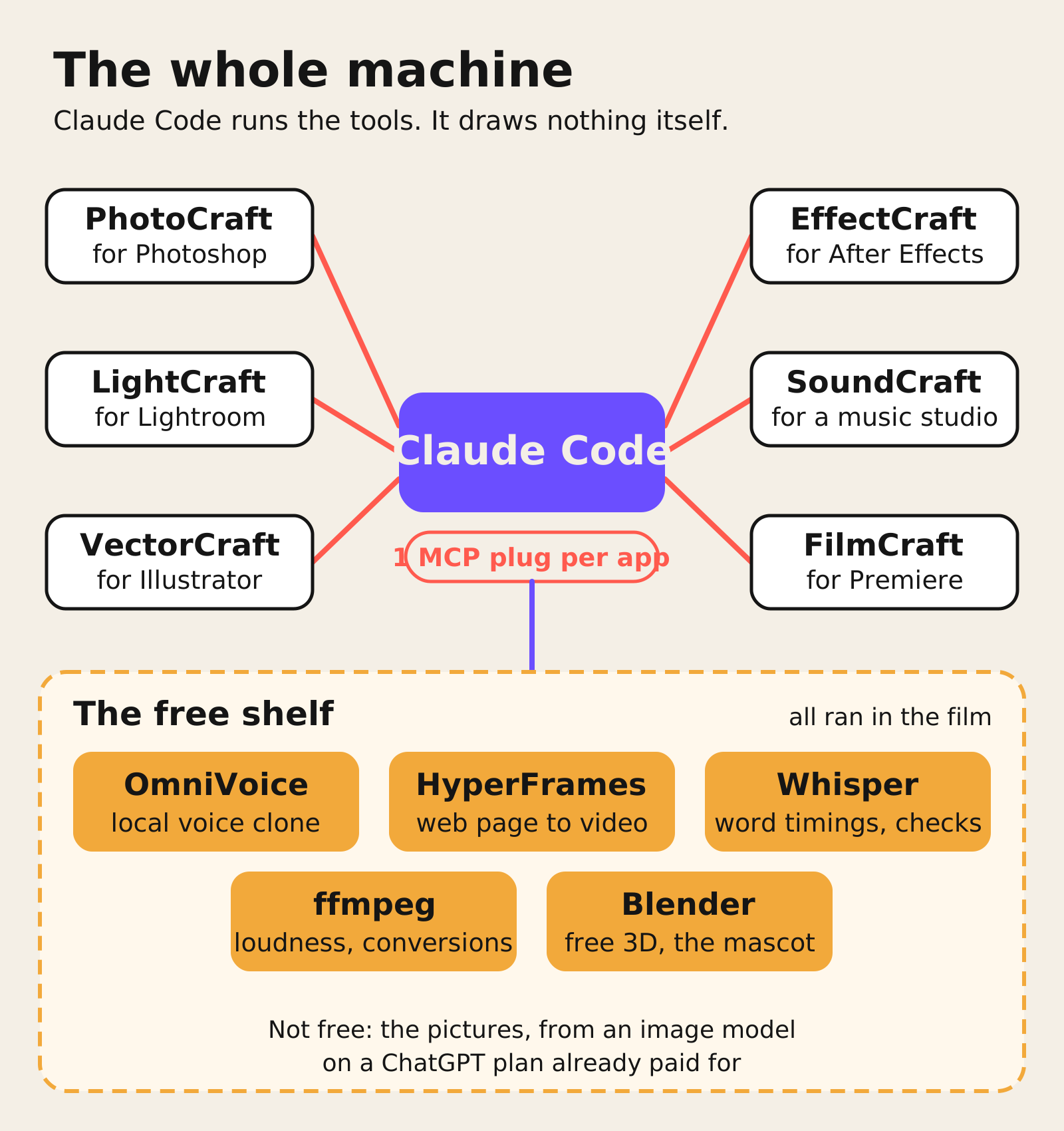
That outer ring is the free shelf, and everything on it ran in the film. OmniVoice clones a voice on your own computer from your own recording, and it voiced the short. HyperFrames turns a web page into video; the film's graphics are built with it. Whisper turns speech into timed text, so it did the captions and the checks, and it heard all 71 words of the short's script. ffmpeg converts and measures files, so every loudness number here came from it. Blender is free 3D, and the film's little mascot was built there. We also tested Demucs, which splits a song into instruments, and CLAP, which finds a sound from a description; CLAP scored our synthetic sounds at 0.071 and 0.076 against 0.344 for a real match, so both stayed optional.
The one thing on the map that isn't free is the pictures: the short's four scenes came from an image model on a ChatGPT plan I already pay for.
Chapter 3. App by app: what each one did, and what broke
LightCraft: one look, four photos, and the colour stays your job
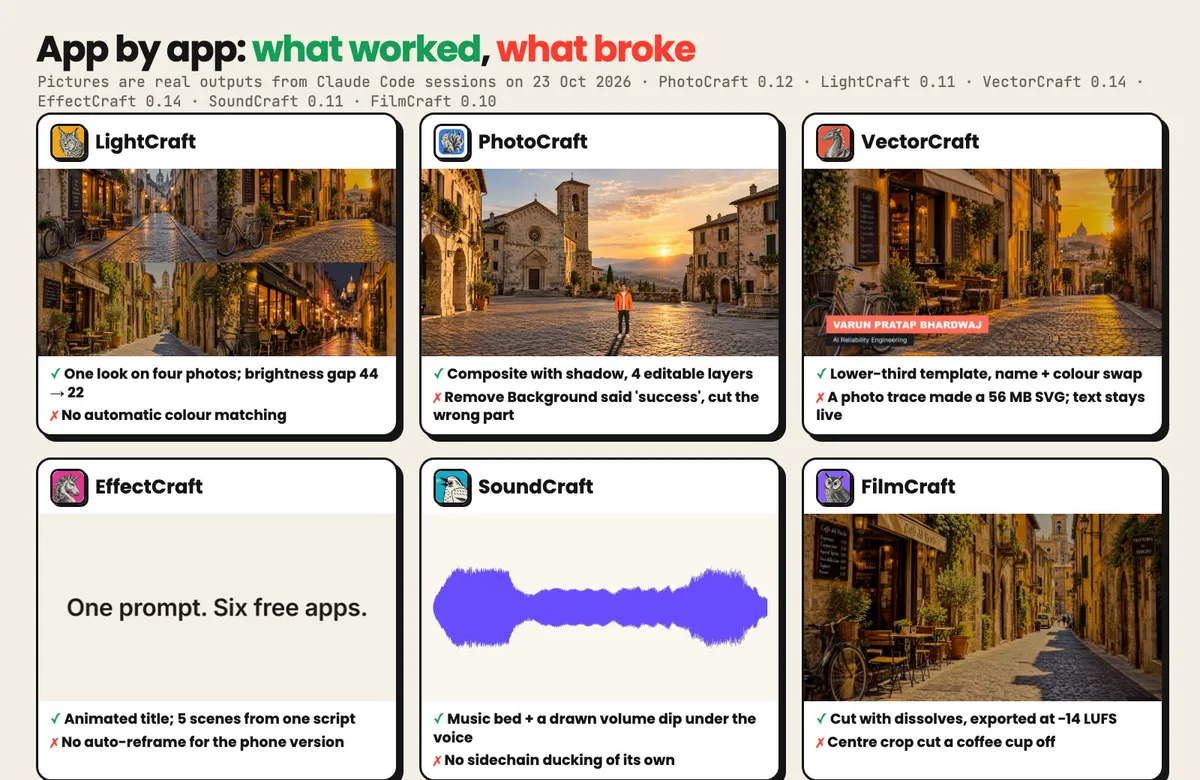
The job: four street photos shot at different times of day, one look across all of them. Claude Code developed the first photo, saved that look as a preset, applied it to all four and exported them in about five seconds over MCP (4.7 seconds plus half a second to import), or 0.8 seconds from the command line. The brightness gap between the four halved, measured as a mean luma spread falling from 44 to 22.
What a preset can't fix is colour. Blue hour stayed blue and golden hour stayed gold, because the same adjustments land on different light, and there's no automatic colour matching. Connect it with a library folder, not a photo folder. We found on a clean install that pointing the server at an empty folder makes it import nothing and exit, so the setup script now registers it like this, and you add photos by asking Claude Code to import them:
claude mcp add lightcraft -- lightcraft-cli mcp --compact --library ~/craft-workspace/lightcraft-library
PhotoCraft: the merge worked, then Remove Background said "success"
Job one was a composite. Claude Code keyed out the green behind a man, masked him, added a soft contact shadow and a warm photo filter, and placed him in a plaza from a second photo. It worked, and the saved file keeps all four layers editable: background, contact shadow, subject and filter.
Job two was Remove Background. On a person against green it worked, with a little green left on the hair and hands. Then we sent it a desk photo, and it came back with this:
{"bounds":[0,0,941,1106],"layer":7}
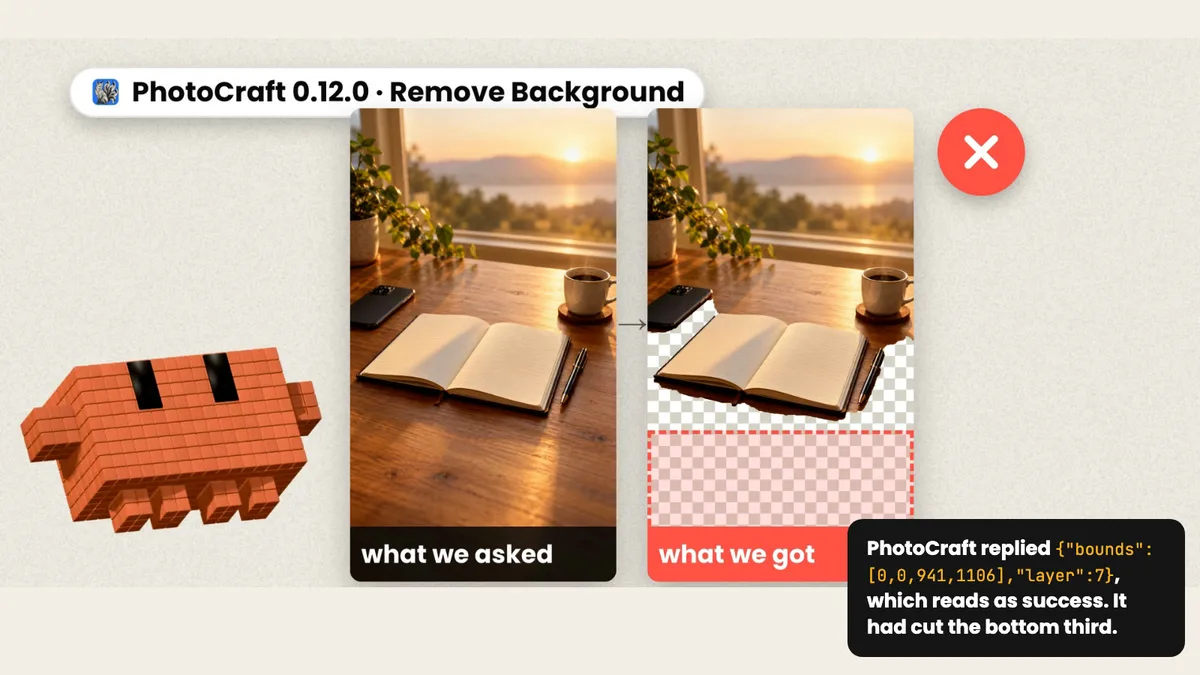
That reads like success: a bounding box, a layer number, no error. When we opened the picture, the bottom third was gone, the table and the notebook with it, and the window and the plant were kept. Nothing crashed. This is the failure I most want you to remember, and Chapter 8 is about catching it.
VectorCraft: three jobs against the clock, then a photo broke the race
A logo from a hexagon, a circle, a four-point star and two lines of text, in one CLI run: a quarter of a second. A lower-third template where dataset.select swaps the name and recolor.apply swaps the colour: under half a second. A flat raster logo traced into vectors: five clean paths and 149 anchors in a fifth of a second.
Then we gave it a photo to trace: 63,835 paths, 1.18 million anchors, a 56 MB SVG. Trace logos only. The other catch bites the next app, because VectorCraft keeps text live inside the file, so outline it before the logo goes anywhere.
vectorcraft-cli convert logo.svg logo_outlined.svg --outline-text
That leaves zero <text> elements in the output.
EffectCraft: five scenes from one script, and nothing reframes for you
Five stills went in, and five animated scenes came out, each with a slow zoom, a label, a headline and a fade. Claude Code wrote them as one parametric script and rendered all five at once in twelve seconds from the command line. Over MCP, the same render on the same files took about 147 seconds, with identical output.
The same script gives you a wide version and a phone version, but nothing reframes automatically, so the layout is yours. And a logo imported with live text loses its words until you outline them in VectorCraft first. From the terminal, one README command renders to a file:
effectcraft-cli render --comp Main --out main.mp4
SoundCraft: a music bed, and a dip it can't do by itself
SoundCraft is pre-alpha by its own README. Claude Code wrote a bed note by note: pad, bass, arpeggio and drums, four tracks at 100 BPM. Honestly, it sounds like a stock demo loop; fine under a voice, not a hero track.
SoundCraft has no sidechain ducking, so it can't dip the music under a voice by itself. Claude Code drew the dip as a volume curve, 16 dB under the voice, measured the bounce with ffmpeg, trimmed and bounced again until it read −14 LUFS, and Whisper heard every word through the music. The README's own line for connecting it is "Give Claude a DAW":
claude mcp add soundcraft -- soundcraft-cli mcp --demo
FilmCraft: the cut, the duck, and a coffee cup lost to the crop
The final cut: five scenes, a dissolve at each join, voice on one track and music on another. FilmCraft ducks the music under the voice on its own, though it merges close lines into one long dip, and it exported at −14 LUFS in 12 seconds from the command line, about 123 over MCP.
Two things it didn't do. Stills arrived with black bars until one command, fillFrame, fixed them. And the phone version is a plain centre crop, which on one scene cut the coffee cup right off. The setup repo's README adds a warning worth repeating: FilmCraft's MCP server has no folder confinement, so point it at a scratch project.
Chapter 4. Two ways in: creator or developer
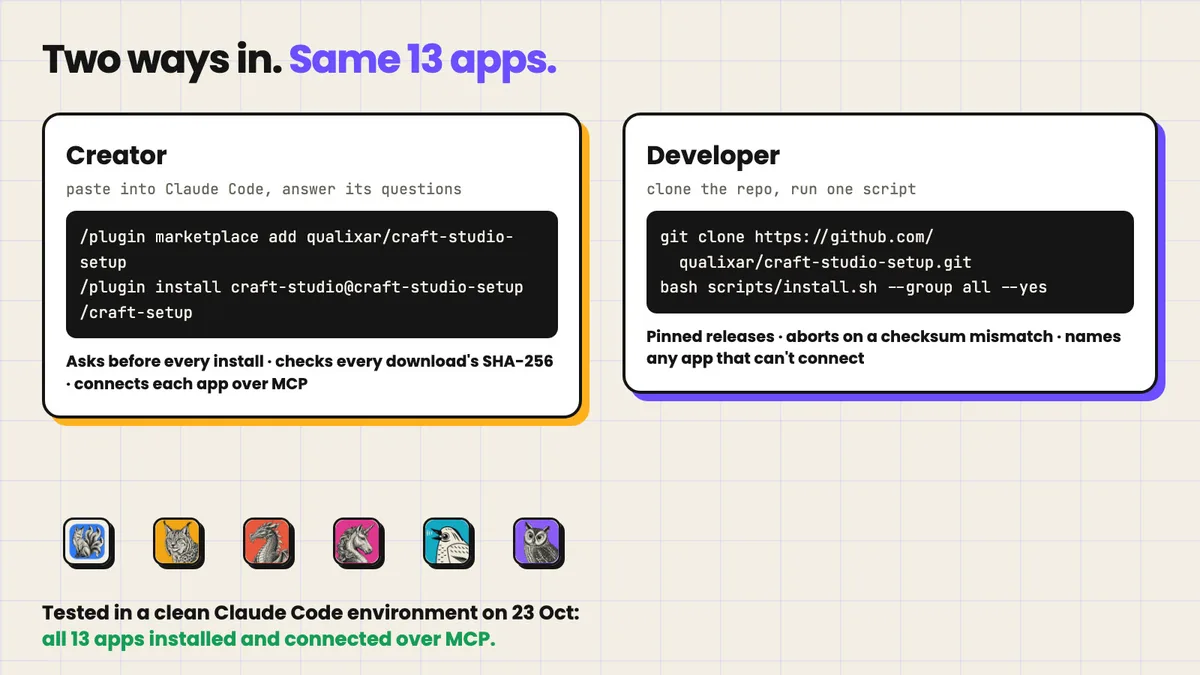
If you edit every day and the terminal scares you a little, the creator path is one prompt. Open Claude Code, paste these three lines, press Enter, and answer its questions:
/plugin marketplace add qualixar/craft-studio-setup
/plugin install craft-studio@craft-studio-setup
/craft-setup
Claude Code checks what your Mac already has, explains each app in one plain sentence, and asks before each install. Every download's SHA-256 fingerprint is checked against the list we publish, and a mismatch stops everything. Then it connects each app over MCP and prints a card of things you can ask it to do. macOS asks once before opening a downloaded app; that's normal, as the apps are signed and notarized. You need a Mac (Windows isn't tested yet), Claude Code and about 1 GB of disk, and the README estimates about 20 minutes for all 13 apps, these six plus seven office apps. On 23 October we tested the whole path in a clean Claude Code environment, exactly as a new user gets it from GitHub: the plugin installed, all 13 apps downloaded and passed their checksum checks, and every one connected over MCP. That test caught one bug, the LightCraft folder issue above, which is fixed in version 0.1.1; the installer now names any app that fails to connect.
Then try asks in plain words, each mapped to something we ran on camera:
Grade these four photos to one warm look and export them for Instagram.
Put the person from photo A into the plaza in photo B, with a soft shadow.
Make a calm 30-second music bed at 100 BPM and duck it under my voice.
If you're a developer, clone the setup repo and run one script:
git clone https://github.com/qualixar/craft-studio-setup.git
cd craft-studio-setup
bash scripts/install.sh --group all --yes
Per app, the script downloads the pinned release zip from github.com/storytold/<app>, checks its SHA-256 against catalog/apps.json and aborts on a mismatch, unzips to ~/tools/craft/<app>/, links the CLI into ~/.local/bin, registers it with claude mcp add, and then verifies <app>-cli --version and claude mcp list. Re-running is safe, and --only <app> or --detect-only narrow it down. You can also wire one app by hand from its README, for example claude mcp add vectorcraft -- /path/to/vectorcraft-cli mcp, and check a download is the real thing first:
ditto -x -k photocraft-cli-<version>-macos-universal.zip .
spctl --assess --type install -vv photocraft-cli-<version>-macos-universal/photocraft-cli
The setup repo is MIT licensed: github.com/qualixar/craft-studio-setup.
Chapter 5. The clock: script to checked video in 180 seconds
Once the short's script existed, we rebuilt the short from scratch with one build script and timed every stage.
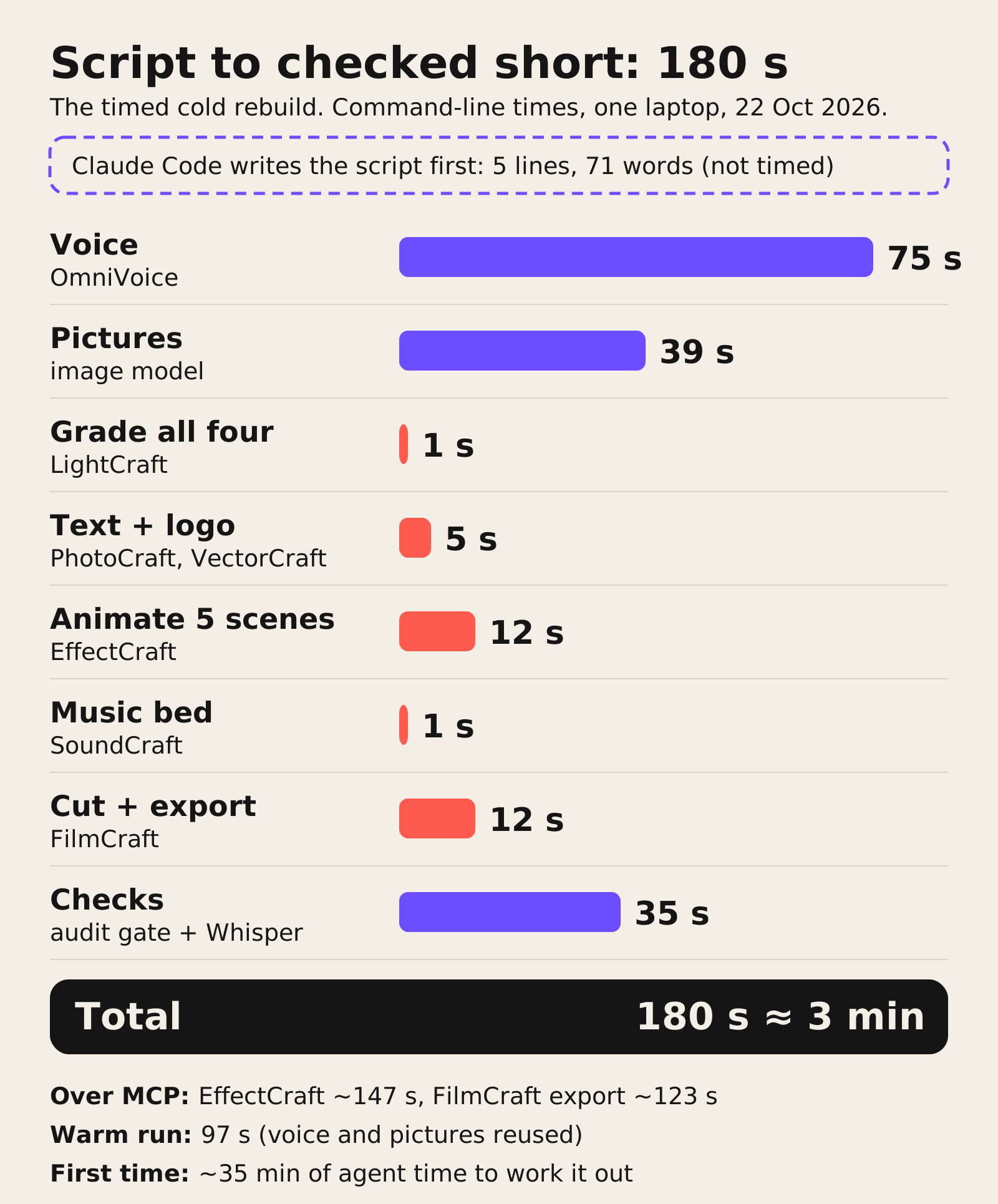
Claude Code writes the 5-line, 71-word script first, and the clock starts after it. OmniVoice voices it in 75 seconds. The four pictures take 39. LightCraft grades all four in about a second. PhotoCraft and VectorCraft add the text and the logo in five, EffectCraft animates the five scenes in twelve, SoundCraft scores the bed in one, and FilmCraft cuts and exports in twelve. Our checks, the audit gate plus Whisper, take 35. That's 180 seconds, about three minutes, from a script to a checked video file on one laptop with free software. In the film I said that number still feels a bit unreal to me.
Now the numbers that keep it honest. Those are command-line times. Over MCP, the way the creator path drives the apps, the two heavy renders took about 147 seconds (EffectCraft) and 123 seconds (FilmCraft export) on the same files, with identical output, so for big renders let Claude Code call the CLI. With the voice and pictures already made and one scene regenerated, the last full run took 97 seconds. And working it all out the first time took about 35 minutes of agent time. Three minutes is the cold rebuild, not the first attempt.
Chapter 6. The ledger: money, time, what broke
Money first. ArtCraft credits spent: zero. The pictures came from an image model on a ChatGPT subscription I already pay for, and the voice ran locally. We didn't measure that subscription's share, so there's no dollar figure here.
Time is Chapter 5. Then what broke. The film counts four breaks: the background removal, the vanished logo text, the 56 MB trace and the lost coffee cup. The guide's full ledger adds each app's limits and one failure that was ours:
| App | What happened | What to do |
|---|---|---|
| PhotoCraft | Remove Background said success and cut the bottom third of the desk photo | Open the result and check what's gone |
| VectorCraft | Logo text stayed live; a photo trace made a 56 MB file | Outline text; trace logos only |
| EffectCraft | The live-text logo lost its words; no auto-reframe | Outline first; lay out each shape by hand |
| FilmCraft | Black bars until fillFrame; the centre crop cut the cup |
Use fillFrame; check every phone frame |
| SoundCraft | No sidechain ducking | Draw the dips, or duck in FilmCraft |
| LightCraft | No automatic colour matching | Match colour by hand |
| Our own checker | Passed a file, then failed the exact same file | Trust three passes in a row |
The short also still looks amateur in places, and the film says so: no captions, one slow zoom per scene, a generic synth bed, text sitting on the subjects, a placeholder logo, and 76 MB for thirty seconds of video. Most of that maps to a tool on the shelf, which brings us to the layer the editors don't cover.
Chapter 7. The motion-graphics layer: a frame is a function of time
Anthropic released Claude Opus 5.5 on 22 September 2026, and people have been sharing motion graphics made with it ever since. The model doesn't output a video file. It writes a web page, often HTML with GSAP or Three.js, where any frame can be drawn from one number, the time, and a renderer steps a headless browser through that page and encodes the frames into an MP4.
HyperFrames is the renderer we use. HeyGen open-sourced it under Apache 2.0, and its README promises deterministic MP4s from HTML, CSS, media and seekable animation: "same input, same frames, same output." It installs into Claude Code as a plugin with claude plugin install hyperframes@hyperframes, and GSAP, the animation library most of these pages seek through, is now free for all users.
The contract underneath is a reliability property dressed up as a rendering trick. If frame 200 can be drawn from t alone, with no random numbers, no wall clock and no state carried over from frame 199, you can jump to any frame and inspect it, render chunks in parallel, and fix one frame without replaying the film. And a frame that looks wrong today will look exactly as wrong tomorrow, so a visual bug becomes a reproducible bug instead of a rumour.
The strongest prompts in the awesome-opus5-5-videos catalog (703 by its README on 23 October) build checks on that contract. @flxrnc's prompt asks for a pure renderAt(t) plus a ?t= URL parameter that freezes any instant for review, with every state on a 0.5-second grid. @twoclipping's keynote-style prompt asks for the beat map and four key stills before any code, then scans frame-to-frame differences after the render and flags any spike about three times its neighbours as a pop. Read those as engineering: a checkpoint against the ask before the expensive step, and a measurement after it.
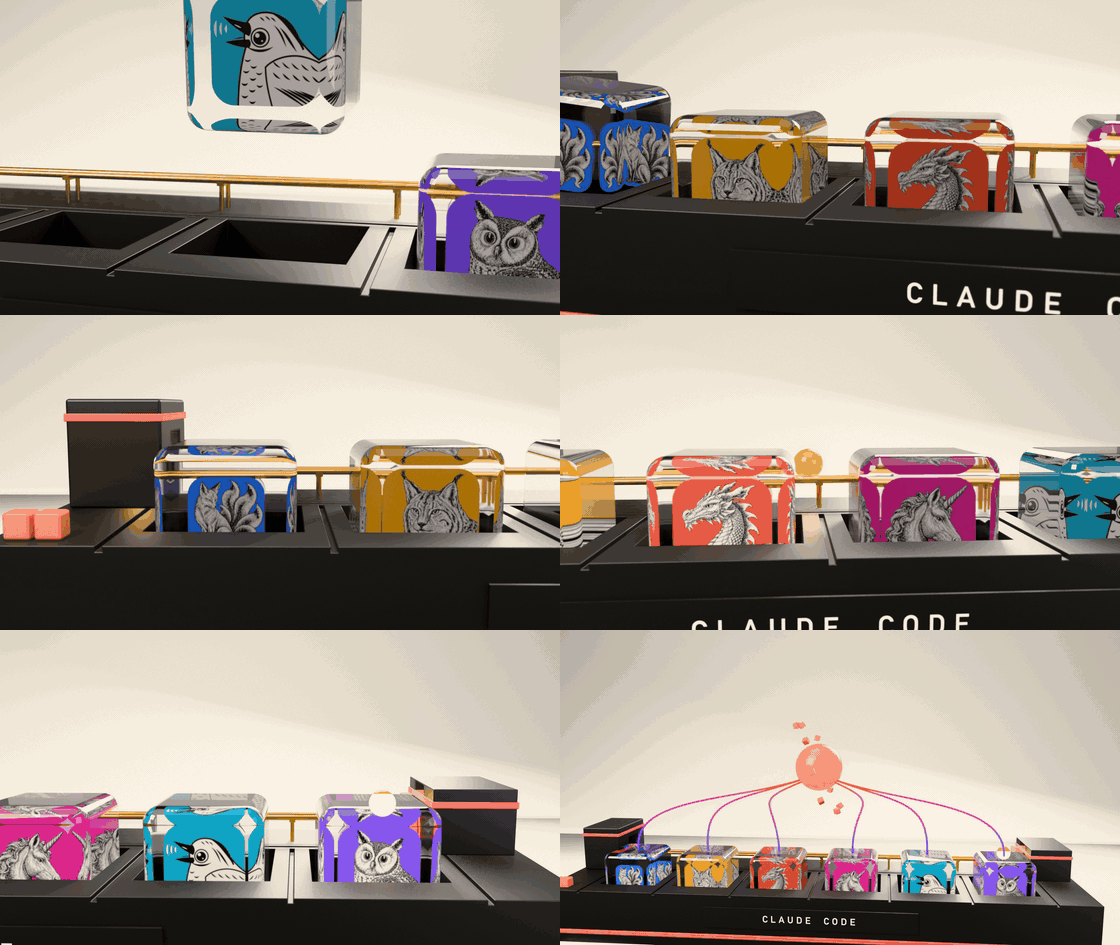
Our own hero shot for the promo reel: real rigid-body physics in Blender, built with Opus 5.5, with the six real app icons inside the glass.
In the film, that layer fixes one item from the ledger. The first short had no captions, so that box on the map stayed dashed. Whisper wrote every word of the voice with its exact timing, HyperFrames drew those words onto the video, and the box went solid. One tool measures, the other renders from the measurement, and both can be rerun.
Chapter 8. How to check an agent's "success"
Go back to the desk photo. A bounding box and a layer number tell you the app did something to some layer. They don't tell you what was removed, or whether it matched what you meant. My reading is that this is where agent work goes wrong quietly: the tool reports that it acted, and only a check against the ask tells you whether the act was right.
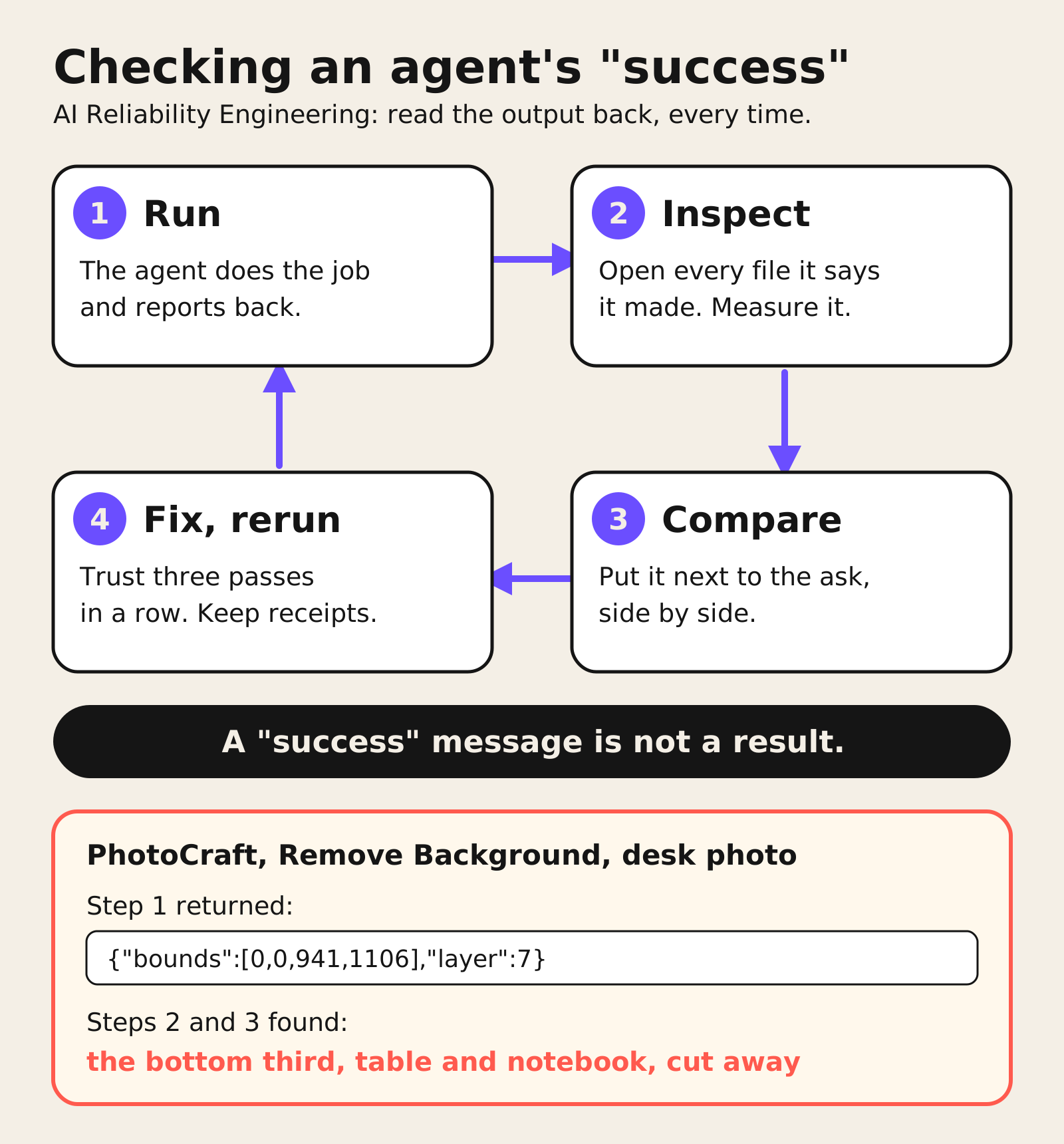
This is what AI Reliability Engineering looks like in practice, and the rule is short: read the output back, every time. Open every file the agent says it made, because a "success" message is not a result. Put what you asked for next to what you got, side by side. Measure what can be measured: loudness, resolution, and the captions word for word against the voice. Run your checks more than once, because ours flipped on the same file, which is why we now trust three passes in a row. And keep the receipts for each step: the command, the time, the version and the output path. Every number in the guide has one.
The loop isn't expensive: in the clock above, the automated checks took 35 of the 180 seconds, covering resolution, loudness, frames and every word heard. They still don't replace the look. A loudness or resolution check would have passed the desk photo; putting the picture next to the ask is what caught it.
Chapter 9. Free apps, an Upgrade button: what the code says
The free apps come from a company whose other app has an Upgrade button, so I read the code. To be fair first: the six editors are one thing, and ArtCraft Studio, their AI generation app, is another. The editors are MIT or Apache licensed and run on your machine. We searched all six for billing code (bill_wallet, credits_pack, MARKUP_NUMERATOR, hasPaidPlan) and found zero matches.
ArtCraft Studio is different. It sends your generation jobs to their server, and that server checks your credits and charges them. These are the receipts, from the code at HEAD of 18 to 21 October, read on 21 and 22 October 2026:
| File | What it shows |
|---|---|
dispatch.rs:59 |
Studio posts jobs to /v1/omni_gen/generate/ on their server |
run_pipeline_v2.rs:184 |
The server bills your wallet: bill_wallet(user_token, cost, …) |
kling_3p0_pro/cost.rs:4 |
MARKUP_NUMERATOR: u64 = 115: one video model, +15%; one credit is one US cent |
TopBar.tsx:611 |
The Upgrade button shows whenever you don't have a paid plan |
subscription-plans.ts:10 |
The plan page offers "Free daily generations" |
get_session_credits_handler.rs:74 |
On the server, let free_credits = 0u64; |
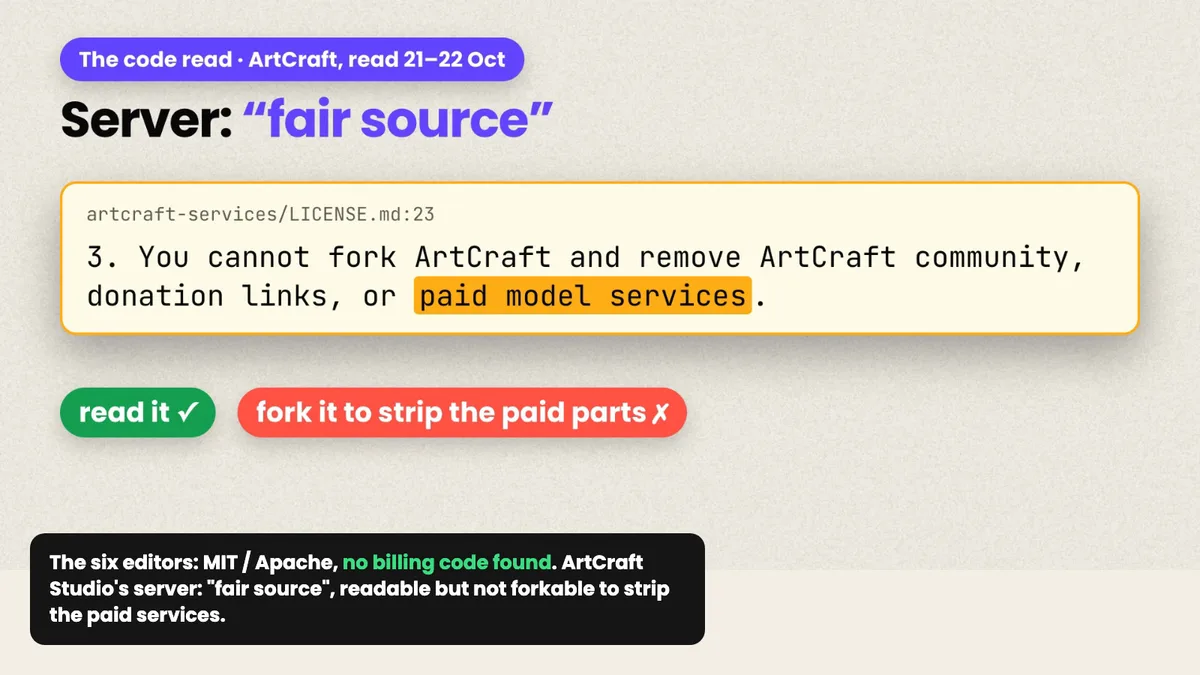
artcraft-services/LICENSE.md:23 |
The server code is "fair source": you can read it, but you can't fork it to strip out the paid model services |
You can also let the agent look inside a tool before you trust it. On 23 October I asked Claude Code to use REA, an open-source reverse-engineering kit it can call over MCP, to check the lightcraft-cli binary for network or telemetry code. Its answer: it found no telemetry, analytics, crash-report or update-check service, and no machine ID; the network code it did find serves downloads you trigger yourself, each checked against a size and SHA-256 hash. It also listed what that check can't prove: a text search misses addresses built at run time or hidden on purpose, and it looked only at the arm64 half of the binary. That's the right shape for an answer, a finding plus its limits.
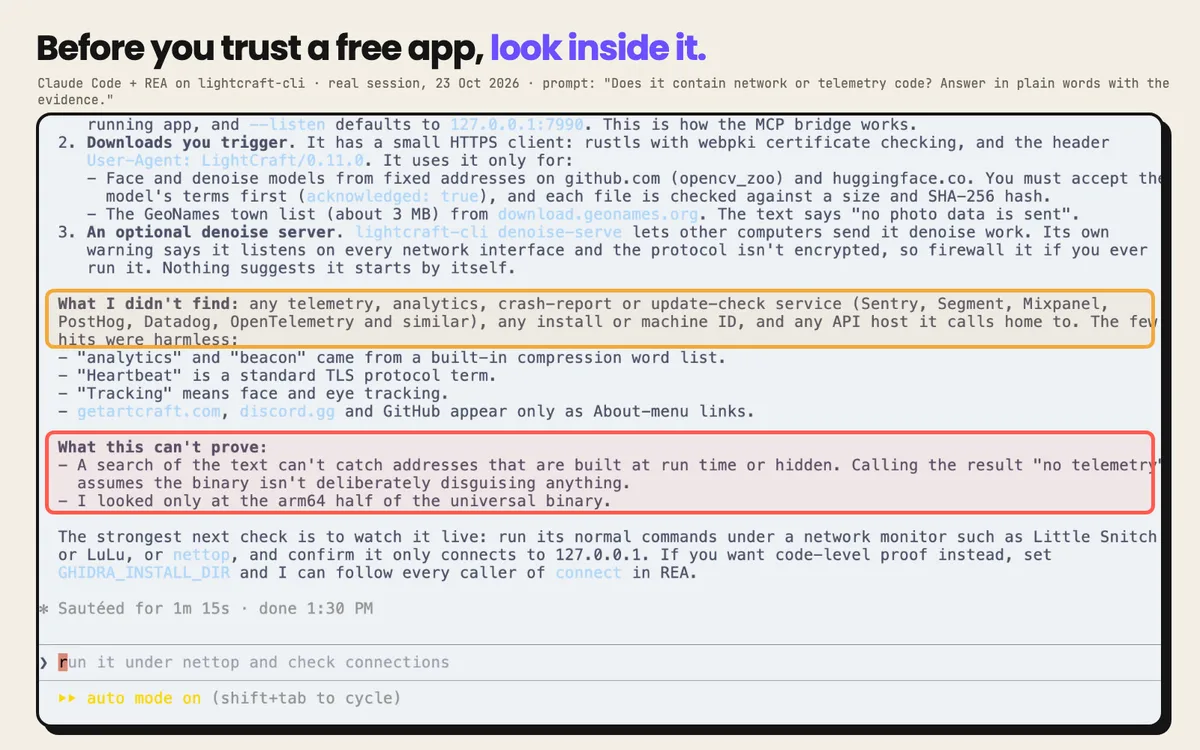
Now the limits. I couldn't find where the free daily generations come from, and not finding something doesn't prove it isn't there. I didn't capture network traffic either, so I won't claim the editors never call home; this is a reading of the code, not a packet capture. In the six editors, there's no meter.
Where this leaves the question
So which of the six would I hand a paying client's job tomorrow? From this run, the app isn't the deciding factor; the check is. LightCraft, VectorCraft and EffectCraft did fast, real work inside clear limits. PhotoCraft produced a clean, editable composite and the most dangerous failure of the test. All six are fine for drafts and experiments today, as long as somebody opens the file before the client does.
If you want to run it yourself, three places to start:
- The film, the full test in about fifteen minutes: youtube.com/watch?v=-VPYXcrsEs0
- The free 16-page PDF guide, with the map, every command, the one prompt to paste into Claude Code and every single thing that broke. It's free with a qualixar.com account and newsletter signup: qualixar.com/learn/guides/claude-code-6-free-adobe-alternatives
- The setup repo, for both paths: github.com/qualixar/craft-studio-setup
The seven office apps get the same treatment next: proposals, invoices, decks and floor plans. In two of them, a command did nothing and said nothing, which is the quieter cousin of the desk photo.
Varun Pratap Bhardwaj builds AI Reliability Engineering tools at Qualixar. ORCID 0009-0002-8726-4289