Varun Pratap Bhardwaj · AI Reliability Engineering · November 2026
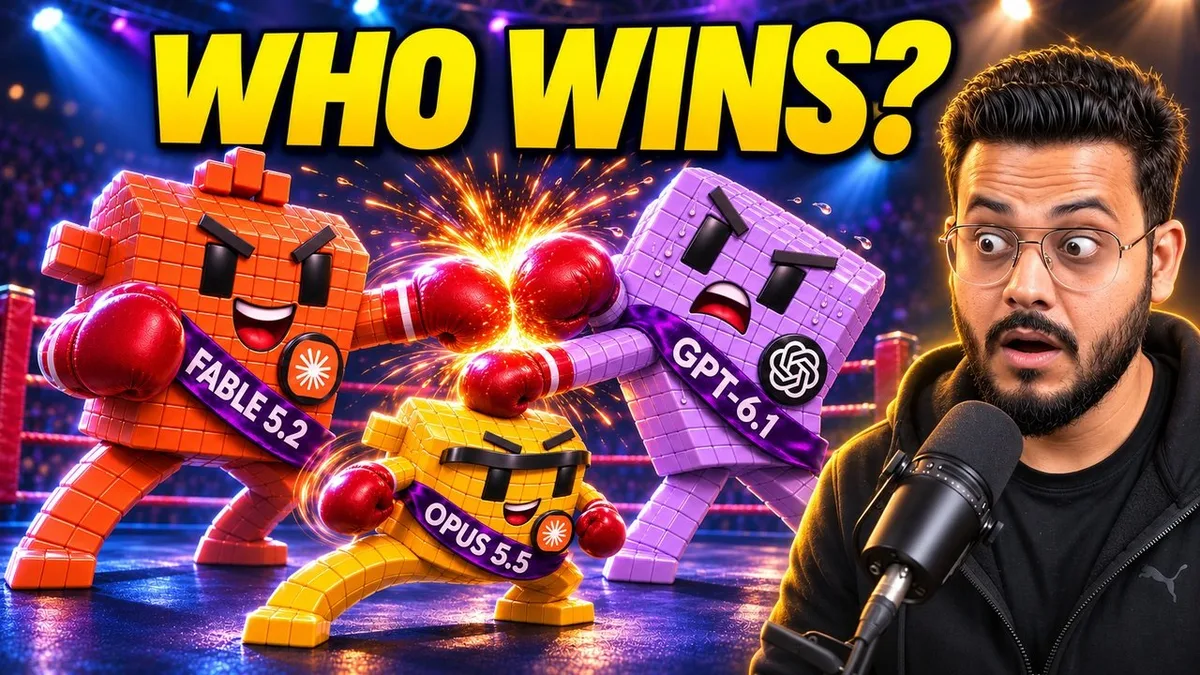
I handed Fable 5.2, Opus 5.5 and GPT-6.1 the same motion-graphics briefs: a glass logo, data turned into a 3D chart, a laptop launch film, and four worlds joined by one camera move. Each model worked in its own sealed folder with the same toolbox, no skills and no memory. The full film is on YouTube: Fable 5.2 vs Opus 5.5 vs GPT-6.1: Who Makes Better Motion Graphics?, and all eleven contest entries are public and untouched.

Every model produced a file that plays. What separated a good entry from a usable one was the distance between "the render finished" and "the video does what the brief asked". Each entry got exactly one follow-up: check your output against the brief and fix every mismatch. This post is about the skill I built so an agent does that every time, without being asked, and about the engineering underneath it.
A video renderer can finish successfully while the video misses its brief. The file may have the right dimensions and the wrong words. A product can fall convincingly while its landing happens outside the camera frame. A music bed can survive an export and still miss the loudness target. Each problem needs different evidence.
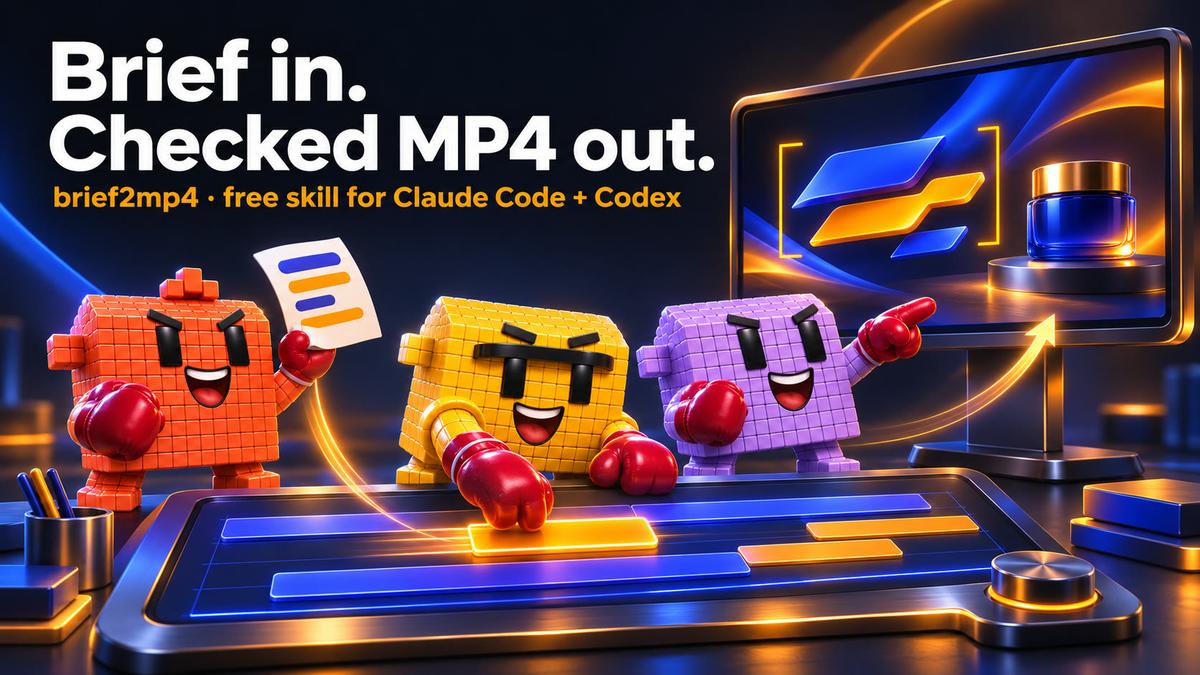
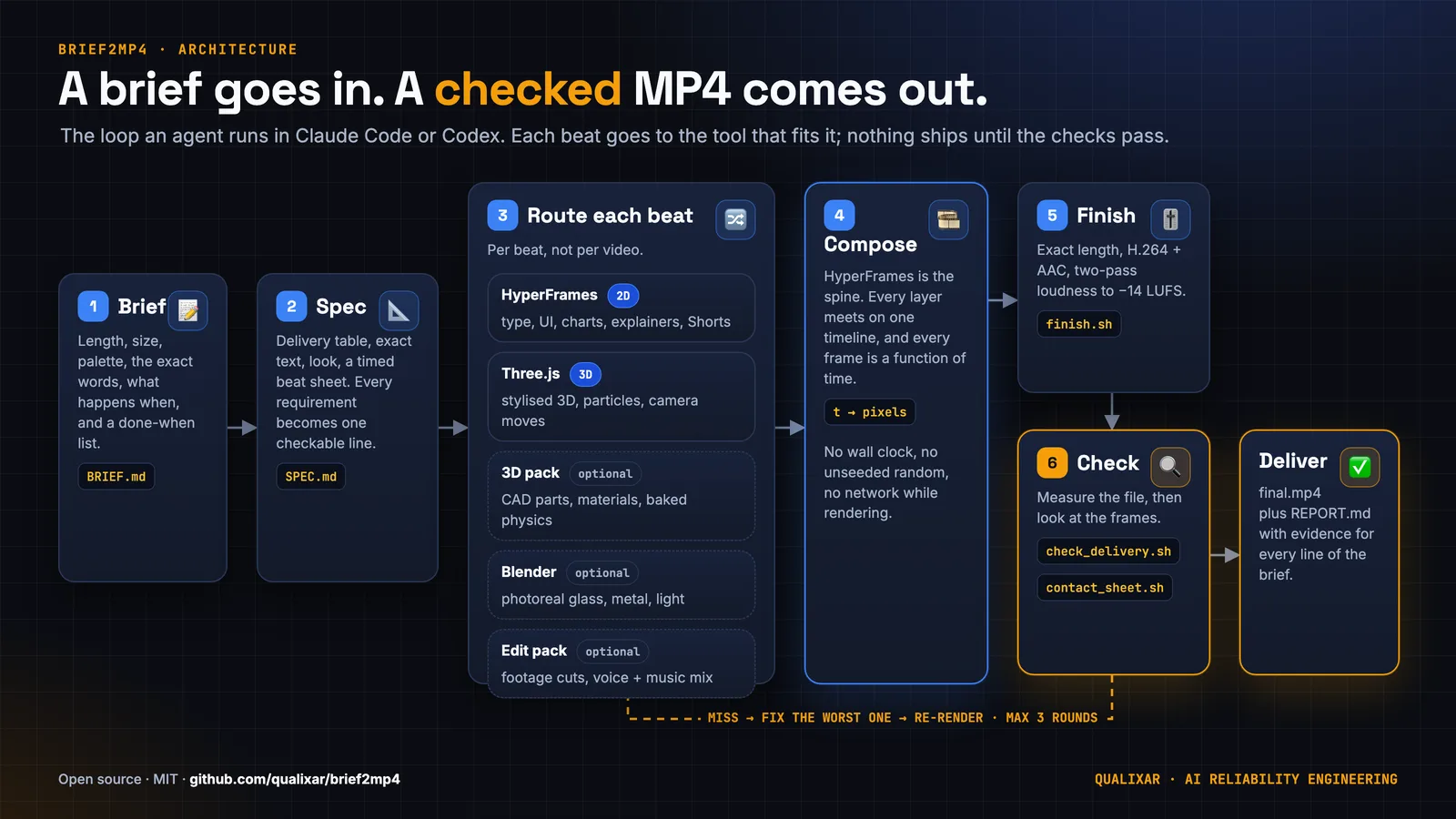
brief2mp4 makes that evidence part of the job. It is an MIT-licensed, open-source skill for Claude Code and Codex: a written video brief goes in, and a checked final.mp4 comes out with a REPORT.md. The agent writes a spec, routes the work, renders, measures the delivered file, looks at frames, and repairs the requirements it missed.
Version 0.3.0 adds optional 3D and editing packs, machine setup instructions, more formats, and cross-platform checks. The author is Varun Pratap Bhardwaj of Qualixar, an independent AI Reliability Engineering research initiative. The engineering idea is simple enough to inspect: specify what success means, measure the artifact, and require evidence before declaring it done.
Start with a requirement you can fail
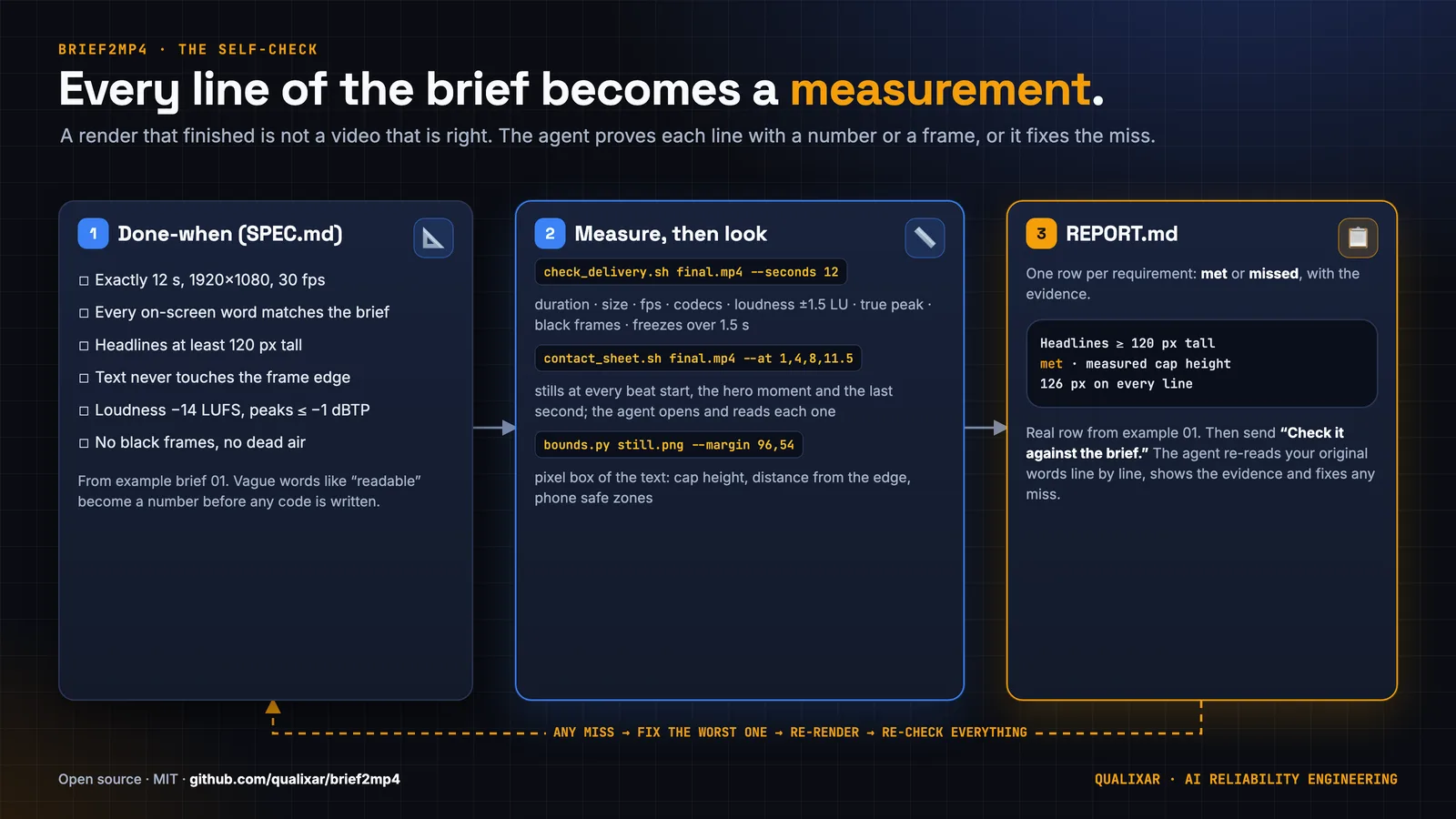
Before writing animation code, the agent creates SPEC.md. Its delivery section records dimensions, frame rate, duration, codecs and audio. Exact on-screen text gets its own section, copied character for character. A look section fixes the palette and typefaces. The beat sheet assigns times to events, and a tool choice explains the route. The final section is a measurable "done when" list.
That last section changes the work. "Make the title readable" leaves the agent room to accept almost anything. A requirement that names a frame, an exact phrase and a minimum size can fail. The spec makes such failures visible before an attractive render encourages everyone to stop checking.
The supplied kinetic-type brief, example 01, asks for a closing line that lands by a named time, stays fully readable and clears a minimum headline height. Its sample report records a measured capital height of 126 px against a 120 px minimum. It also distinguishes that painted height from the CSS font size. Those are different measurements, and the report says which one satisfied the brief.
The spec remains an interpretation. When the user sends "Check it against the brief," the skill requires the agent to return to the original words. Otherwise an omitted requirement can disappear into a perfectly consistent implementation of an incomplete spec.

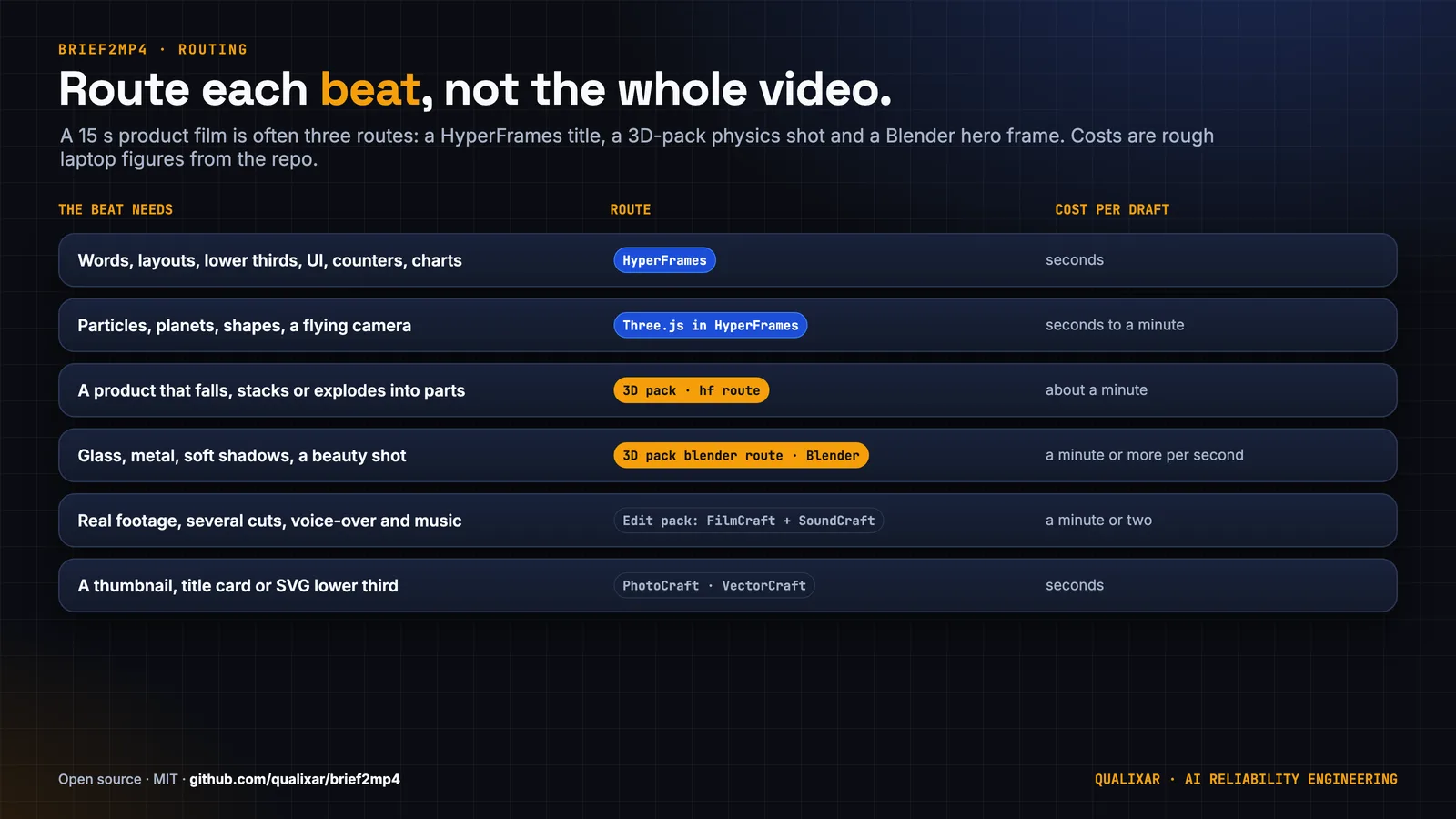
Route each beat separately
HyperFrames is the spine where layers meet on a shared timeline. It captures HTML and CSS in headless Chrome, with a paused GSAP timeline supplying animation state. That is the default route for type, diagrams, charts, layouts, captions and UI.
Three.js draws stylised 3D inside the composition. The optional 3D pack adds model generation, material presets, physics tracks and a shot description that builds a HyperFrames project. Blender renders shots that need realistic materials, light and shadows. Its frames or alpha video become layers under the type. The edit pack handles footage cuts, audio mixing and other editing work. ffmpeg finishes and measures the resulting master.
The unit of choice is a beat. A title does not need the same renderer as a falling product, and the product does not force the closing line into a 3D scene. Keeping type in HTML above a Three.js canvas preserves its spelling and layout as editable text. A Blender insert can occupy only the shot that needs it.
The routing reference includes approximate laptop costs. These are planning estimates from the repository, expressed as elapsed work, rather than provider prices or guarantees for a particular machine:
| Beat | Route | Repository planning estimate |
|---|---|---|
| Words, UI, counters, charts | HyperFrames | Seconds per draft |
| Planets, particles, flying camera | Three.js inside HyperFrames | Seconds to a minute |
| Product falling, stacking or opening | 3D pack, hf route |
About a minute |
| Glass, metal, soft-shadow hero | 3D pack blender route or Blender template |
A minute or more per second of video |
| Extruded logo or icon | 3D pack model, material, reveal | About a minute |
| Recording as a video layer | HyperFrames after ffmpeg preparation | Seconds |
| Several footage cuts, voice and music | FilmCraft, SoundCraft, HyperFrames | A minute or two |
| Thumbnail or SVG lower third | PhotoCraft or VectorCraft | Seconds |
The skill itself is free. Your agent subscription and local compute are separate costs. The estimates above should guide where to spend rendering effort; they do not establish a performance ranking between tools.
Time is the only animation input
A browser animation normally progresses as time passes. A frame renderer must also be able to request a later frame before an earlier one. HyperFrames seeks frames across Chrome workers, so a scene needs to answer a precise question: what should be visible at time t?
The skill requires every visible value to follow that time. It excludes wall-clock reads, unseeded random values and network calls during rendering. The Three.js reference replaces a running animation loop with draw(t), sets positions directly, renders once, and registers the paused root timeline. This excerpt is copied from that reference; the surrounding scene setup comes from the shipped template:
const clock = { t: 0 };
const tl = gsap.timeline({ paused: true });
tl.to(clock, { t: DURATION, duration: DURATION, ease: "none", onUpdate: () => draw(clock.t) }, 0);
window.__timelines = window.__timelines || {};
window.__timelines["main"] = tl;
draw(0);
Random layouts use a seeded generator. Three.js uses preserveDrawingBuffer: true, and the reference sets the renderer pixel ratio to one because the canvas already has the delivery dimensions. A real-time requestAnimationFrame loop would let the browser's playback history affect what a worker captures. The time-driven pattern gives the renderer an addressable frame.
The repository's determinism test for an added route is concrete: render the same frame twice in separate runs and compare the PNGs. That is a useful acceptance condition for a route. It should not be stretched into a promise that arbitrary GPUs, browsers and dependency versions produce identical pixels everywhere.
Vendor the inputs before rendering
Deterministic JavaScript still depends on assets. A font fallback can change line breaks while leaving every character in the HTML correct. A CDN script can turn an offline render into a failed load.
vendor_libs.sh copies pinned GSAP, Three.js and font files into the project. It also writes a font stylesheet and copies font licences. Its dependency acquisition uses npm; offline rendering begins after those inputs have been prepared. The HyperFrames reference explicitly tells the agent to replace the CDN script in the initial template with the local copy.
The composition contract has another easy trap: only the root timeline should be paused. A paused child timeline nested inside it will remain frozen when the root seeks. Starting visibility also belongs in CSS. The reference warns that a timeline setter at time zero may arrive too late for the first capture.
These details explain why a snapshot belongs before the full render. Lint checks structure, but the frame shows whether the font loaded, the initial state exists and the subject is lit. The repository supplies these commands:
npx hyperframes lint .
npx hyperframes check .
npx hyperframes snapshot . --at 0.5,3,7.5
npx hyperframes render . -o render.mp4 --quality delivery --fps 30
They are documented project commands, not commands executed for this article. The snapshot times should come from the actual beat sheet when building your own film.
Bake the physics before a worker asks for it
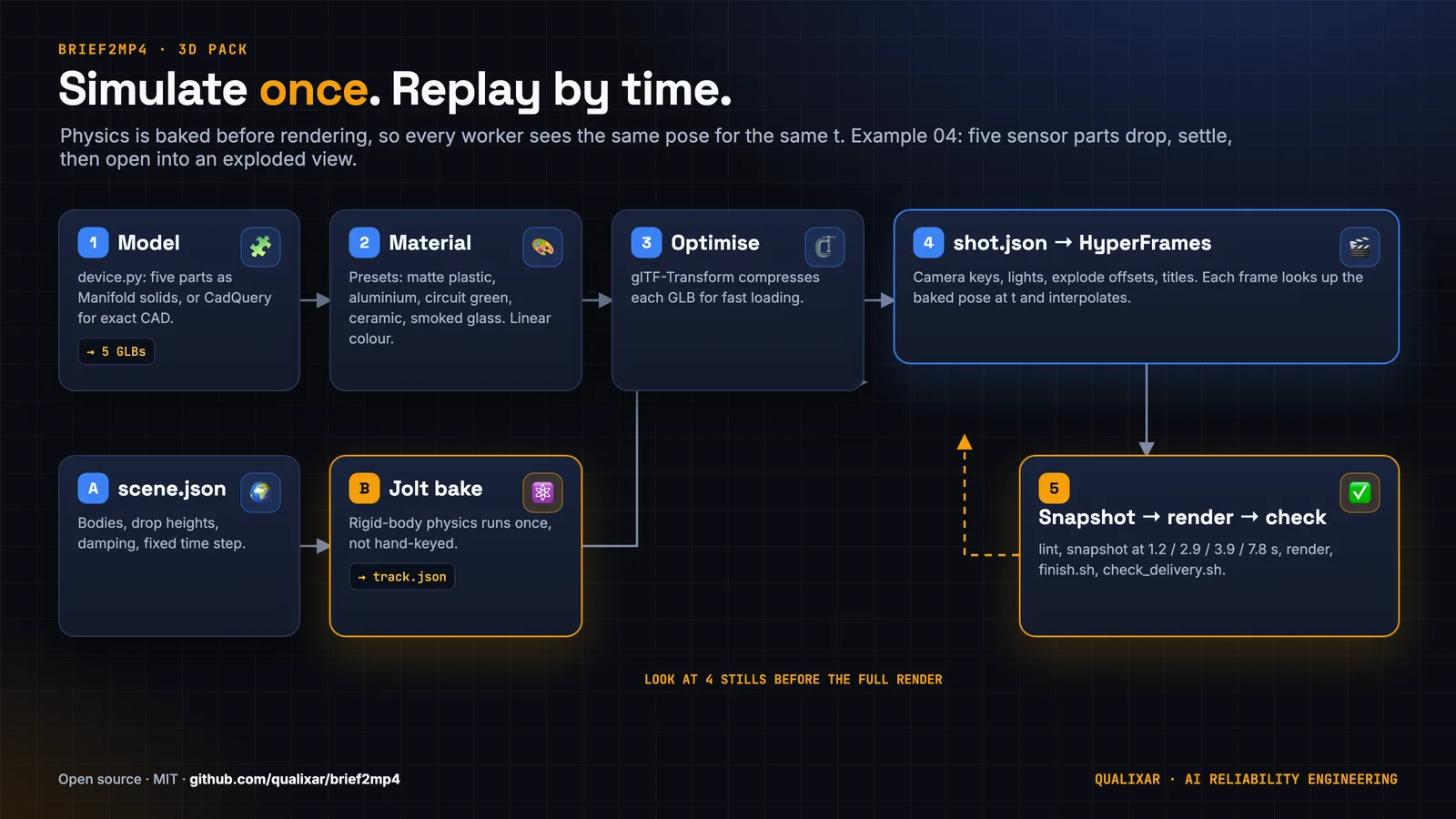
The 3D pack separates geometry, materials, motion and presentation. A Python model spec can return Manifold geometry, a trimesh, or named parts. CadQuery is optional for parametric CAD. The model step exports GLB; material assignment applies presets; glTF-Transform and meshoptimizer support optimisation and compression.
Part names matter because an exploded view addresses them by node name. The pack documentation warns that merging meshes with --join breaks that relationship. It also handles a reader boundary: Python geometry readers cannot decode meshopt compression directly, so the physics route decodes a temporary copy when it needs geometry.
Jolt runs once in WASM at a fixed simulation step. It writes a pose per frame to a track. The render page looks up the track by time and interpolates between frames. A worker requesting a later pose does not have to reproduce every preceding collision. That keeps the simulation history out of the frame capture path.
The command forms are intentionally small and return JSON results. These are copied from the pack reference, where b2m3d denotes the installed command or module invocation:
b2m3d physics scene.json track.json
b2m3d hf shot.json project/
b2m3d optimize in.glb out.glb [--simplify 0.5] [--join] [--no-compress]
The bracketed options in the final line describe syntax; remove the brackets and choose the options when running it. A shot JSON supplies models, camera, lights and titles. The generated project includes local libraries, fonts and GLBs, and waits for model loading and shader compilation before it becomes ready for capture.
A repeatable shot still needs a camera
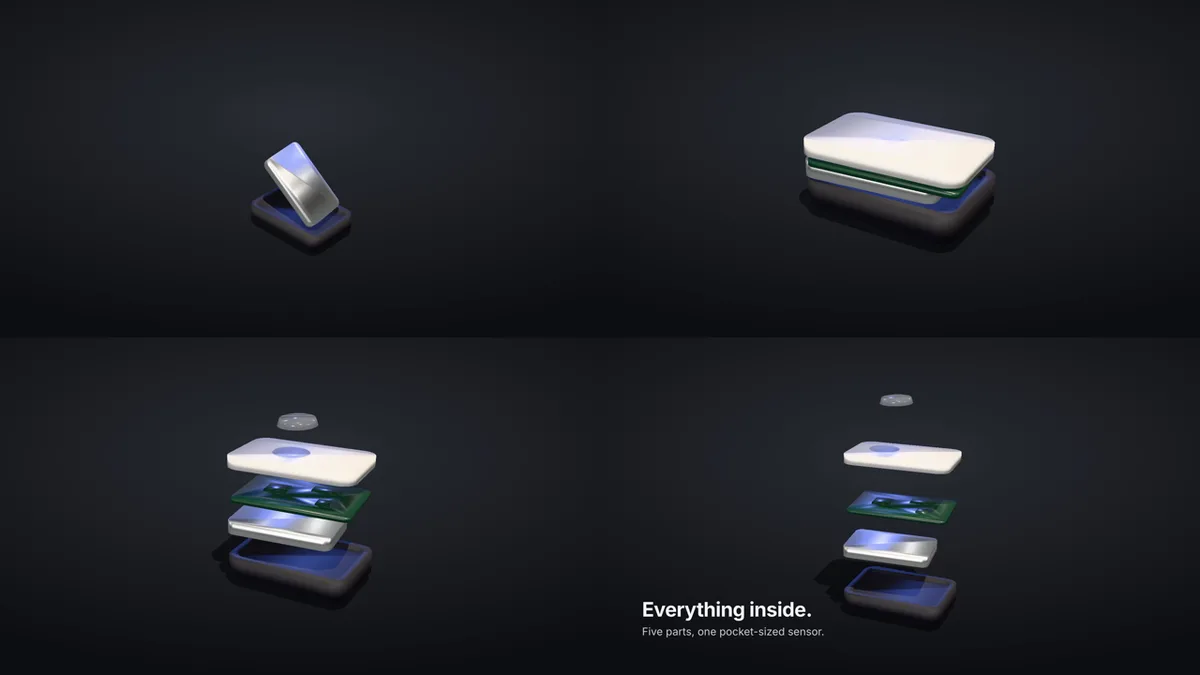
Example 04 asks for sensor parts to fall, settle and open into an exploded view. Its walkthrough names a practical error: frame the landing zone instead of chasing the fall. It also says the automatic camera does not understand the exploded finish, so the worked example uses camera keys to pull back around the column.
The pack's look rules are equally explicit. Use neutral tone mapping by default, a dim environment with a stronger key light, and a shadow catcher over the background. Convert selected sRGB colours to linear values for glTF. Keep bloom for emissive materials. These are repository defaults to inspect in frames, rather than universal claims about every art direction.
There are geometry limits too. Physics hulls are convex, so a hollow part cannot contain another part through the hull representation. Blender remains a separate installed program for realistic hero renders. Without the pack, the general skill can use its Three.js template and disclose hand-animated physics or exploded views in the report. A brief that requires a real simulation still needs that requirement resolved honestly.
Finish the actual deliverable
finish.sh accepts a video or numbered PNG frames. It fits the picture inside the requested dimensions, pads the remainder, converts frame rate and pixel format, and can hold the last frame if the rough render ends early. It trims to the requested duration and encodes H.264 with AAC audio. Audio can come from a replacement soundtrack or the rough render; with neither selected, the script writes a silent stereo track.
That last-frame extension is useful, but it cannot prove that the intended ending exists. A file padded to the correct duration could hold an unfinished scene. Duration measurement therefore stays separate from the visual done-when requirement.
The default final encoding uses x264 CRF 18, the slow preset, yuv420p and AAC at 48 kHz. For a supplied soundtrack the AAC bitrate is 192k. The output is configured for fast start. These are explicit delivery choices in the script, and the delivery checker examines the encoded result.
The finishing reference gives these command forms for a supplied soundtrack and the checks that follow. They assume a project already contains render.mp4 and bed.wav, and that the scripts are being invoked from the skill folder or through their resolved paths:
scripts/finish.sh --in render.mp4 --out final.mp4 --seconds 12 --audio bed.wav
scripts/check_delivery.sh final.mp4 --seconds 12
scripts/contact_sheet.sh final.mp4 --at 0.5,3,6,9.5,11.5
The sample times illustrate the interface. For the actual check, select beat starts, the hero moment and the last second from the brief. A generic sampling interval can miss the instant an arriving title crosses another object. Keep the delivery log and the viewed still names beside the requirement they support, so someone can inspect the conclusion without reconstructing the agent's tool history.
The audio path deserves a closer look because sparse hits exposed a failure that a plausible filter command could hide.
Loudness needs a measured correction loop
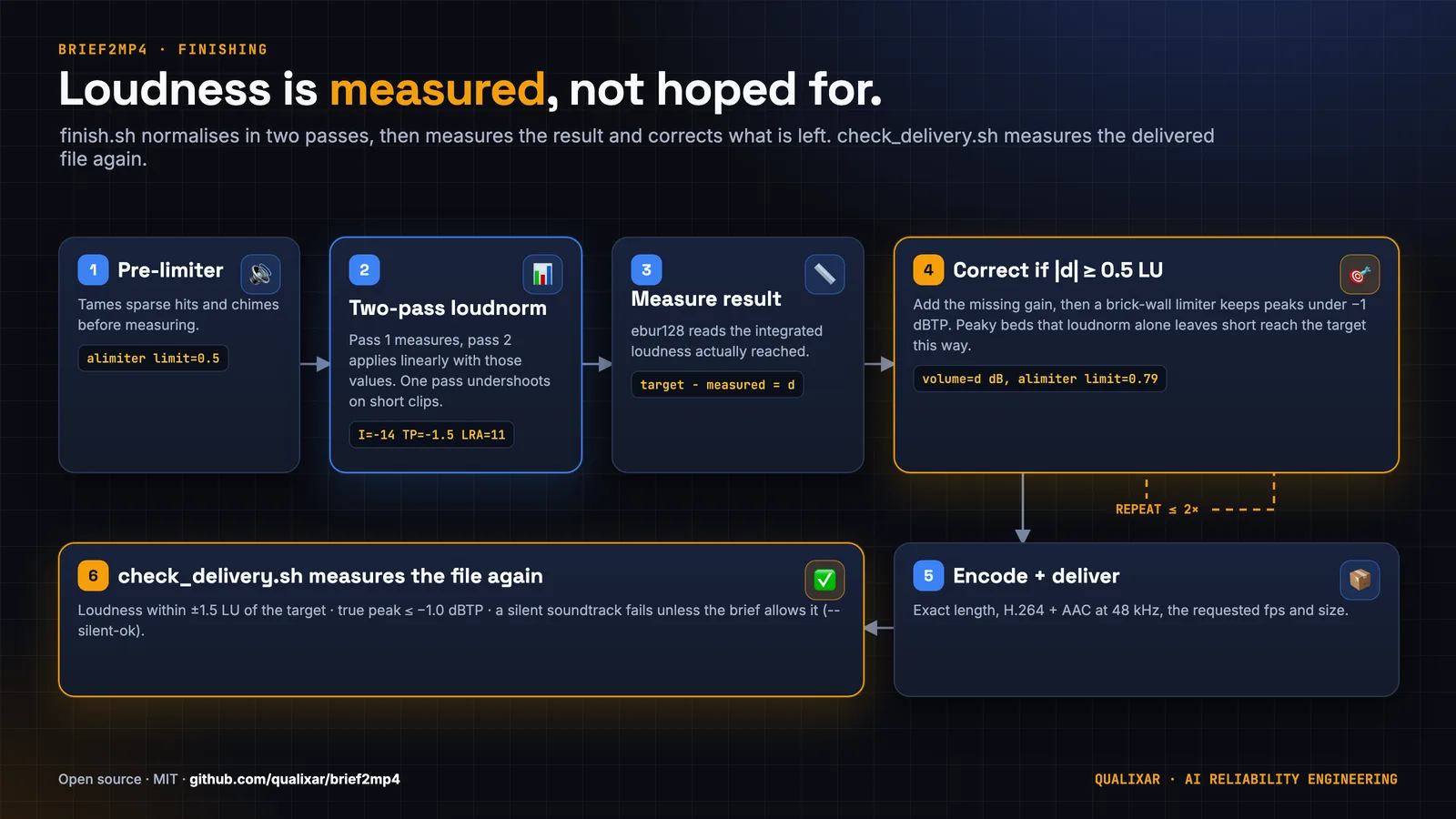
The finishing script starts with a limiter before two-pass loudnorm. Pass one measures integrated loudness, true peak, loudness range, threshold and target offset. Pass two feeds those measurements back to loudnorm, requesting linear normalisation where feasible. The default integrated target is −14 LUFS; loudnorm targets −1.5 dBTP to leave room beneath the delivery check's −1 dBTP ceiling.
Short material with sharp chimes can still undershoot. The script comments explain that peak constraints can make loudnorm fall back to dynamic behaviour. The implementation measures the filter output with ebur128, calculates the remaining loudness difference and adds gain through a limiter when needed. It makes at most two correction additions and stops early when the difference is within half a loudness unit.
The arithmetic is visible in the implementation: the correction is target minus measured integrated loudness. The loop uses a limiter amplitude of 0.79 for these additions. The tail resamples, pads, trims and applies a final fade. The delivery checker then measures the encoded audio, which is the artifact the viewer receives.
Example 07's report records why the extra measurement exists. Its first finish landed at −15.2 LUFS against a −14 target. That was inside the checker's tolerance, but below the intended target. After the finishing fix, the same cut and mix measured −14.4 LUFS with a −2.0 dBTP true peak. These are recorded example results, not measurements repeated for this launch post.
Check the file, then inspect its frames
check_delivery.sh probes the encoded file for codec, pixel format, dimensions, average frame rate, duration and audio. Duration has a one-frame tolerance. Integrated loudness has a tolerance of ±1.5 LU around the requested target, while measured true peak must be at or below −1 dBTP. Silence fails unless the brief permits it and the caller supplies --silent-ok.
Picture-health checks use blackdetect and freezedetect. Black stretches over 0.5 seconds and freezes over 1.5 seconds produce warnings. A warning can coexist with RESULT: PASS, so the report has to explain it. A closing card held still may satisfy the brief. A small moving dot may also fall below whole-frame freeze sensitivity. Neither case can be judged from the word "freeze" alone.
contact_sheet.sh extracts PNGs at named moments and makes a grid. By default it removes earlier generated stills in the checks folder, preventing an old image from surviving a new render. The agent must open the images, read exact words, inspect overlap and compare each beat with the spec. If its environment cannot display images, the skill requires that limitation to appear in the report.
For missed requirements, the skill calls for the worst miss first, another render and another full check. It caps repair rounds at three and requires unresolved issues to be listed honestly. That bounded loop limits work; it does not turn an unresolved requirement into a pass.
Measure the phone layout
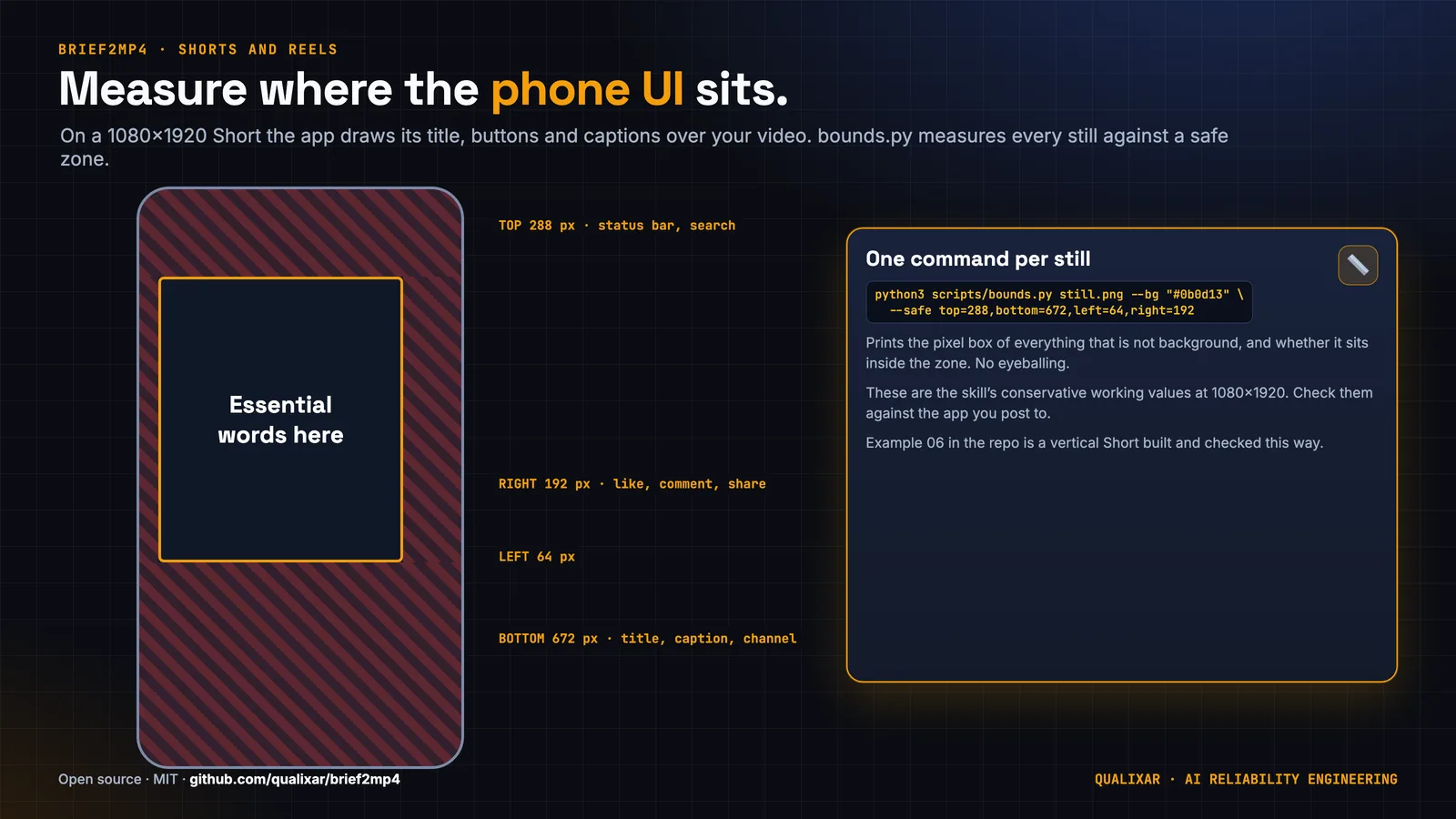
A vertical frame can contain all the text while placing it under app controls. The formats reference uses conservative working exclusions for essential content at 1080×1920: top 288 px, bottom 672 px, left 64 px and right 192 px. These are repository layout values. Platform interfaces move, so the reference also recommends checking a current screenshot near an edge.
bounds.py measures pixels that differ from a specified background, optionally within a region, and checks their box against margins or safe zones. It uses the Python standard library and reports JSON. The script measures painted content rather than understanding text or reading a CSS font size. On a crowded or textured frame, choose an isolated region and inspect what contributed to the box.
Example 06 uses the following safe-zone arguments. This command form is copied from the script documentation:
python3 bounds.py still.png --bg "#101114" --safe top=288,bottom=672,left=64,right=192
The example brief goes beyond static placement: sampled dot positions must demonstrate eased arrival, eased departure and equal angular steps during a constant-speed orbit. Measurements connect the requested motion to visible positions at named times.
Editing brings another dependency boundary
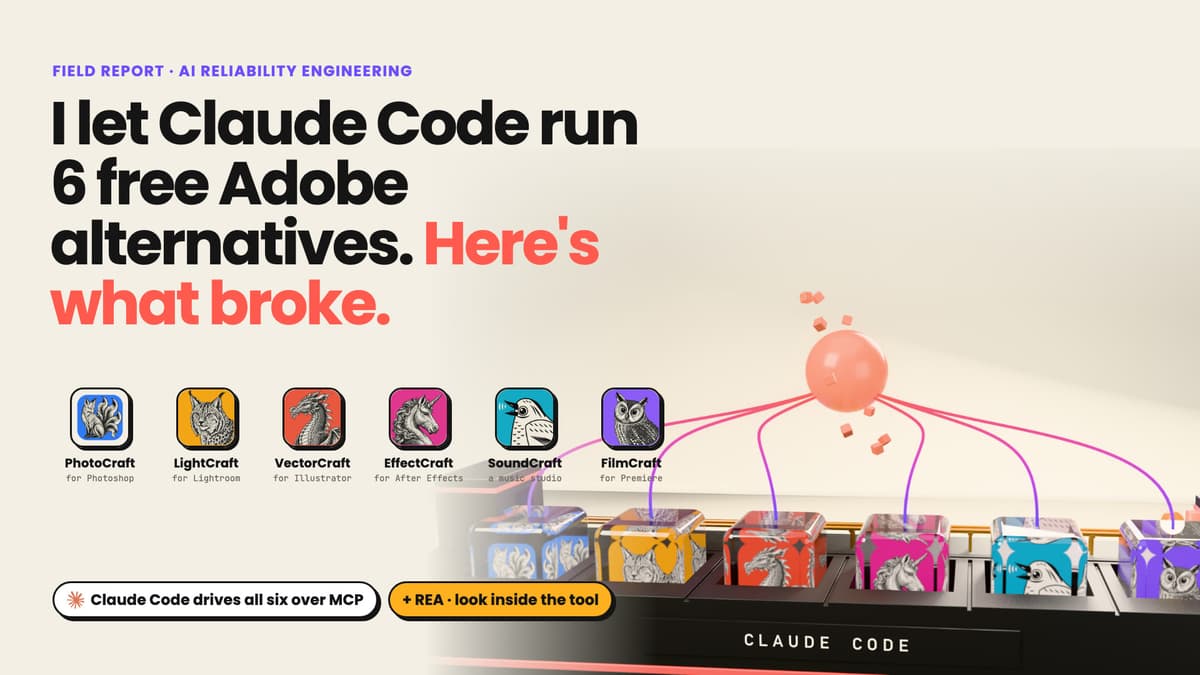
The optional edit pack installs the ArtCraft CLIs: FilmCraft for timeline cuts, SoundCraft for multitrack mixing, EffectCraft for layered compositing, PhotoCraft for raster work and VectorCraft for SVG. The apps are alpha software. The pack pins versions and supplies a tested recipe for each application; commands beyond those recipes must be discovered from the pinned CLI.
Download verification happens before unpacking. Each archive's SHA-256 must match both the release checksum file and the hash pinned in versions.json. When GPG is available, the installer also verifies the checksum-file signature against the pinned signing-key fingerprint. Without GPG it reports signature: SKIPPED; the two hash comparisons remain mandatory. Describing every install as signature-verified would erase that condition.
The edit output enters the existing pipeline as a layer or soundtrack. A SoundCraft bounce goes to finish.sh --audio. To verify ducking, measure the bed stem separately: a chime inside the same time window can make the complete mix louder even while the music drops. Example 07 reports that separate-stem measurement alongside the final mix result.
Cross-platform work appears in the tests
Windows uses PowerShell installers and Git Bash for the bash scripts. .gitattributes keeps shell scripts on LF line endings and PowerShell files on CRLF. The script-hygiene test checks encoding and line endings, and reads executable mode from git ls-files -s when available. Windows filesystems do not expose that bit the same way as Unix filesystems, so the test checks the repository's recorded mode.
The tests also keep the relevant PowerShell files ASCII because Windows PowerShell 5.1 interprets BOM-less text as ANSI. The CI workflow defines macOS, Ubuntu and Windows jobs and a separate Windows PowerShell 5.1 step. It installs FilmCraft and SoundCraft, runs their recipes, then finishes and checks the output. The edit documentation limits EffectCraft, PhotoCraft and VectorCraft recipe testing to macOS and identifies desktop and live agent MCP workflows as untested.
The release changelog records 97 tests: 76 fast and 21 involving renders or downloads. That is the documented release count, not a fresh execution result from this article. The test runner skips optional dependencies with reasons and has a separate slow mode. Those boundaries matter when interpreting a green subset.
The format changes what you check
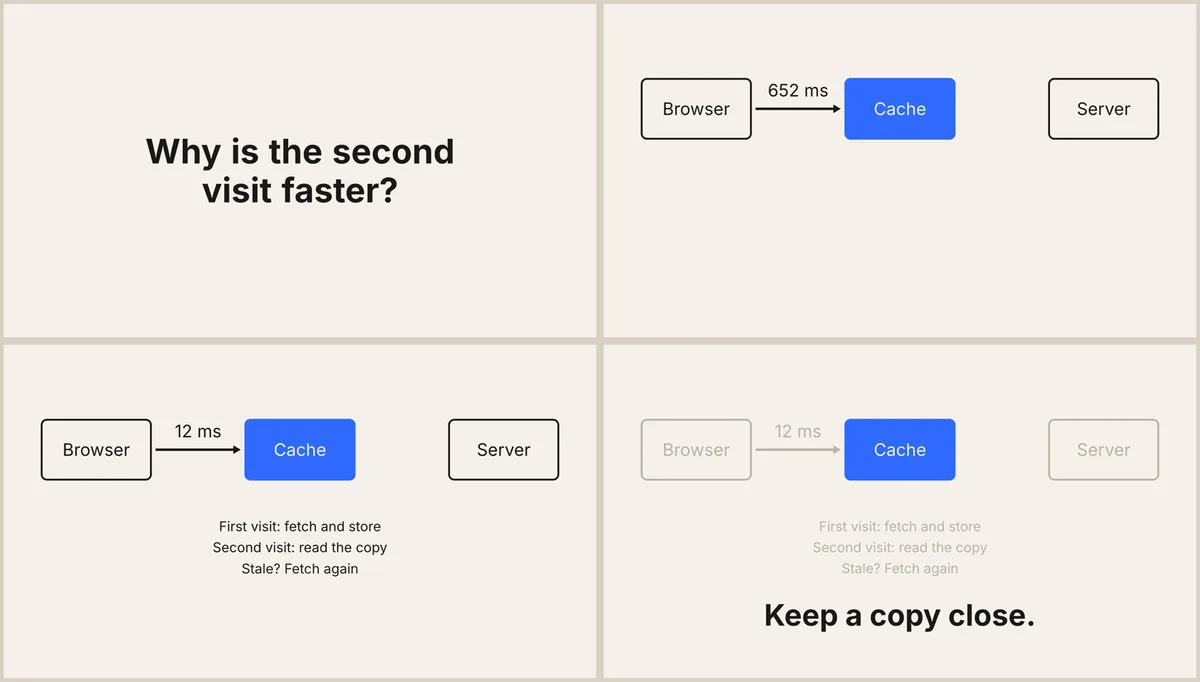
For a 2D explainer, the formats reference asks for exact labels and completed diagrams without overlap. Example 05's cache animation uses a changing clock label; its displayed milliseconds are authored teaching content, not a cache benchmark.
Maths and algorithm pieces can use MathJax SVG or KaTeX HTML, with Manim inserts for heavier transformations. Check every symbol and keep the insert's frame rate and dimensions aligned with the master. Tutorials need callouts on the correct UI element without hiding the action. Stories and skits need caption timing and shot changes that serve the scene; full lip sync and character animation remain outside the skill.
Shorts need a usable first frame, safe placement and the requested ending. Product 3D needs framing, contacts, materials and the correct motion. Kinetic type needs exact words and readable holds. These checks derive from what the viewer is meant to understand, so they cannot all collapse into one encoding test.
Try it in two minutes
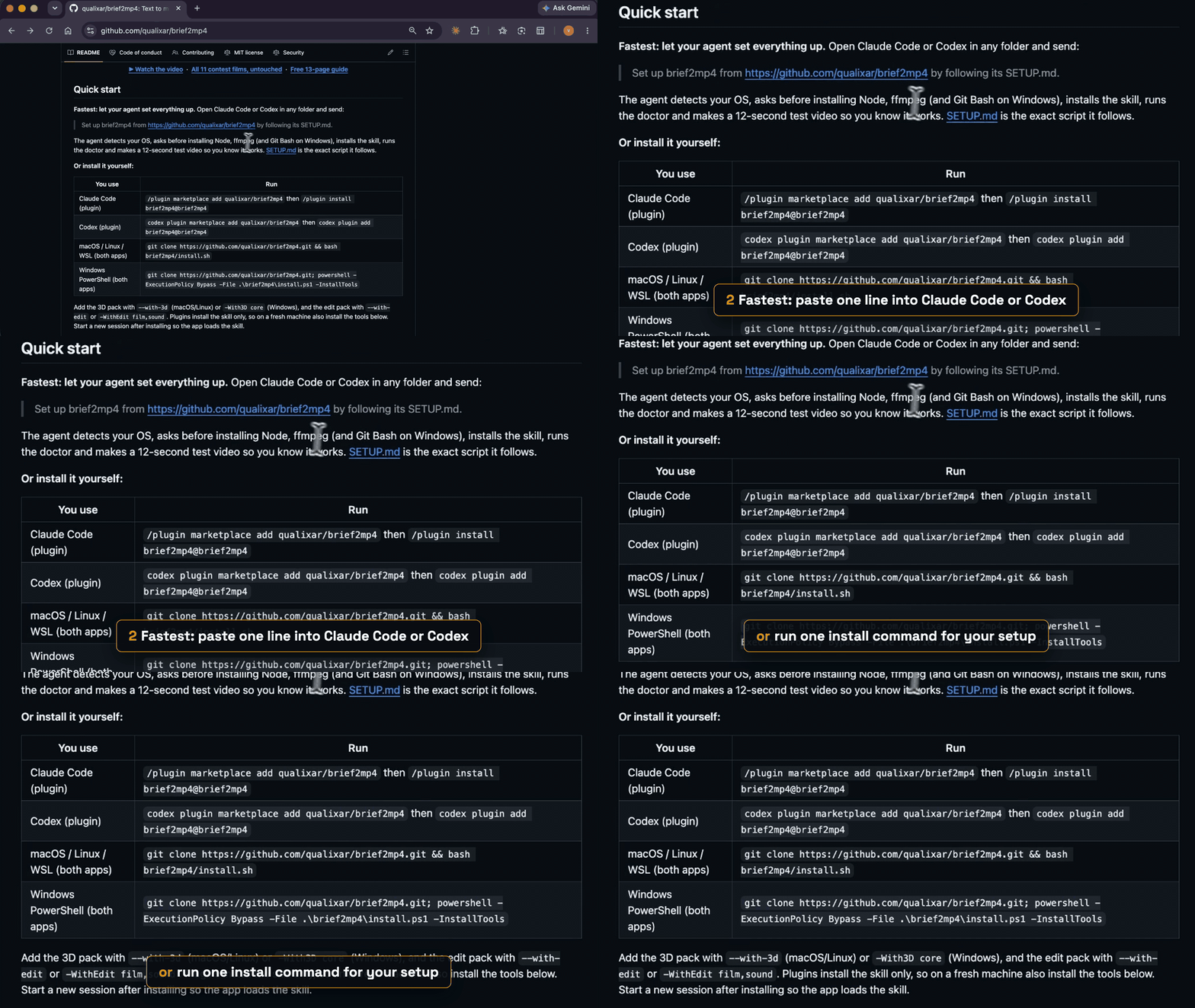
The getting-started guide describes a two-minute route when Node and ffmpeg are already installed. A fresh machine needs tool installation too, so treat that timing as setup guidance. The required runtime is Node.js 22 or newer; ffmpeg and git must also be available. The shortest documented prompt is:
Set up brief2mp4 from https://github.com/qualixar/brief2mp4 by following its SETUP.md.
For manual installation, these commands are copied from SETUP.md:
git clone https://github.com/qualixar/brief2mp4.git
cd brief2mp4
bash install.sh
bash plugin/skills/brief2mp4/scripts/doctor.sh
Start a new agent session in a video folder, ask it to use brief2mp4 and paste example 01's brief. After delivery, send "Check it against the brief." Read the report beside the film. Check whether each requirement names a measurement or a viewed frame, and whether any warning needs your judgment.
FAQ
Do I need both optional packs?
Install components for the work the brief needs. Type and 2D motion work without either pack. The 3D pack adds geometry, materials and baked motion; the edit pack adds editing applications. Plugin installation supplies the skill, while system tools still need setup.
Does everything run offline?
Rendering uses local assets after dependency installation and vendoring. Setup downloads packages. Claude Code or Codex has its own model access. The offline render rule applies to the composition's inputs during capture.
Does a passing delivery check approve the creative result?
The checker measures file properties and picture-health signals. The agent must also view stills and walk the brief line by line. Warnings and unresolved issues remain visible in REPORT.md; a file-level pass covers the checks it actually ran.
Where should I start?
The repository includes setup instructions, briefs and sample reports. The free guide walks through the workflow. Start with a brief whose ending you can name, then ask for the frame and measurement that prove it arrived.
Watch it, then try it
The showdown that started this, with every round and my picks, is on YouTube: watch Fable 5.2 vs Opus 5.5 vs GPT-6.1. The skill is free and MIT-licensed at github.com/qualixar/brief2mp4, and the free guide has every brief, prompt and setting. If you make something with it, send it to me on X at @varunPbhardwaj.
Varun Pratap Bhardwaj builds AI Reliability Engineering tools at Qualixar. ORCID 0009-0002-8726-4289