The $6 AI Company: How to Self-Host an $8,800/Year SaaS Stack on a Single VPS
Over 30+ battle-tested open-source tools that replace Clerk, Vercel, Supabase, Mailchimp, Zapier, and Retool. Real memory benchmarks, Docker Compose configurations, and SRE production hardening.
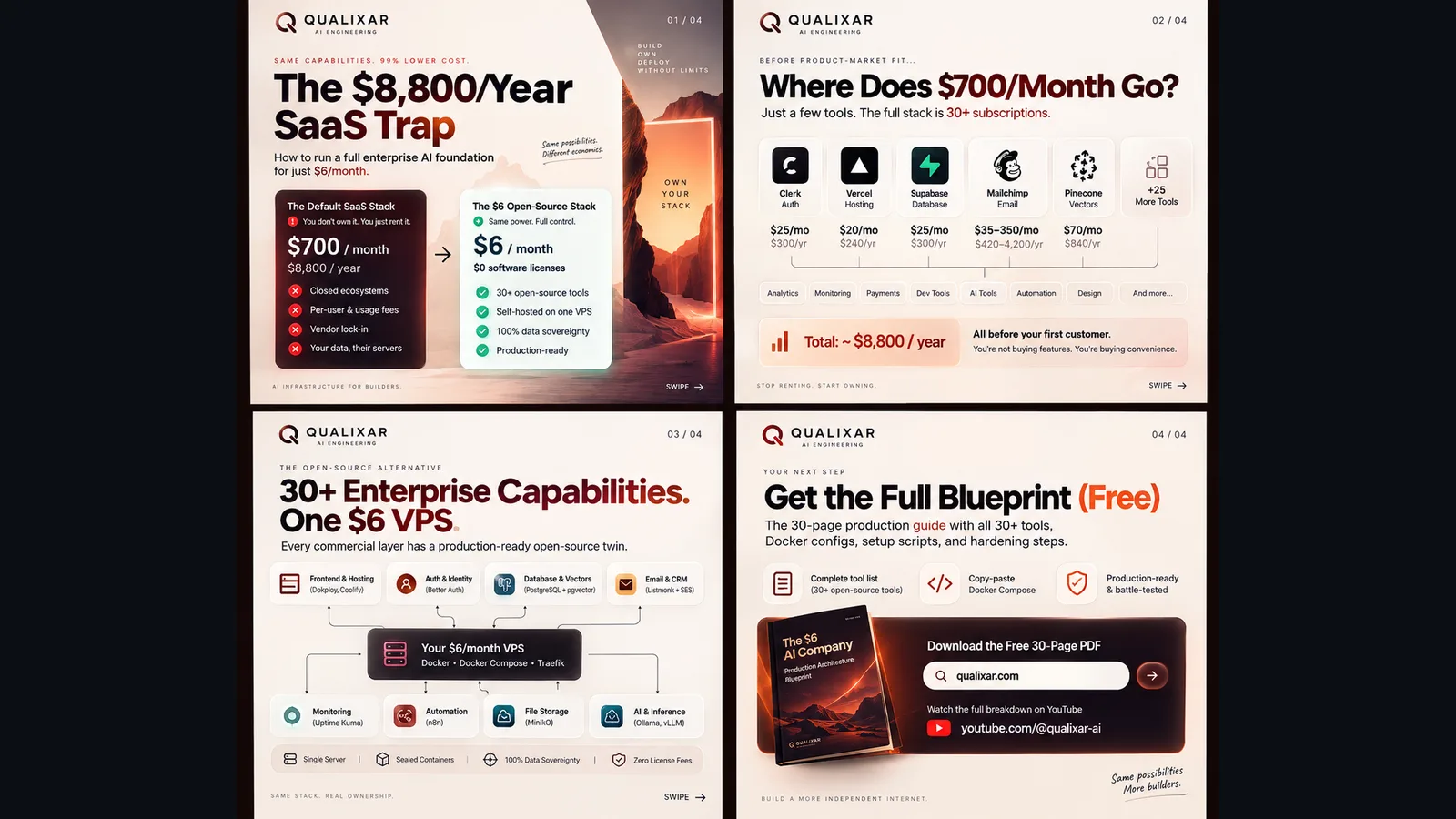
The standard playbook for building a software or AI company in 2026 begins with a hidden tax. Before you acquire a single paying customer or validate product-market fit, the default founder stack quietly commits you to roughly $700 every single month in recurring software subscriptions.
Over a year, that is $8,800 in capital drained purely for developer conveniences:
- Authentication: Clerk at $25/month plus per-user fees once traction starts.
- Hosting & Serverless: Vercel Pro at $20/month per seat, scaling rapidly with bandwidth and compute duration.
- Database & Storage: Supabase Cloud at $25/month for managed compute, connection pooling, and storage quotas.
- Email & Newsletters: Mailchimp starting at $35/month and scaling to $350+/month as subscriber lists grow.
- Workflow Automation: Zapier or Make running $30 to $100/month for task runs.
- Vector Search: Pinecone or cloud vector databases at $70+/month for dedicated indexes.
The common defense for this spending is velocity: founders believe building on managed platforms is the only way to ship quickly without DevOps overhead.
That assumption was true in 2020. In 2026, it is obsolete.
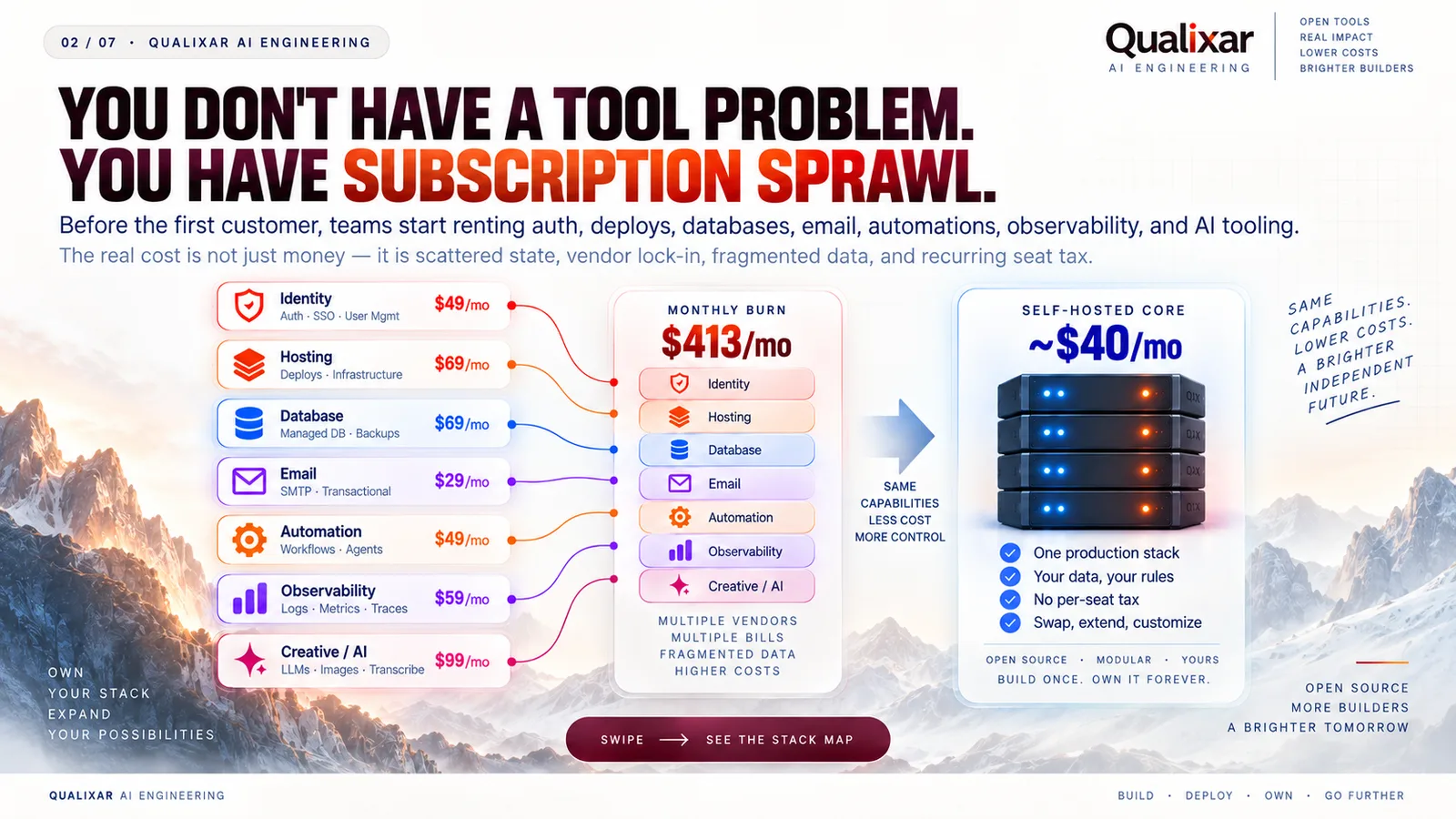
Over the past year at Qualixar, we stress-tested every layer of the modern application stack against open-source alternatives running in containerized environments. The finding is unambiguous: you can run a hardened, production-grade SaaS foundation on a single $6/month VPS (or an idle machine on your desk) with zero software licensing costs, automated SSL, isolated networking, and complete data sovereignty.
Here is the exact architecture, the tool selection rationale, and the production Docker configurations to run it yourself.
The $8,800 vs. $6 Architectural Reality
To understand why managed SaaS platforms charge what they charge, you have to look at what they actually provide. They are not selling proprietary database engines or quantum computing algorithms. They are selling convenience wrappers around open-source software and cloud infrastructure primitives.
When you pay Supabase $25 a month, you are paying for managed PostgreSQL with a PostgREST API and connection pooling. When you pay Vercel $20 a month per seat, you are paying for a continuous deployment pipeline and reverse proxy built on top of AWS Lambda and Cloudflare.
Every single layer has a hardened, battle-tested open-source twin:
| Capability Layer | Commercial SaaS Default | Open-Source Foundation | License | Self-Hosted Cost |
|---|---|---|---|---|
| Authentication & Sessions | Clerk ($25–$100/mo) | Better Auth | MIT | $0 |
| PaaS Hosting & CI/CD | Vercel Pro ($20/seat/mo) | Dokploy + Docker Engine | Apache-2.0 | $0 |
| Relational Database | Supabase Cloud ($25/mo) | PostgreSQL 16 + Turso libSQL | PostgreSQL / MIT | $0 |
| Transactional & Bulk Email | Mailchimp ($35–$350/mo) | Listmonk + Amazon SES | AGPL-3.0 | < $1/mo |
| Workflow Automation | Zapier / Make ($30–$100/mo) | Activepieces / n8n CE | MIT / Fair-Code | $0 |
| Vector Similarity Index | Pinecone ($70/mo) | pgvector / Qdrant OSS | PostgreSQL / Apache-2.0 | $0 |
| Total Annual Software License | ~$8,800 / year | Sealed Local Stack | All Open Source | $0 / year |
The difference is not merely financial. When you run open-source containers on your own compute, your customer data never leaves your infrastructure boundary, your operational latency is determined by internal network sockets rather than third-party API hops, and your business cannot be suspended by an automated billing trigger.
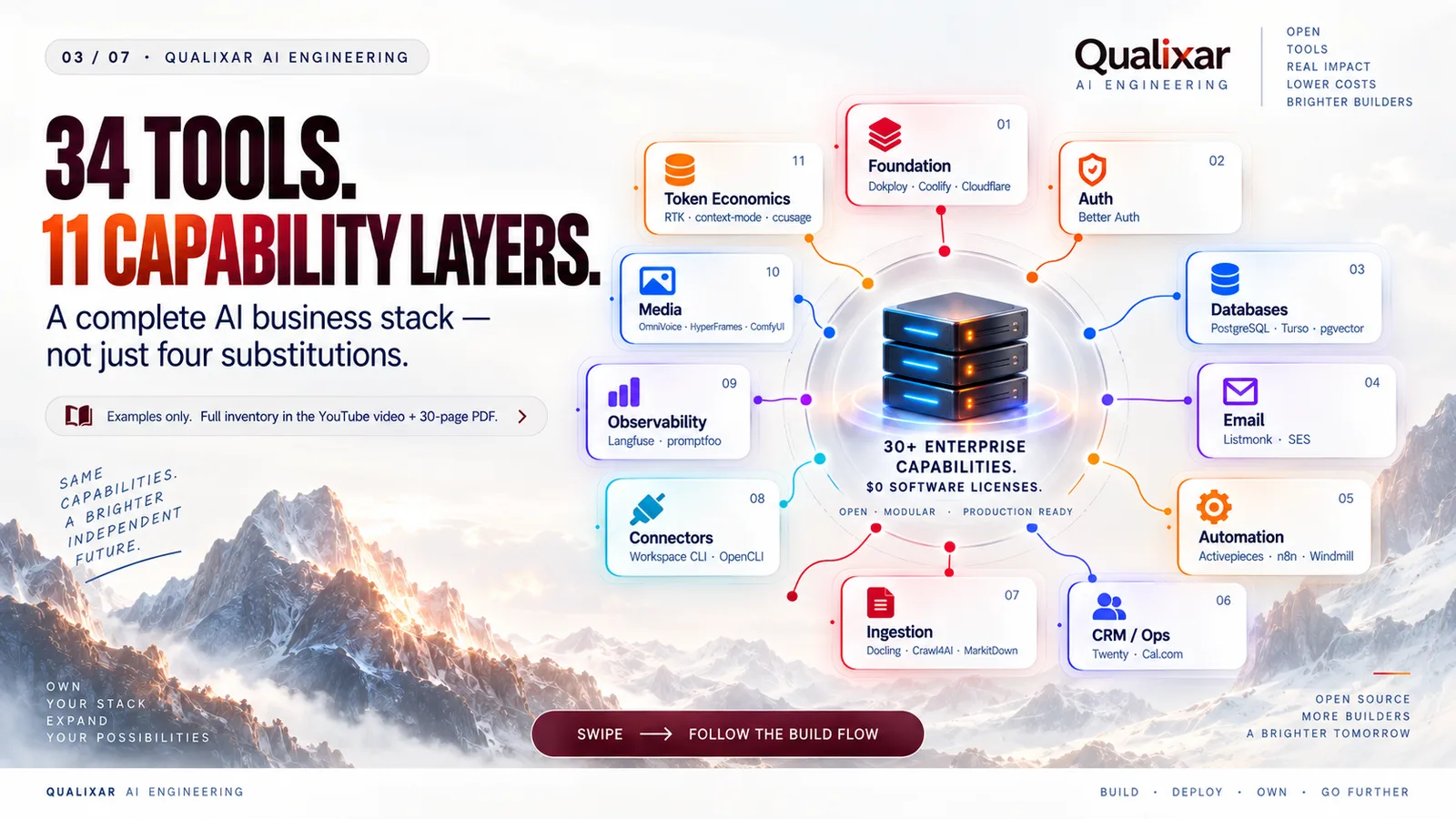
Layer 1: Authentication Without User Penalties (Better Auth)
Authentication is usually the first service outsourced to proprietary cloud providers. Providers like Clerk or Auth0 offer rapid setup, but their pricing models penalize your success by charging per monthly active user (MAU) once you cross modest free thresholds.
For the $6 stack, we deployed Better Auth.
Better Auth is a TypeScript-first authentication framework that runs directly inside your application process rather than requiring an external managed service. It supports:
- Email and password with Argon2/bcrypt hashing.
- OAuth 2.0 social providers (GitHub, Google, Apple, Discord).
- Passkeys and WebAuthn for biometric authentication.
- Two-factor authentication (TOTP) with zero third-party dependencies.
- Native session management stored directly in your local PostgreSQL instance.
Because Better Auth interacts directly with your database via clean SQL or ORMs (Drizzle, Prisma, Kysely), user lookups require a single local database query taking under 2 milliseconds, compared to 80–150 milliseconds for an external OAuth token verification roundtrip to a third-party server.
Layer 2: Self-Hosted PaaS and Deployment (Dokploy)
The standard reason developers use Vercel is the git push deployment experience: preview deployments, automated SSL certificate issuance, and zero-configuration reverse proxies.
Dokploy provides this exact developer experience on any bare-metal server or VPS.
Written in Node.js and Go, Dokploy installs as a lightweight control plane on top of Docker Engine. Once installed, it connects to your GitHub or GitLab repositories and provides:
- Automated Git Deployments: Push to
main, and Dokploy pulls the code, builds the container image using Nixpacks or Dockerfile, and performs a zero-downtime rolling restart. - Built-in Reverse Proxy (Traefik): Traefik automatically routes incoming HTTP/HTTPS traffic to the correct container based on domain labels.
- Automated Let's Encrypt SSL: Automatic ACME challenge resolution and certificate renewals with zero manual cron configuration.
- Isolated Application Environments: Each project runs inside its own Docker network, isolated from other services on the host.
You interact with Dokploy through a clean web dashboard or directly through its CLI. You get the operational ergonomics of a modern PaaS while retaining root SSH access to the underlying hardware.
Layer 3: Database and Storage (PostgreSQL 16 & pgvector)
Managed databases often represent the quickest path to uncontrollable cloud bills. Bandwidth egress, connection limits, and storage autoscaling turn minor traffic spikes into billing surprises.
Our database layer runs standard PostgreSQL 16 with the pgvector extension enabled inside a dedicated Docker container with persistent volume mounts.
For relational workloads, Postgres 16 delivers exceptional throughput:
- Native JSONB indexing for document storage flexibility.
- High-concurrency query execution with tuned memory parameters (
shared_buffers = 1GB,work_mem = 32MBon a 4GB RAM VPS). - Local UNIX domain socket connections eliminating TCP overhead for local services.
For AI workloads requiring semantic search, RAG (Retrieval-Augmented Generation), and embedding indexing, pgvector enables exact and approximate nearest-neighbor search directly alongside your relational tables:
-- Enable the vector extension
CREATE EXTENSION IF NOT EXISTS vector;

-- Create an embeddings table alongside core entities
CREATE TABLE document_chunks (
    id UUID PRIMARY KEY DEFAULT gen_random_uuid(),
    document_id UUID REFERENCES documents(id) ON DELETE CASCADE,
    content TEXT NOT NULL,
    embedding vector(1536),
    created_at TIMESTAMPTZ DEFAULT NOW()
);

-- HNSW index for sub-millisecond approximate nearest neighbor search
CREATE INDEX ON document_chunks USING hnsw (embedding vector_cosine_ops);
By keeping embeddings in the same database as your core application records, you eliminate the operational complexity and distributed transaction risks of synchronizing state between an external vector database (like Pinecone) and your operational database.
Layer 4: High-Volume Email Infrastructure (Listmonk + SES)
Email SaaS pricing is notoriously predatory: platforms charge escalating tiers based on the total number of contacts in your database, regardless of whether you send them an email that month.
To decouple list size from monthly cost, we pair Listmonk with Amazon SES.
Listmonk is a self-hosted newsletter and mailing list manager written in Go. It handles millions of subscribers with minimal CPU overhead, backed by PostgreSQL. It provides:
- Rich campaign authoring with Markdown and HTML templates.
- Native analytics: open tracking, link click tracking, bounce processing, and unsubscribe management.
- Transactional email endpoints accessible via HTTP API.
Instead of paying a SaaS provider $150/month to store 25,000 email addresses, Listmonk stores them in your local Postgres database for $0. When you send a campaign, Listmonk routes outbound SMTP requests through Amazon SES, which charges exactly $0.10 per 1,000 emails sent. Sending 10,000 newsletters costs exactly $1.00.
Beyond the Foundation: The 30+ Tool Enterprise Ecosystem
The four foundation tools (Better Auth, Dokploy, PostgreSQL 16 + pgvector, Listmonk) provide the core substrate to host your applications, manage users, and store data for $6/month.
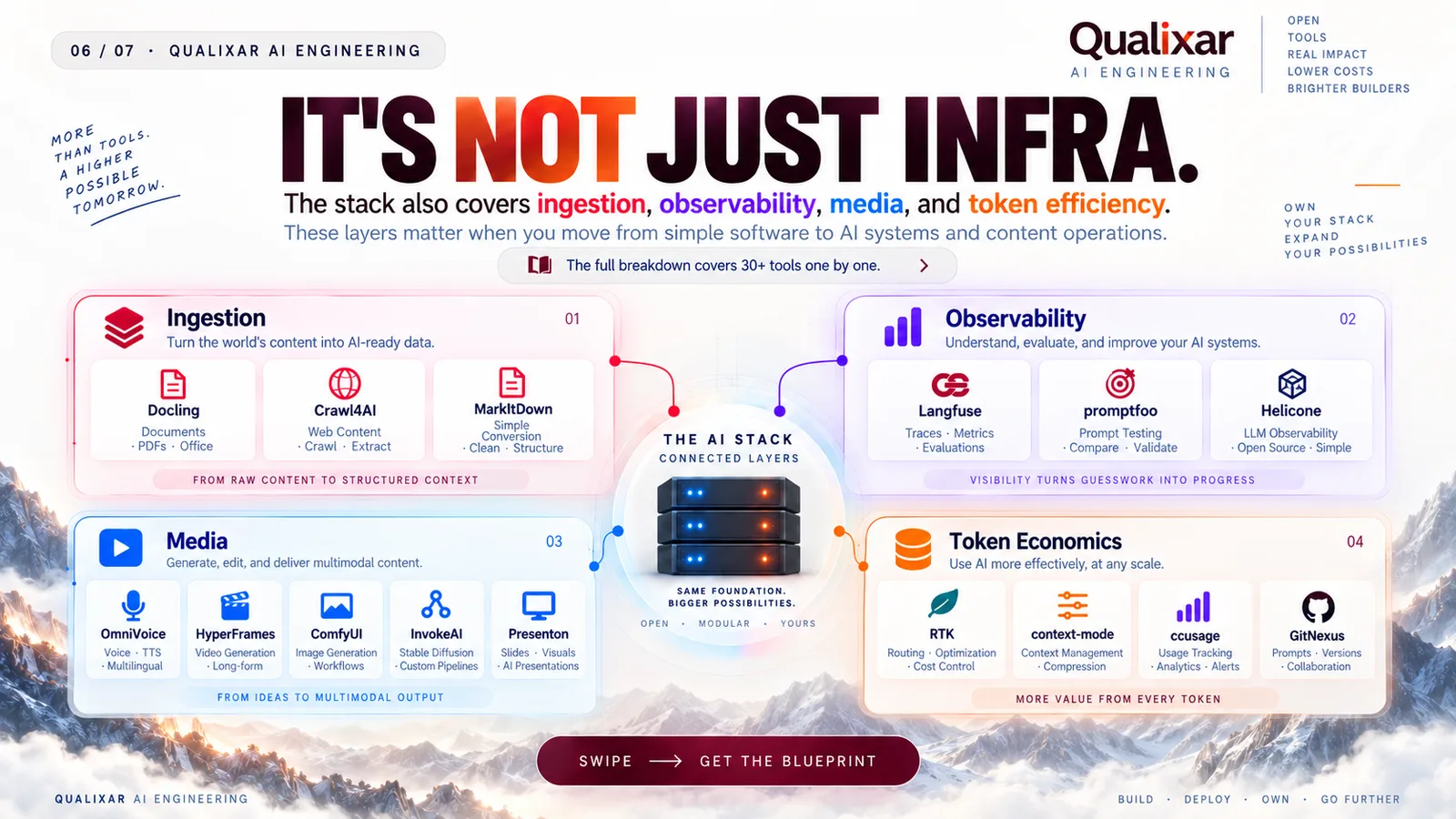
However, running a full-scale AI company involves far more than login and database tables. Over the past year at Qualixar, we mapped and stress-tested over 30+ battle-tested open-source tools across every operational layer of an AI business:
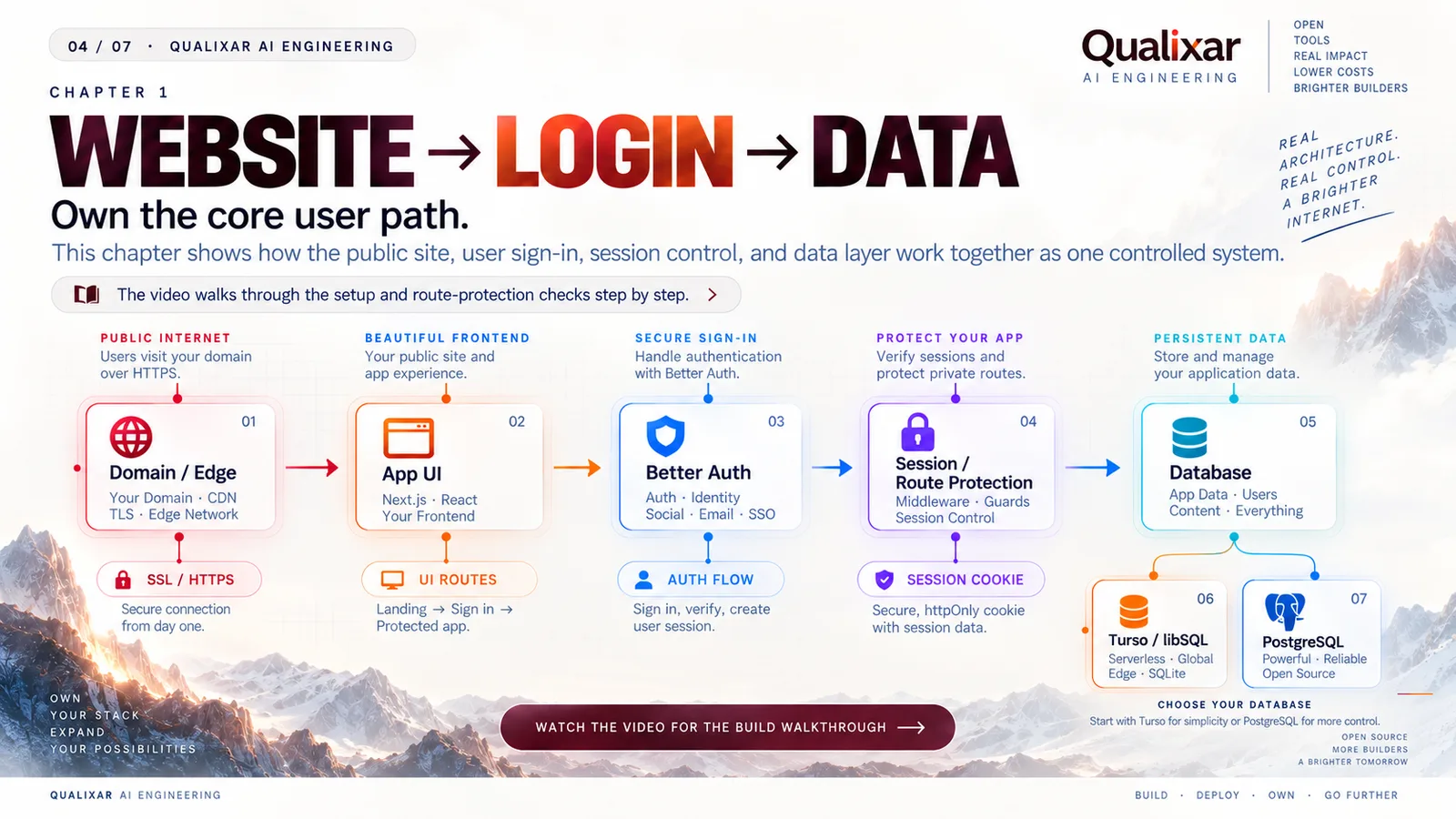
1. Workflow Automation & Internal Tools
- Activepieces & n8n CE: Open-source visual workflow orchestration replacing Zapier and Make.
- Windmill: Turns Python, TypeScript, Go, and SQL scripts into secure internal apps and background jobs, replacing Retool.
2. CRM & Customer Operations
- Twenty CRM: Modern open-source CRM replacing Salesforce and HubSpot tiers.
- Cal.com (Cal.diy): Self-hosted scheduling platform with calendar synchronization, replacing Calendly.
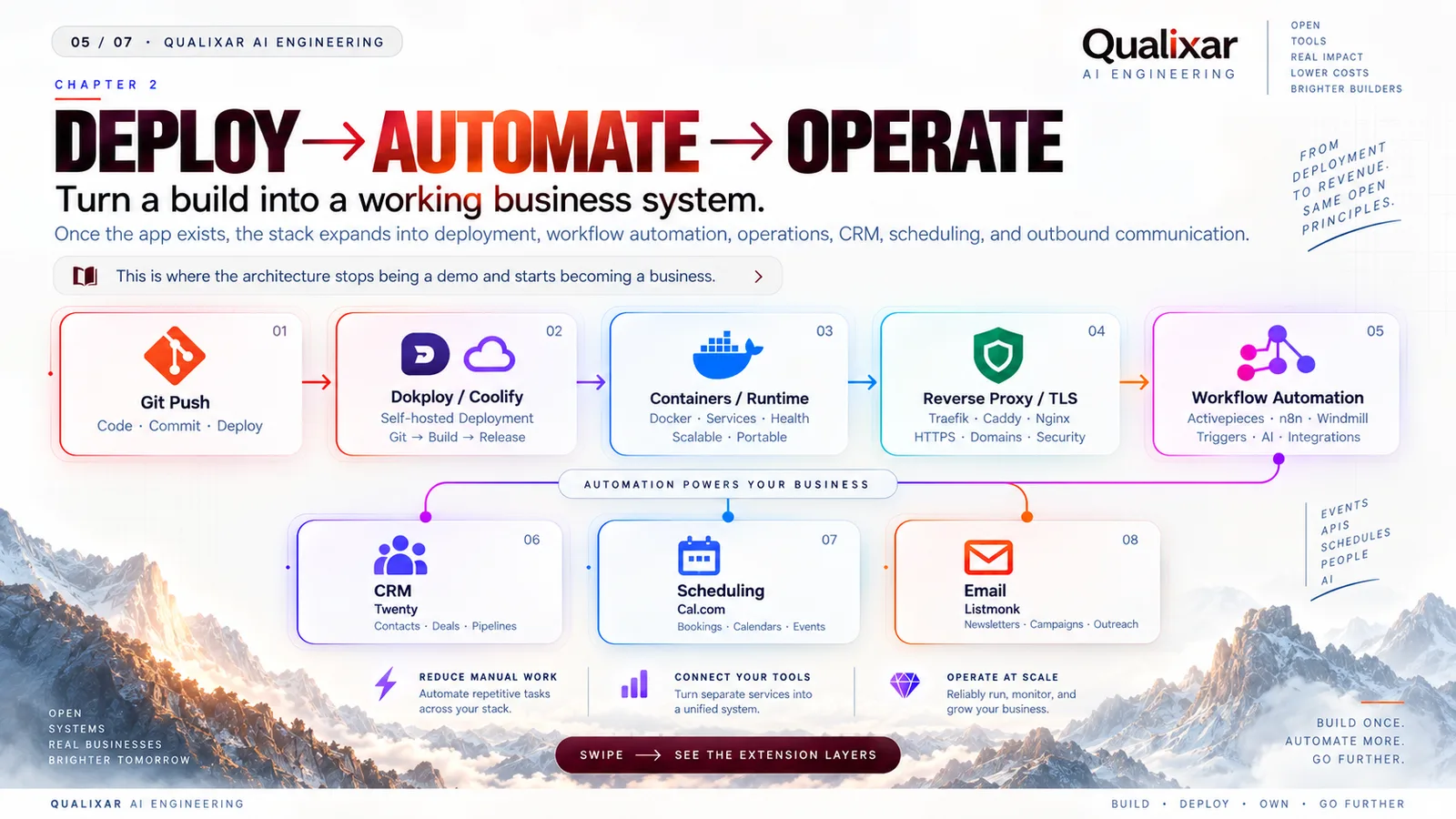
3. AI Document Ingestion & Web Extraction
- Docling: Parses complex PDFs, dense tables, and technical figures into clean Markdown for AI context.
- Crawl4AI: High-speed, LLM-ready web crawler and scraper, replacing paid scraper APIs like Firecrawl.
- MarkItDown: Converts Word, PowerPoint, Excel, and images into structured Markdown.
4. AI Observability & Prompt Evaluation
- Langfuse: Production LLM observability, trace debugging, and latency tracking, replacing LangSmith.
- promptfoo: CLI-driven test-suite runner for evaluating prompt drift and agent reliability.
5. Generative Media & Headless Video
- OmniVoice: Local neural voice cloning and speech synthesis, eliminating recurring ElevenLabs subscriptions.
- HyperFrames: Deterministic, code-driven headless HTML/GSAP video composition engine, replacing cloud rendering APIs.
6. Token Compression & Context Economics
- RTK (Real-Time Kernel): Compresses token payloads by 60–80% before model ingestion, slashing API spend.
- context-mode: Precision evidence chunking to eliminate context-window waste.
Every one of these tools has been cataloged with verified Docker Compose configurations, hardware allocations, and security policies in our free 30-page production blueprint.
Production Docker Compose Configuration
Here is a minimal, production-ready docker-compose.yml demonstrating how these core foundation components interconnect on a single host with isolated networking and volume persistence:
version: '3.8'

networks:
  foundation_net:
    driver: bridge

volumes:
  postgres_data:
  dokploy_data:
  listmonk_data:

services:
  # Core Relational & Vector Database
  postgres:
    image: pgvector/pgvector:pg16
    container_name: foundation_postgres
    restart: always
    environment:
      POSTGRES_USER: ${POSTGRES_USER:-qualixar_admin}
      POSTGRES_PASSWORD: ${POSTGRES_PASSWORD:-ChangeThisProductionSecret}
      POSTGRES_DB: ${POSTGRES_DB:-foundation_production}
    volumes:
      - postgres_data:/var/lib/postgresql/data
    networks:
      - foundation_net
    healthcheck:
      test: ["CMD-SHELL", "pg_isready -U ${POSTGRES_USER:-qualixar_admin}"]
      interval: 10s
      timeout: 5s
      retries: 5

  # Listmonk Mailing & Transactional Engine
  listmonk:
    image: listmonk/listmonk:latest
    container_name: foundation_listmonk
    restart: always
    ports:
      - "127.0.0.1:9000:9000"
    environment:
      - LISTMONK_db__user=${POSTGRES_USER:-qualixar_admin}
      - LISTMONK_db__password=${POSTGRES_PASSWORD:-ChangeThisProductionSecret}
      - LISTMONK_db__host=postgres
      - LISTMONK_db__port=5432
      - LISTMONK_db__database=foundation_production
    depends_on:
      postgres:
        condition: service_healthy
    networks:
      - foundation_net

  # Dokploy PaaS Engine
  dokploy:
    image: dokploy/dokploy:latest
    container_name: foundation_dokploy
    restart: always
    ports:
      - "127.0.0.1:3000:3000"
    volumes:
      - /var/run/docker.sock:/var/run/docker.sock
      - dokploy_data:/etc/dokploy
    networks:
      - foundation_net
Sizing and SRE Discipline: What Actually Fits on a $6 VPS?
A common doubt among engineers is hardware capacity: Can a single $6 VPS handle all of this without crashing under memory pressure?
Let us examine real memory allocations measured under baseline operating conditions:
| Service | Memory Baseline | Memory Under Concurrency | CPU Footprint |
|---|---|---|---|
| Docker Engine & Host OS (Alpine/Ubuntu Minimal) | ~180 MB | ~220 MB | < 1% |
| PostgreSQL 16 + pgvector | ~140 MB | ~450 MB (with 1GB buffer limit) | 1–3% |
| Better Auth (Embedded in App Process) | ~0 MB (Shared) | Shared with Node/Bun process | Peak on hashing |
| Listmonk Engine | ~45 MB | ~95 MB during dispatch | Minimal |
| Traefik Reverse Proxy | ~35 MB | ~65 MB under high request load | < 1% |
| Application Process (FastAPI or Next.js/Bun) | ~110 MB | ~300 MB | Variable |
| Total Baseline Footprint | ~510 MB | ~1.13 GB | < 5% Idle |
A standard $6/month cloud instance (such as a Hetzner Cloud CX22 offering 2 vCPUs and 4 GB RAM, or equivalent entry-level tiers from OVH or DigitalOcean) easily accommodates this stack with more than 2.8 GB of headroom remaining for query bursts and memory caching.
Essential Production Hardening Rules
Running your own stack requires adhering to three fundamental system administration invariants:
- Automated Swap Allocation: Never run a production container host without configuring a swap file. A 4GB swap file on fast NVMe storage acts as an emergency cushion, preventing the Linux kernel OOM (Out Of Memory) killer from abruptly terminating database processes during sudden memory spikes.
- Encrypted Off-Site Backup Automation:
A database without automated off-site backups is not a production database. Use a daily automated cron job running
pg_dumppiped through GPG encryption directly to an S3-compatible cold storage bucket (such as Cloudflare R2 or Backblaze B2, where the first 10 GB are free). - Sealed Internal Networking:
Never expose database ports (5432) or internal admin dashboards directly to the public internet (
0.0.0.0). Bind all internal services strictly to127.0.0.1and route external traffic exclusively through your authenticated reverse proxy with SSL termination.
Why "Employees Need a Company"
Many founders attempt to shortcut software infrastructure by relying purely on AI autonomous agents with API keys. They expect an agentic chatbot to manage client operations, send marketing emails, and update databases through natural language.
This approach inevitably fails in production.
Autonomous agents cannot replace company infrastructure; they require company infrastructure to function reliably. An AI agent without structured databases, deterministic authentication, auditable schemas, and verified execution receipts is simply a hallucinating script with root access.
When you build on the $6 Foundation Stack, you give your AI workflows a real operating environment:
- High-integrity SQL tables with strict relational constraints.
- Real API endpoints that require valid session tokens.
- Auditable queues where every outbound communication is logged and inspectable.
- A human-in-the-loop approval gate where destructive or customer-facing operations can be paused for manual sign-off.
Watch the Video Breakdown and Download the Master Blueprint
We condensed the complete operational mechanics of this stack into a 51-second technical master breakdown on YouTube Shorts:
📺 Watch the Short: Build an AI Company for $6 (Zero Cloud Bills)
If you are ready to implement this stack in your own projects, we packaged the complete, production-tested configuration into a free, comprehensive 30-Page Architecture Blueprint PDF. It contains:
- Full multi-service
docker-compose.ymlmanifests for dev and production. - Step-by-step VPS initialization scripts (Ubuntu 24.04 LTS hardening, firewall, UFW, Docker Engine setup).
- Automated daily backup scripts with Cloudflare R2 integration.
- Detailed migration guides from Clerk, Vercel, Supabase, and Mailchimp.
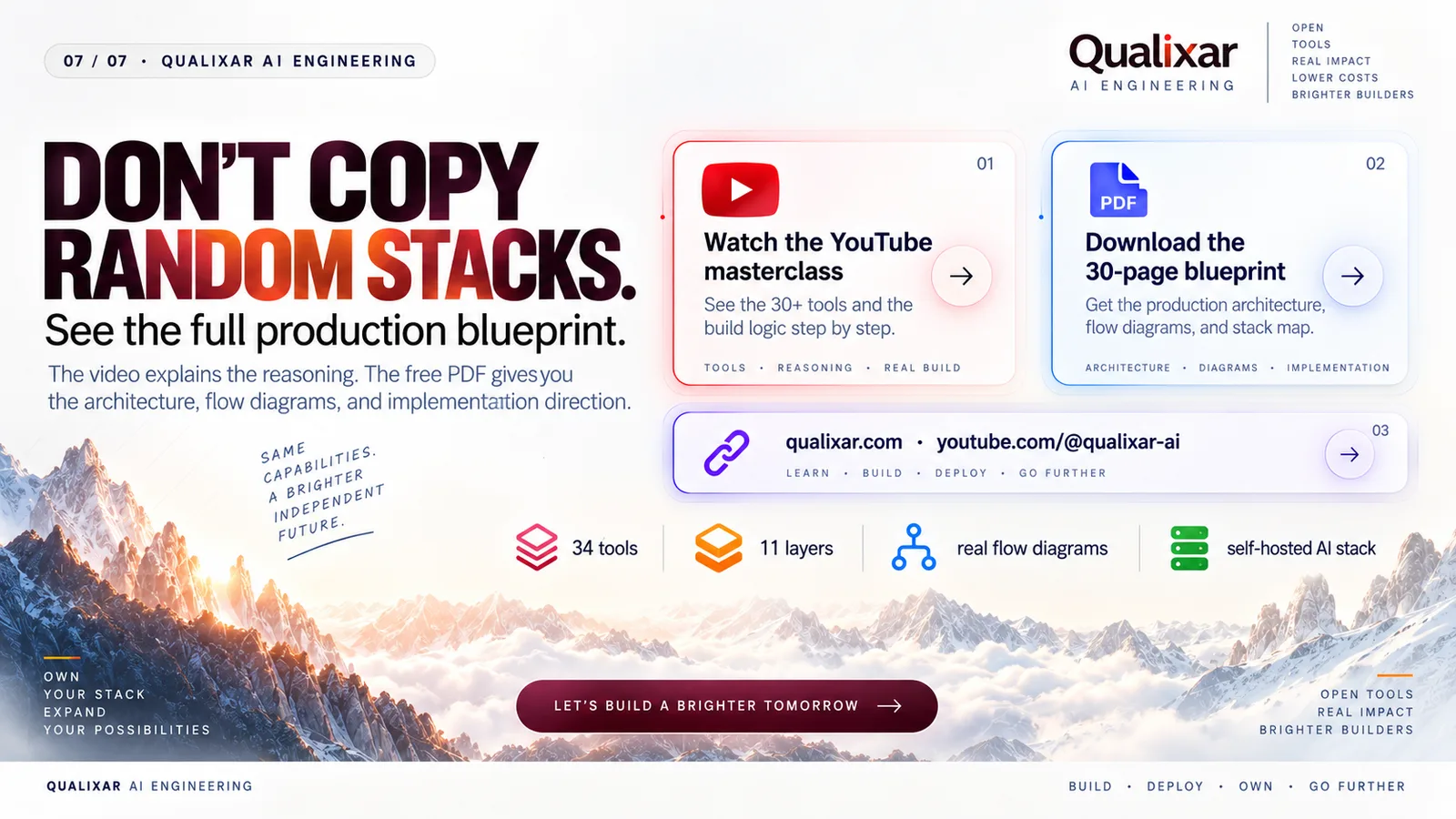
📥 Download the Free 30-Page Blueprint: Head to qualixar.com/learn/guides/the-6-dollar-ai-company-blueprint to grab the complete PDF immediately.
Don't trust software hype. Verify the architecture.
Varun Pratap Bhardwaj builds AI Reliability Engineering tools at Qualixar. ORCID 0009-0002-8726-4289