PHP2Shell: Patched PHP Can Still Be Vulnerable Until You Restart It
You installed the PHP2Shell fix and your site can still answer as vulnerable. Where PHP runs in the request path, how to prove which build every instance is serving, reload versus restart per SAPI, the third issue with no fix release yet, and the defender loop.
Varun Pratap Bhardwaj · AI Reliability Engineering · October 2026
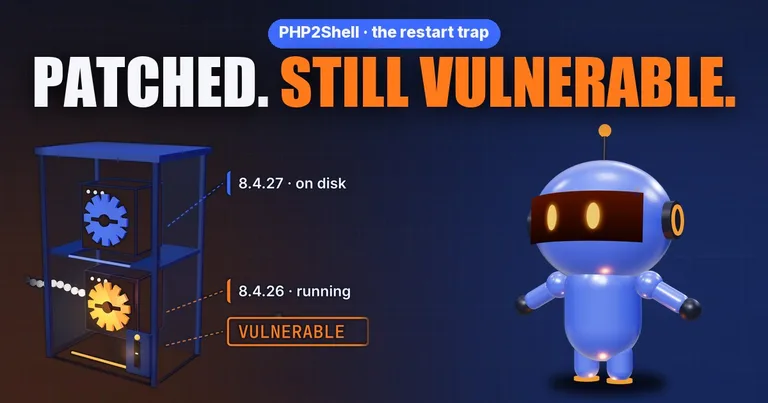
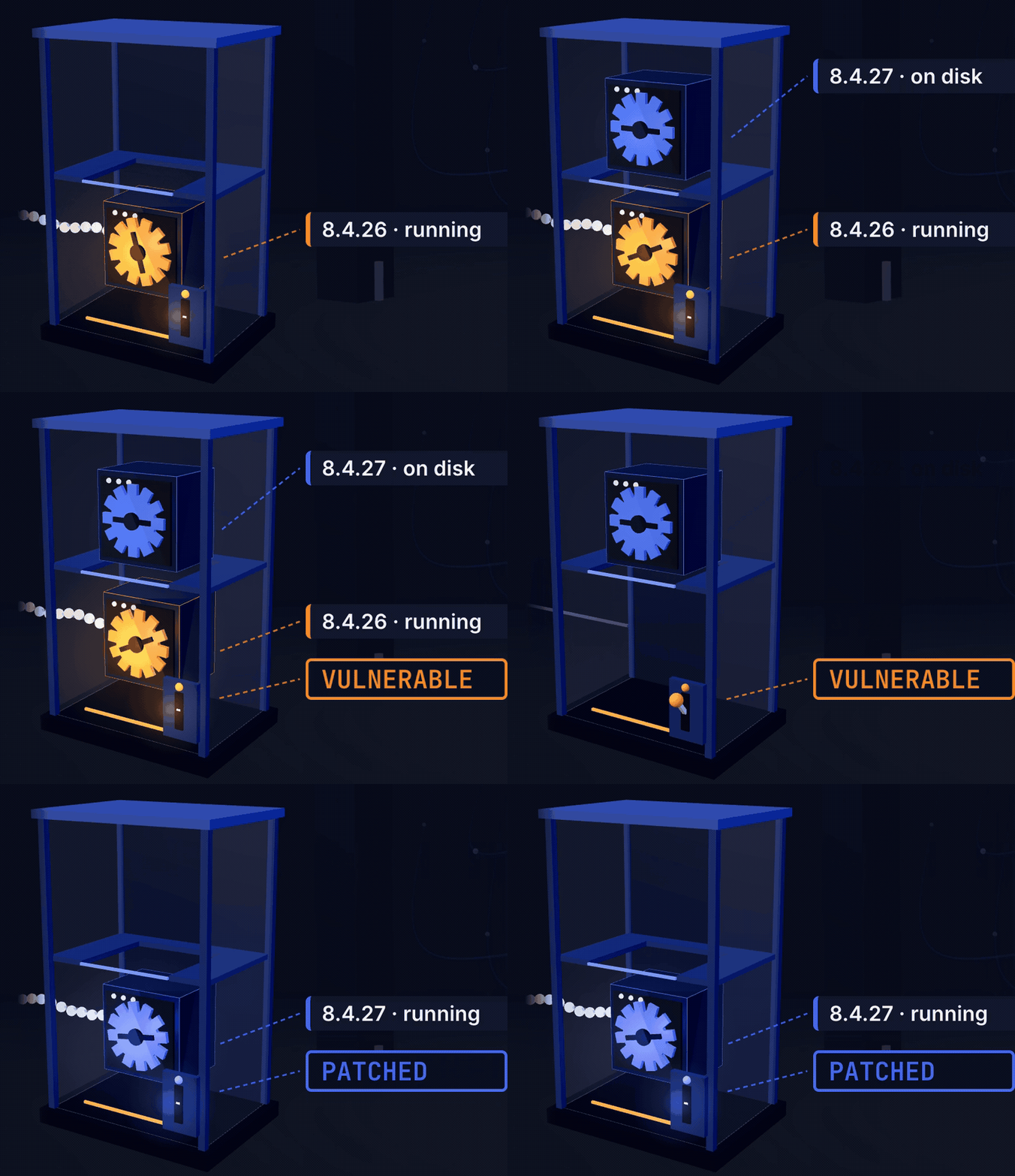
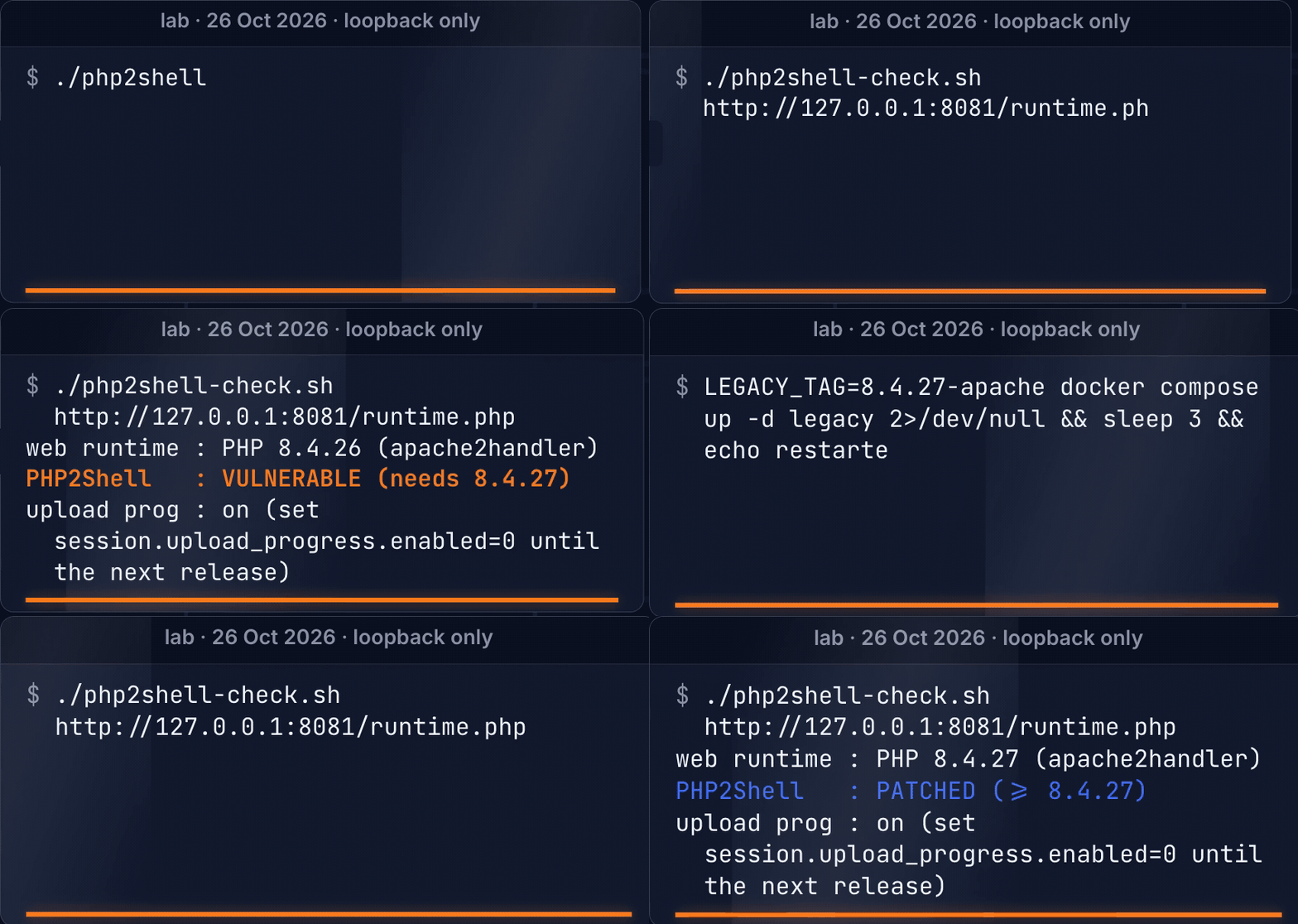
On 26 October I ran two containers side by side on my own machine, both answering only on loopback. One ran PHP 8.4.26, the last 8.4 release before the PHP2Shell fix. The other ran 8.4.27, the fixed one. Then I pulled the patched image for the first container and asked it again which PHP was answering. It still said 8.4.26. The fix had been downloaded, and the old process kept serving every request.
$ ./php2shell-check.sh http://127.0.0.1:8081/runtime.php
web runtime : PHP 8.4.26 (apache2handler)
PHP2Shell   : VULNERABLE (needs 8.4.27)
Start there, with the question that output answers: which PHP build is serving your requests right now? Not the one on disk, not the one in your terminal, the one inside the process that answers the next request.
The film, with the lab on screen, is here: PHP2Shell: Patched PHP Can Still Be Vulnerable (Here's Why). The lab from the video is public, with CI that proves each step: qualixar/php2shell-lab.
What PHP2Shell is, briefly
PHP2Shell is the name for two critical bugs in PHP itself, CVE-2026-109618 and CVE-2026-109619. PHP fixed both on 21 October 2026 in 8.5.12, 8.4.27, 8.3.36 and 8.2.35, and says they "can allow unauthenticated remote code execution." Both carry a CVSS v4.0 score of 9.2.
Older branches need their own plan. Calif, the firm that reported one of the bugs, says the earliest affected path it found dates to PHP 5.4.0. PHP says that PHP 8.1 and older no longer receive updates from the PHP project. The security team did publish minimal source backports for 7.4, 8.0 and 8.1, so a fix exists for those branches, but only if your vendor or your own build pipeline turns it into a package.
Both bugs are about how a PHP worker handles memory across the life of a request. I am going to stay at that level. The mechanics are in PHP's advisories, and nothing a defender has to do tonight depends on them.
The week, in the order it happened
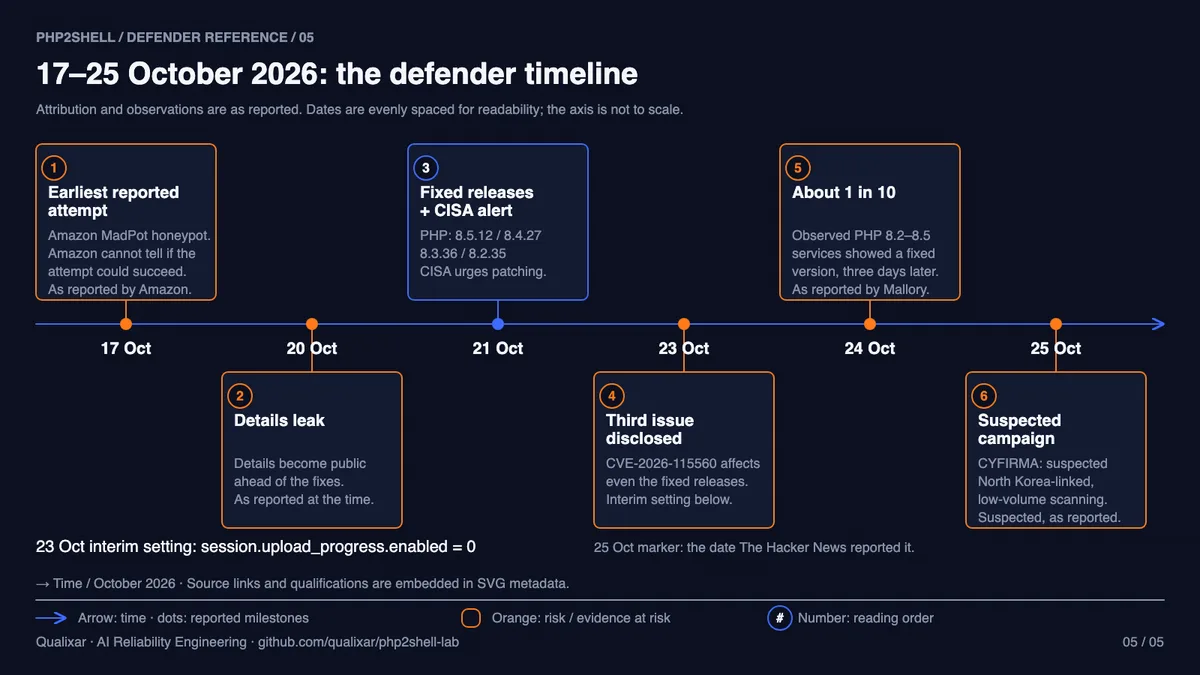
Amazon says one of its MadPot honeypots caught an attempt on this bug on 17 October, four days before disclosure, and it also says it cannot tell whether those early attempts would have worked against a real server. Details leaked on 20 October, two days before the planned date, according to watchTowr. Cloudflare turned on WAF protection for all customers, free plans included, from 03:02 UTC on 21 October, before PHP's releases went out that day.
Then organisations started switching things off as a precaution. Patchstack reports that Dutch government services DigiD and MijnOverheid went offline until the patch was released. In Japan, the office of Prime Minister Sanae Takaichi temporarily blocked access to its website and had it back by 4 p.m., the railway operator Odakyu and the food maker Meiji had sites go dark for a while, and authorities said no damage directly tied to the flaw had been reported.
Those were precautionary shutdowns. The teams could not yet show that their servers were running a fixed build, so they took the sites down until they could.
Where PHP sits in the request path
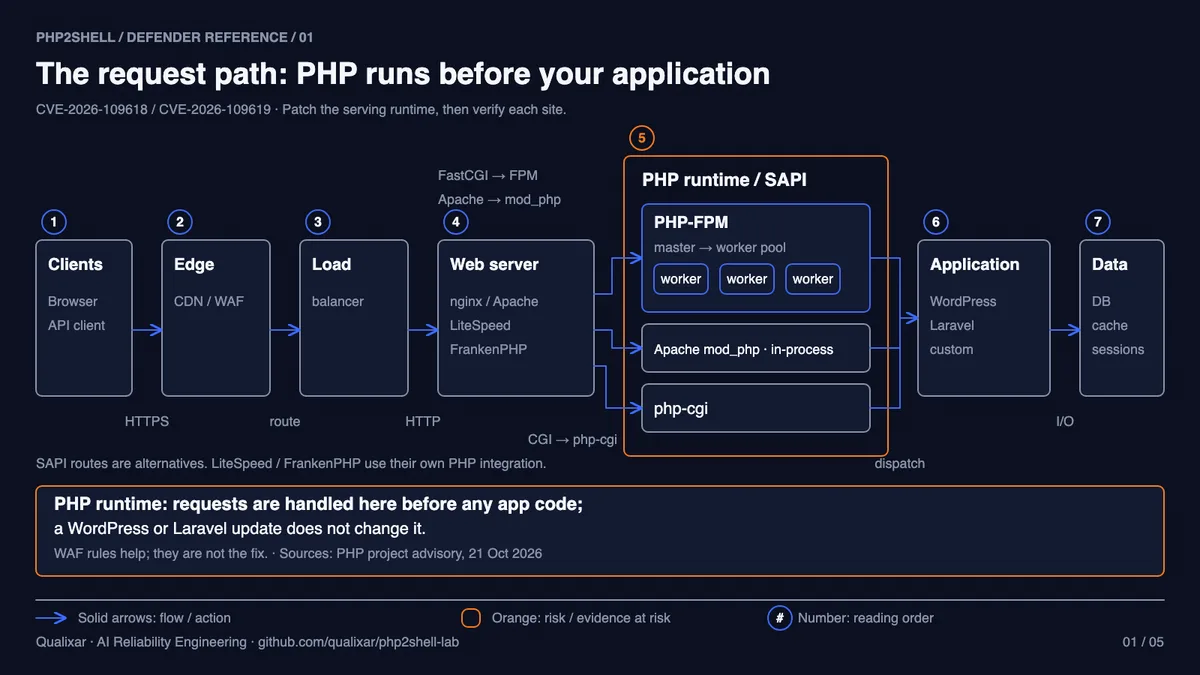
Follow one request. It crosses the edge and the load balancer, reaches your web server, and for a PHP site the web server hands it to a PHP runtime. Before PHP runs a single line of your application, it has already started reading that request on your behalf: parsing form fields, receiving uploaded files, and running a feature called session upload progress. PHP's advisory says that feature "is enabled by default, and no application call to session_start() is required." Only after all of that does your login check, framework or WordPress get a turn.
That is why the diagram marks the runtime layer. By the time your login page runs, the engine has already handled the request. It is also why updating WordPress or Laravel does not help here: neither one updates PHP itself.
How PHP is attached to the web server changes the exposure:
- mod_php (Apache): PHP is loaded as a module inside the Apache worker processes. PHP considers the risk highest here, "with a demonstrated exploit where an unauthenticated request can trigger the attack before any application code runs."
- PHP-FPM: PHP runs in its own pool, a master process and its workers, and nginx or Apache talks to them over FastCGI. PHP does not rank this route at the top, which is where the "FPM is less exposed" line came from. FPM is still on the affected list.
- CGI-style and embedded runtimes: php-cgi, FrankenPHP and LiteSpeed's PHP each run the same engine. Google's guidance lists PHP-FPM, Apache, FrankenPHP and LiteSpeed by name when it tells you to restart after updating.
PHP's list of affected setups includes FPM, mod_php, php-cgi, FrankenPHP and LiteSpeed, and every one of them needs the same update.

Why the package on disk does not change a running worker
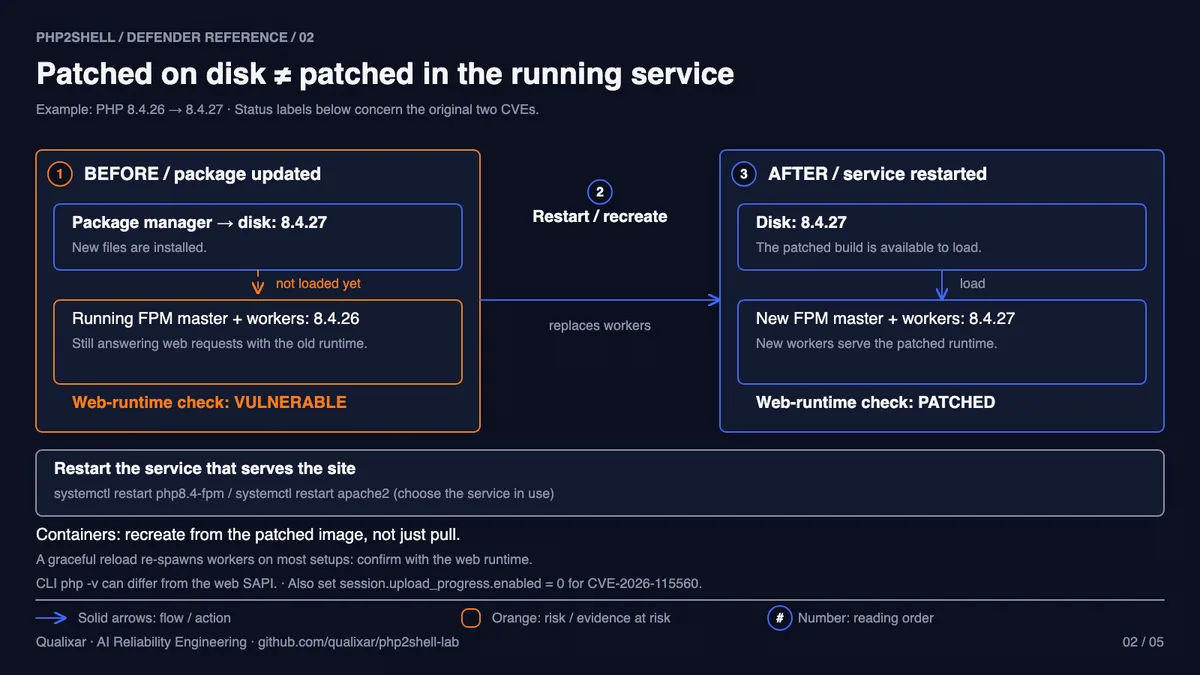
A long-running PHP process loads its binary and extensions into memory when it starts. FPM keeps a master and a pool of workers alive for as long as the service runs, and Apache with mod_php does the same with its own children. When your package manager installs 8.4.27, it replaces files on disk. The processes already in memory keep executing the code they loaded, and they keep doing so until they are replaced. So the fix has two halves: install the patched build, then replace every process still running the old one.
The lab shows the container version of that. docker compose pull downloaded the patched image, and the running container carried on with the old one, because a container keeps the image it was created from. Only recreating it from the patched image changed the answer (output trimmed to the relevant lines):
$ LEGACY_TAG=8.4.27-apache docker compose pull -q legacy && echo 'patched image downloaded'
patched image downloaded

$ ./php2shell-check.sh http://127.0.0.1:8081/runtime.php
web runtime : PHP 8.4.26 (apache2handler)
PHP2Shell   : VULNERABLE (needs 8.4.27)

$ LEGACY_TAG=8.4.27-apache docker compose up -d legacy 2>/dev/null && sleep 3 && echo restarted
restarted

$ ./php2shell-check.sh http://127.0.0.1:8081/runtime.php
web runtime : PHP 8.4.27 (apache2handler)
PHP2Shell   : PATCHED (>= 8.4.27)
Strictly, that demonstrates image deployment, not an in-place package upgrade, and the two need different steps. On a VM or bare-metal host you upgrade the package and restart the service. With Compose you pull or rebuild the image and recreate the container; docker compose restart restarts the same container on the same image and will not pick up a new one. On Kubernetes you roll out a patched image, ideally pinned by digest because tags can move, wait for the rollout to complete, and then check every replica, since a single request through a Service can land on a pod that never got replaced.
Reload or restart, per SAPI
Google's guidance names a restart, and that is the safe default. The details differ by runtime:
- PHP-FPM: the php-fpm manual describes SIGUSR2 as a graceful reload of all workers plus a reload of the FPM configuration and binary, and many distribution units map
systemctl reloadto it. It can work. Confirm it through the web runtime afterwards instead of trusting the unit file. - mod_php: the engine lives inside Apache, so after the security upgrade do a full
systemctl restart apache2(httpd on RHEL-family systems). A graceful restart lets old children finish their requests first, which leaves them on the old code for a while. - nginx in front of FPM: restarting nginx alone replaces nothing in PHP. FPM is the process that has to go.
- Classic CGI: php-cgi started per request picks up the new binary on the next request. Persistent FastCGI setups that keep php-cgi processes alive behave like FPM and need those processes replaced.
Ask the web server which PHP it is running
The version your shell reports is weak evidence. Datadog warns that the command-line PHP "can use a different version or configuration than the runtime that serves your web application." Many hosts have two or three PHP builds installed side by side, and php -v in your terminal may be none of the ones nginx is talking to.
So ask the runtime that serves requests. The lab uses a small probe that reports three values and nothing else, which avoids dumping everything phpinfo() would show. This is www/runtime.php from the repo:
<?php
// Lab-only: reports what the WEB interpreter is running. Never leave this on a real server.
header('Content-Type: application/json');
echo json_encode([
    'php_version' => PHP_VERSION,
    'sapi' => PHP_SAPI,
    // filter_var: a pool or vhost value of "Off"/"false" is a non-empty (truthy) string in plain PHP
    'upload_progress' => filter_var(ini_get('session.upload_progress.enabled'), FILTER_VALIDATE_BOOLEAN) ? 'on' : 'off',
], JSON_PRETTY_PRINT), "\n";
If you put it on a real host, restrict it to localhost or an allowlist and delete it when you are done. php2shell-check.sh in the same repo calls that URL, reads compact or pretty-printed JSON, compares the upstream part of the version with the fixed release for its branch, and prints the upload-progress setting on its own line. It exits 0 for patched, 1 for vulnerable, 2 for an end-of-life branch and 3 if it cannot read the probe, so it drops into a loop over many backends.
Distribution builds need one more step. A vendor package such as 8.4.27-1+ubuntu24.04.1+deb.sury.org+1 reports a long version string; the checker compares the upstream 8.4.27 part. A vendor can also backport the fix under an older-looking number, so for a red result on a distro build, match the installed package release and repository against your vendor's advisory before you call it vulnerable. The reverse holds too: a new number in your terminal proves nothing about the worker serving traffic.
A probe answers for the one instance that handled the request. Behind a load balancer, check each backend directly, each vhost and each FPM pool, and make sure no cache sits in front of the probe.
On Linux you can also look at the processes. These are illustrative for a Debian-style host; names differ by distribution:
# After an in-place upgrade, a process still mapping the replaced binary or library shows "(deleted)"
for pid in $(pgrep php-fpm8.4); do sudo ls -l /proc/$pid/exe; done
sudo grep -l 'libphp.*(deleted)' /proc/$(pgrep -o apache2)/maps
Treat that as a hint and the web probe as the answer, because workers recycle and an FPM reload can swap the binary underneath a long-lived master.
What the checker can and cannot see
OpenAI published a free, open-source tool, php2shell-checker, that reads the PHP version a site advertises in its headers, or a local install, and answers OK, potentially vulnerable or unknown. Its README is clear about the limits: it "does not send exploit probes," headers cannot see backported fixes, and "even OK only describes the advertised version."
That makes it a good inventory tool and a weak verdict. Run it across everything you own, write each answer next to the site's name, and then confirm every site that matters from the server side.
Edge protection has a similar boundary. VirusTotal's point is that edge rules only help if the origin is not directly reachable, so restrict origin access until requests cannot bypass the WAF. Even then a WAF rule does not change the code running on your box. It buys time to patch.
The third issue, and the one setting that came back
On 21 October a configuration line went round as the workaround: turn session upload progress off. PHP said it blocks the confirmed session paths and not the other variants, and that there are no complete mitigations. The Hacker News quoted PHP's release manager: "ini settings won't save you." Update PHP. That advice has not changed.
After the fixed releases shipped, PHP disclosed a third issue, CVE-2026-115560, which also affects the fixed releases, 8.5.12 included, according to Cloudflare. PHP calls it an "unlikely RCE vector," is handling it in the regular release cycle, and suggests you "set session.upload_progress.enabled=0 until the next regular bugfix release."
So the line that was never enough for the first two bugs is PHP's recommended stopgap for the third. On the patched container in my lab the check printed upload prog : on right after the restart, because nobody had changed it. Note what the checker's verdict covers: PATCHED refers to the original two CVEs only. Its exit code says nothing about CVE-2026-115560, which is why the setting gets its own line.
This is the file from the repo. Put it in the conf.d directory of the runtime that serves requests, for example /etc/php/8.4/fpm/conf.d/ or /etc/php/8.4/apache2/conf.d/, not cli/:
; CVE-2026-115560 interim mitigation from php.net (23 Oct 2026), kept until PHP's next regular release.
; This does NOT fix CVE-2026-109618 or CVE-2026-109619. Only the update does that.
session.upload_progress.enabled = 0
Pool files and vhosts can override ini values, so confirm the result through the probe. If a page in your application shows an upload progress bar built on this feature, that bar will stop updating.
Before you replace anything: capture evidence if a host looks wrong
Replacing processes is part of the fix, and it also ends some evidence. Google advises you to "capture worker memory before patching or rebooting, as restarting workers permanently destroys volatile heap evidence." If a server already shows files, processes or outbound connections nobody can explain, stop. Snapshot worker memory, disk and logs with your incident-response tooling, record who did it and when, and bring in whoever handles incidents for you. If nothing looks wrong, patch without delay.
Patch, replace the old processes, keep the evidence
Illustrative commands; adjust package and unit names for your distribution:
# Debian / Ubuntu: upgrade every installed PHP 8.4 package (FPM, mod_php, extensions)
sudo apt-get update && sudo apt-get install --only-upgrade 'php8.4*'
sudo systemctl restart php8.4-fpm      # PHP-FPM
sudo systemctl restart apache2         # mod_php (httpd on RHEL-family systems)

# RHEL / Fedora family
sudo dnf upgrade 'php*' && sudo systemctl restart php-fpm

# Compose: get the patched image, then recreate (restart alone keeps the old image)
docker compose pull app                # prebuilt images
docker compose build --pull app        # images you build on php:*
docker compose up -d --force-recreate app

# Kubernetes: roll out a patched digest, wait for it, then check what every pod resolved
kubectl set image deployment/app app=registry.example.com/app@sha256:<patched-digest>
kubectl rollout status deployment/app
kubectl get pods -l app=app -o jsonpath='{range .items[*]}{.metadata.name}{"  "}{.status.containerStatuses[0].imageID}{"\n"}{end}'
Then decide what counts as evidence. A dated check output is one piece of it, and on its own it only describes one responding runtime. The record I would want to hand a manager, a client or an auditor has three parts: the installed package or image digest, a runtime check from every serving instance with the date, and proof that the restart or rollout completed. None of it says whether the host was compromised before you patched. That is what the hunt is for.
for backend in 10.0.1.11 10.0.1.12; do
  ./php2shell-check.sh "http://$backend/runtime.php" | tee "php2shell-$(date +%F)-$backend.txt"
done
Old branches and shared hosting
VulnCheck found more than 1.1 million hosts, about 42% of the PHP in its early scan, on versions that get no official fixed release. If you are on PHP 8.1 or older, get your vendor's backport build or upgrade. If you can do neither today, CISA's guidance is to take the system offline until it is patched.
On shared hosting you cannot patch the engine yourself. Ask your host in writing whether they have patched and restarted PHP, then run the checker against your own site and see what it advertises.
Hunt back to 17 October
A patch today does not undo last week. If somebody was trying this bug from 17 October, the date of Amazon's first sighting, look back to that date. The repo's scripts/hunt.sh is read-only and covers the first pass: files in the web root changed since 17 October, every POST in the current and rotated access logs (front controllers route /login or /wp-json/ to index.php, so counting only .php URIs misses most of them), session files in PHP's real session.save_path, and shells, interpreters or download tools running as the web server user. On a host instead of the lab container:
sudo env HOST=1 WEBROOT=/var/www/html ACCESS_LOG=/var/log/nginx/access.log ./scripts/hunt.sh
On systemd hosts, PrivateTmp can hide /tmp from your shell, and a restart wipes it, so look before you restart. In the lab, the only new file was the lab's own probe. On your server, read every line the hunt prints in context: normal session files and routine processes exist on every busy host. Escalate anything suspicious for investigation. An empty result does not clear you either, because a process listing cannot show a shell that ran yesterday. If compromise is suspected, contain the host and rotate the credentials it held from a trusted machine.
Keep watching
A hunt is a snapshot, and some of the scanning is patient. On 25 October The Hacker News reported CYFIRMA's finding of what it called a suspected North Korea-linked campaign, run from 21 compromised nodes and probing 216 unpatched or partially mitigated hosts across the US, Japan, South Korea and elsewhere. CYFIRMA's CEO described the scanning as deliberately low-volume and said threshold-based alerting is unlikely to catch it.
For continuous visibility on Linux, Huntress recommends Florian Roth's free process-watcher, which flags a PHP worker launching a shell or a download tool, and suggests starting it in observe mode. The Dutch National Cyber Security Centre keeps a public PHP2Shell repository with operational information, which CISA links from its own alert.
The loop, and what to make routine
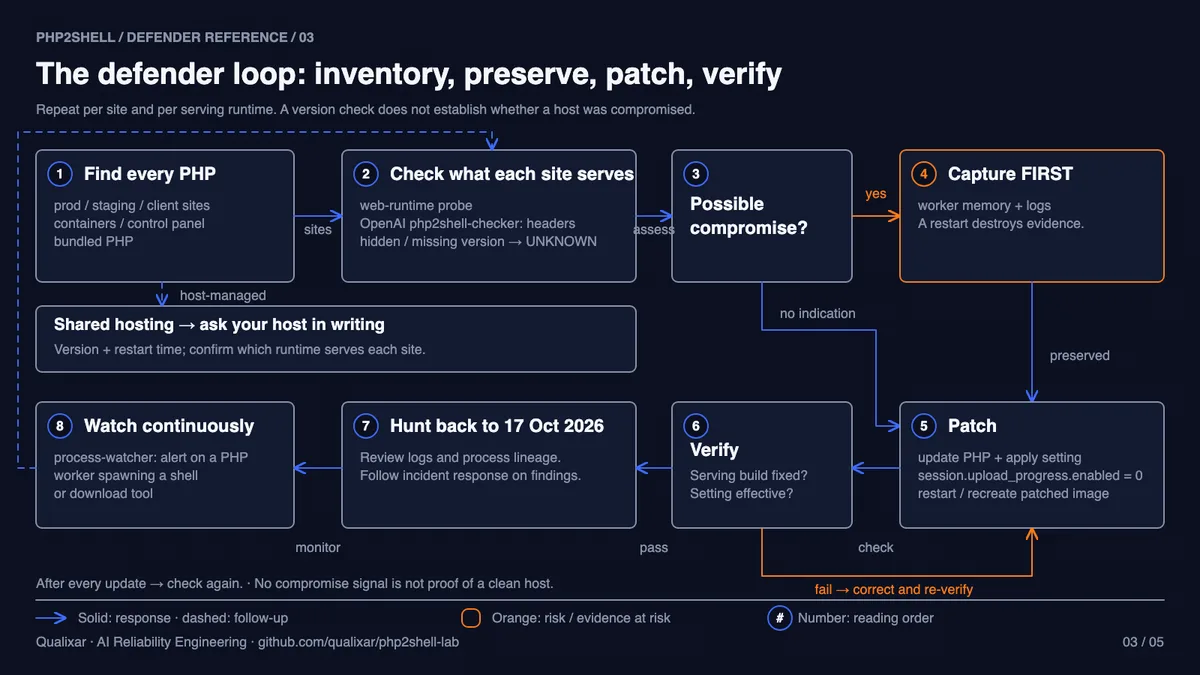
The loop is the order I would work in tonight. The decision before the patch matters most: if a host already looks wrong, capture evidence before anything restarts. After the patch, verification is per serving instance, and a failed check sends you back to find the process that did not get replaced.
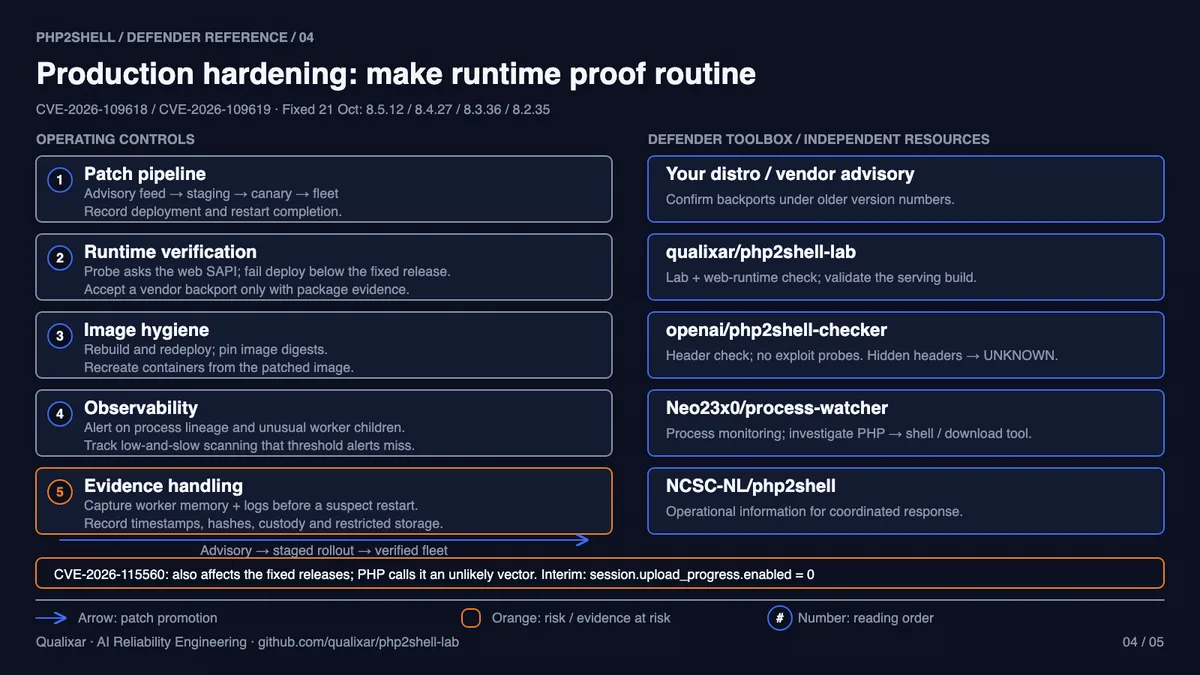
The second diagram is the version for after tonight. A runtime check that fails a deploy below the fixed release, images rebuilt and pinned by digest, alerts on unusual worker children, and an evidence runbook mean the next PHP advisory is a pipeline run instead of a night like this one.
What is still open
Nobody has said publicly who was behind the attempt on 17 October, which is why the hunt starts on that date. The third issue has no fix release yet, only PHP's word that it comes with the next regular release, so keep that setting at zero and run the check again after every update.
OpenAI says Calif identified one of these flaws using an OpenAI model, and that Wiz independently discovered and reported both. A model helped find the bug; people still have to verify the fix on every server that runs it. That verification step, done with evidence, is what I mean by AI Reliability Engineering.
If you run the check, tell me what it said, or which step tripped you up.
Sources
- PHP release notes and advisories: https://www.php.net/archive/2026.php
- PHP advisory GHSA-6wmf-4rv5-p3rp: https://github.com/php/php-src/security/advisories/GHSA-6wmf-4rv5-p3rp
- php-fpm manual (signals): https://manpages.debian.org/bookworm/php8.2-fpm/php-fpm8.2.8.en.html
- Apache httpd, stopping and restarting: https://httpd.apache.org/docs/2.4/stopping.html
- Docker Compose restart: https://docs.docker.com/reference/cli/docker/compose/restart/
- Kubernetes images: https://kubernetes.io/docs/concepts/containers/images/
- Calif: https://calif.io/php2shell/
- Amazon Threat Intelligence (MadPot): https://aws.amazon.com/blogs/security/amazon-threat-intelligence-identifies-php2shell-exploitation-prior-to-public-disclosure-in-madpot/
- watchTowr FAQ: https://watchtowr.com/intelligence/php-cve-2026-109618-faq/
- Cloudflare: https://blog.cloudflare.com/php-vulnerabilities-waf-protection/
- Patchstack: https://patchstack.com/articles/php-major-vulnerability-alert-10-2026/
- NewsOnJapan: https://newsonjapan.com/article/151117.php
- Google Cloud: https://cloud.google.com/blog/products/identity-security/responding-to-core-php-vulnerabilities-cve-2026-109618-cve-2026-109619
- Datadog Security Labs: https://securitylabs.datadoghq.com/articles/php2shell-critical-vulnerabilities-in-php/
- The Hacker News, what protects you: https://thehackernews.com/2026/10/php2shell-what-actually-protects-you.html
- The Hacker News, CYFIRMA report: https://thehackernews.com/2026/10/php2shell-exploitation-hits-government.html
- VirusTotal: https://blog.virustotal.com/2026/10/sizing-php-exposure-window-for-cve-2026.html
- VulnCheck: https://www.vulncheck.com/blog/php2shell-vulnerabilities
- Mallory: https://mallory.ai/blog/php-rce-rapid-response
- CISA alert: https://www.cisa.gov/news-events/alerts/2026/10/21/critical-vulnerabilities-php-require-immediate-patching
- Huntress: https://www.huntress.com/blog/php2shell-leaked-critical-php-vulnerabilities
- OpenAI php2shell-checker: https://github.com/openai/php2shell-checker
- OpenAI coordinated disclosure: https://openai.com/index/coordinated-disclosure-of-critical-vulnerabilities
- NCSC-NL php2shell: https://github.com/NCSC-NL/php2shell
- process-watcher: https://github.com/Neo23x0/process-watcher
- Lab from the video: https://github.com/qualixar/php2shell-lab
Varun Pratap Bhardwaj builds AI Reliability Engineering tools at Qualixar. ORCID 0009-0002-8726-4289